Are you trying to convert 

In this comprehensive guide, you’ll learn everything you need to know about the EML to Thunderbird Converter. As you read, you’ll explore its core features, technical workflow, and compatibility with different systems. You’ll also see how it compares to manual import methods and competing tools. In addition, you’ll find step-by-step instructions, real-world use cases, best practices, and answers to the most common questions. By the end, you’ll understand exactly why this converter is the preferred choice for anyone who needs to import EML to Thunderbird with full folder structure, and you’ll know how to get started right away.
If you’re migrating from Outlook to Thunderbird, you’ll first need to extract your emails from the Outlook PST file. This can be done using an appropriate data extraction tool such as the Data Extraction Kit for Outlook. For a detailed, step-by-step guide on how to accomplish this migration smoothly, refer to our comprehensive article.
What Is an EML to Thunderbird Converter?
The EML to Thunderbird Converter is specialized software designed to import EML files ( individual email message files ) directly into Mozilla Thunderbird’s mailbox folders. Because manual import methods are often slow and error-prone, this converter automates the entire process. As a result, all emails, attachments, and metadata remain intact. The software runs on Windows, supports bulk operations, and preserves the original folder hierarchy. Consequently, it’s an excellent choice for personal, business, and enterprise-level migrations.
Why Choose an EML to Thunderbird Converter?

The Challenge of Manual Import
EML to Thunderbird Converter is free software created by email migration professionals for everyone. Although Thunderbird allows manual EML import, the process comes with several limitations. For example, the drag-and-drop method only works well for small batches. Thunderbird’s built-in tools also lack native support for bulk imports or complex folder structures. Add-ons like ImportExportTools NG can help, yet they require extra steps and may feel overwhelming for non-technical users. Because of these obstacles, many people look for a more efficient and dependable solution.
The Automated Solution
The EML to Thunderbird Converter solves these issues by offering a streamlined, automated workflow. For instance, it includes:
- Bulk import capabilities for thousands of EML files
- Preservation of folder hierarchy and metadata
- Full support for attachments and HTML formatting
- Compatibility with all major Thunderbird versions
- User-friendly interface with preview and filtering options (Pro version)
- Advanced features such as selective import, destination path selection, and offline processing
Thanks to these features, the converter has become the preferred Thunderbird Local Folders migration tool for users who value accuracy, efficiency, and data integrity.
How‑To Import EML Files Into Thunderbird
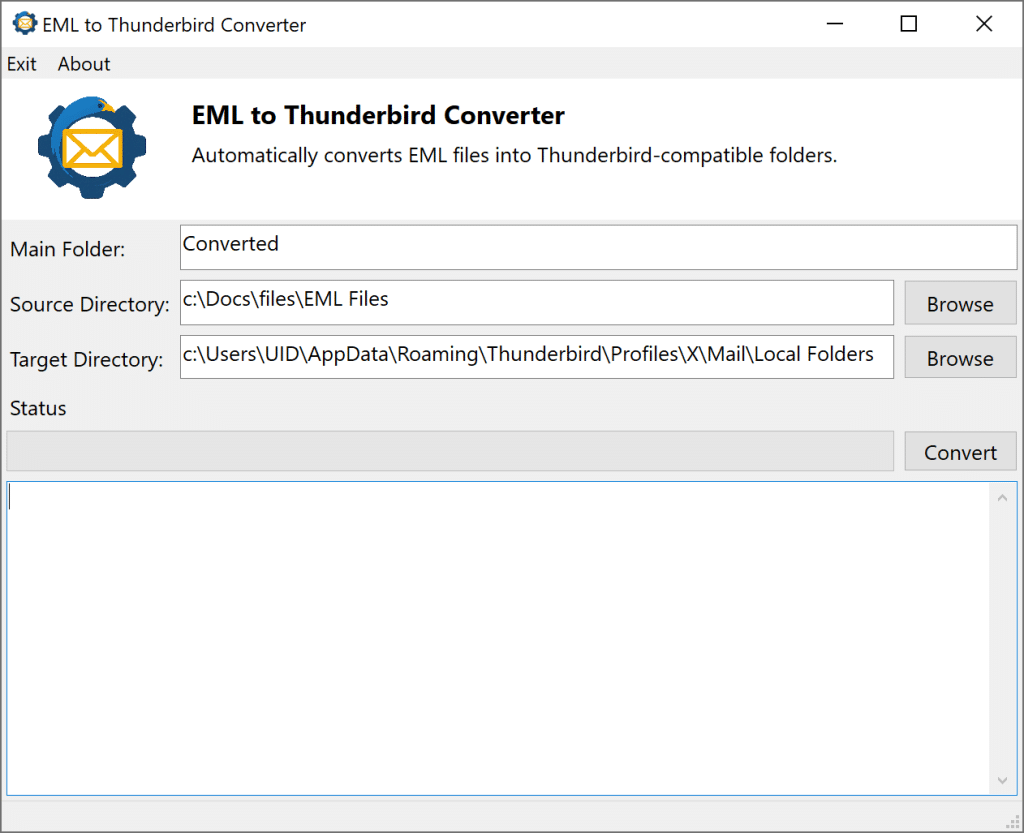
Step 1: Download and install the EML to Thunderbird Converter for your operating system.
Step 2: Launch the software and specify the source folder containing your EML files.
Step 3: Choose the location where the converted Thunderbird folders, mailboxes, and index files will be saved.
Step 4: Click “Convert” to begin the import process.
Step 5: Open Thunderbird and verify that all emails, attachments, and folders appear correctly.
Core Features of the EML to Thunderbird Converter
1. Bulk EML to Thunderbird Conversion Software
The converter is engineered for large-scale EML processing. It can handle entire directories or deeply nested folder structures in a single operation. Because of this, it’s especially useful for businesses or individuals migrating years of archived emails.
2. Import EML to Thunderbird With Folder Structure
One of the most important features is its ability to import EML to Thunderbird with the original folder structure intact. The software scans your EML directories and recreates the same hierarchy inside Thunderbird. As a result, your organizational system remains consistent and easy to navigate.
3. Data Integrity and Metadata Preservation
The converter maintains all essential email properties, including:
- Sender and recipient information
- Timestamps and subject lines
- Attachments (PDFs, images, documents, etc.)
- HTML formatting and inline images
- Read/unread status and flags (when available in source files)
Because these details remain intact, your emails look and function the same in Thunderbird as they did in their original environment.
4. Compatibility and System Requirements
The EML to Thunderbird Converter supports:
- Operating Systems: Windows 11, 10, 8.1, 8, 7 (32/64-bit), Windows Server editions, and macOS
- Thunderbird Versions: All current and legacy releases
- EML Sources: Outlook Express, Windows Live Mail, Windows Mail (Windows 10/11 Mail app), eM Client, Mailbird, The Bat!, Inky, Apple Mail, and many others
Because of this broad compatibility, the tool fits seamlessly into almost any migration scenario.
5. Security, Privacy, and Offline Processing
Your data’s security matters. For that reason, the converter operates entirely offline. Your emails never leave your device, and no information is stored or transmitted externally. In addition, the software is regularly scanned for malware and vulnerabilities, giving you peace of mind during every migration.
Manual Methods vs. Automated Conversion
Manual Methods
Drag-and-Drop
- How it works: You create a new folder in Thunderbird and then drag EML files from your file explorer into this folder.
- Limitations: This method is only practical for small batches. It doesn’t preserve complex folder structures, and it can be slow and error-prone, especially when you handle many files.
ImportExportTools NG Add-On
- How it works: You install the ImportExportTools NG add-on in Thunderbird and then use its menu options to import EML files or entire directories.
- Strengths: It can handle larger batches than simple drag-and-drop and, in some cases, it maintains parts of the folder structure.
- Limitations: However, it requires manual installation and configuration. It may not process very large datasets efficiently, and it can feel confusing or intimidating for non-technical users.
Automated EML to Thunderbird Converter
- How it works: Dedicated software automates the entire process, from file selection to final import. It also offers advanced options for filtering [pro], preview [pro], and folder mapping.
- Strengths: It handles bulk imports, preserves all data and folder structure, provides advanced features, and remains user-friendly even for beginners.
- Limitations: In typical migration scenarios, there are effectively no functional limitations for standard EML-to-Thunderbird use cases.
Comparison Table: Manual vs. Automated Methods
| Feature | Manual (Drag-and-Drop) | ImportExportTools NG Add-On | EML to Thunderbird Converter |
|---|---|---|---|
| Bulk Import Support | Limited | Moderate | Unlimited |
| Folder Structure Preservation | No | Partial | Full |
| Attachment & Metadata Handling | Partial | Good | Excellent |
| User-Friendliness | Basic | Moderate | High |
| Filtering & Search | No | Limited | Advanced [pro] |
| Error Handling | Manual | Some | Automated |
| Technical Skill Required | Low | Moderate | Low |
| Cost | Free | Free | Free |
As you can see, the EML to Thunderbird Converter clearly excels in scenarios where data integrity, efficiency, and ease of use are priorities. Moreover, it offers a smoother experience than manual methods or add-ons, especially when you need to process large archives or preserve complex folder structures.
User Scenarios and Use Cases
Personal Email Migration
When you move from Windows Live Mail, Outlook Express, or any other EML‑based client to Thunderbird, the converter helps you keep everything intact. As a result, all your messages, folders, and attachments arrive safely. This is especially useful for people who have years of archived emails or those who want to consolidate several accounts into one organized mailbox. Moreover, the automated workflow reduces the risk of mistakes during the transition.
Business and Enterprise Migration
Organizations often need to migrate large volumes of email data during system upgrades, mergers, or compliance audits. Because these projects can be complex, the converter’s bulk processing and advanced filtering features become extremely valuable. IT administrators and consultants can manage migrations more efficiently, and they can do so without worrying about data loss or inconsistent folder structures. Additionally, the software’s predictable performance helps teams meet strict deadlines.
Backup and Archiving
Importing EML files into Thunderbird is a practical way to restore archived emails for easy access, search, and long‑term management. The converter ensures that backup files retain their original structure and content. Consequently, you can browse your restored messages just as you did before archiving them. This makes the tool ideal for users who maintain extensive personal or professional archives.
Legal and Compliance
For legal discovery or audits, maintaining the integrity and traceability of email data is crucial. Because the converter preserves metadata and folder hierarchy, it supports compliance requirements effectively. In addition, its detailed logs help legal teams verify the authenticity of imported messages. This level of accuracy is essential when email records must be presented as evidence.
Performance, Batch Processing, and Limits
Speed and Efficiency
The EML to Thunderbird Converter is optimized for high performance. It can process thousands of emails per hour, depending on your system resources. Furthermore, batch operations reduce manual intervention and lower the risk of errors. This combination of speed and reliability makes the tool suitable for both small and large‑scale migrations.
File Size and Quantity
- File Size: There are no strict limits. However, performance may vary based on your hardware and the number of large attachments.
- Quantity: The converter supports importing entire directories and nested folders, making it suitable for both small and massive migrations.
Data Integrity
The software is engineered to prevent data loss, corruption, or duplication. Attachments, inline images, and HTML formatting are preserved throughout the process. As a result, your imported emails look and behave exactly as expected, ensuring a seamless transition into Thunderbird.
Compatibility and System Requirements
Supported Operating Systems
- Windows: Windows 11, 10, 8.1, 8, 7 (32/64‑bit), Windows Server 2022, 2019, 2016, 2012 R2, 2008
Supported Thunderbird Versions
- All current and legacy versions, including the latest releases
Hardware Requirements
- RAM: Minimum 2 GB (4 GB recommended)
- Processor: Intel Pentium 1 GHz or higher
- Disk Space: At least 10 MB free
Supported EML Sources
- Windows Live Mail
- Windows Mail (Windows 10/11 Mail app)
- Outlook Express
- eM Client
- Mailbird
- The Bat!
- Inky
- Apple Mail
- Other EML‑compatible clients
Security, Privacy, and Compliance
Offline Processing
All operations take place locally on your device. Because nothing is uploaded, transmitted, or stored externally, you maintain complete control over your data. This approach ensures maximum privacy and significantly reduces security risks.
Data Protection
The converter never alters or deletes your original EML files. Instead, it copies your messages into Thunderbird while preserving the source data. As a result, you always retain a clean and untouched backup of your email history.
Compliance
The software follows industry best practices for secure data handling and privacy. Consequently, business and enterprise users can rely on it during migrations that must comply with regulations such as GDPR or HIPAA. This makes the tool suitable for environments where data governance is essential.
Licensing and Legal Considerations
-
- Licensing: Choose from personal, business, or technician licenses depending on your workflow and project size.
- EULA: Review the End‑User License Agreement (EULA) for details on usage terms, refund policies, and support coverage.
User Interface, Preview Features, and UX Best Practices
Intuitive Design
The converter’s interface focuses on clarity and ease of use. As a result, both beginners and advanced users can navigate it comfortably. Key interface elements include:
- Dashboard: A centralized control panel for all major operations
- File Selection: Drag‑and‑drop support or manual browsing for files and folders
- Preview Pane: View email content, attachments, and metadata before importing [pro]
- Progress Indicators: Real‑time status updates and detailed logs
Accessibility
- Language Support: Available in multiple languages to support global users [pro]
- Help and Documentation: Built‑in guides, tooltips, and FAQs to assist users at every step
Advanced Features
- Selective Import: Choose specific emails or folders to import [pro]
- Search and Filter: Locate emails by date, sender, subject, or keywords [pro]
- Destination Path Selection: Decide exactly where imported emails appear inside Thunderbird
Effortlessly migrate your emails with the EML to Thunderbird Converter! Import EML files into Thunderbird folders in bulk, preserve attachments and folder structure, and enjoy a seamless transition. There’s no data loss and no hassle, just smooth, accurate migration. Try it free today!
Frequently Asked Questions (FAQ)
How do I convert EML files to Thunderbird folders?
Use the EML to Thunderbird Converter to select your EML files or folders, choose your Thunderbird Profile directory as the destination, and start the import. The software automatically recreates your folder structure and imports all emails, attachments, and metadata.
Can I import EML to Thunderbird with folder structure preserved?
Yes. The converter maintains the original folder hierarchy, ensuring your emails remain organized exactly as they were in your source directories.
Is the EML to Thunderbird Converter suitable for bulk migration?
Absolutely. It’s designed for bulk EML to Thunderbird conversion and handles thousands of emails and complex folder structures efficiently.
Does the converter preserve attachments and formatting?
Yes. All attachments, HTML formatting, and metadata ( such as sender, recipient, and timestamps )are preserved during the import process.
What are the system requirements?
The converter supports Windows 11/10/8/7 (32/64‑bit) and Windows Server editions. Minimum requirements include 2 GB RAM, an Intel Pentium 1 GHz processor, and 10 MB of free disk space.
Is my data secure during the conversion?
Yes. All processing is done offline on your device. No data is transmitted externally, ensuring maximum privacy and security.
What if I need help or encounter issues?
Comprehensive documentation, video tutorials, and 24/7 customer support are available. Troubleshooting guides cover common issues, and technical teams are ready to assist whenever needed.
How does the converter compare to manual methods or Thunderbird add‑ons?
Manual methods work for small batches but lack advanced features and can be error‑prone. The converter automates the process, supports bulk imports, preserves all data, and offers a user‑friendly interface.
Convert EML files to Thunderbird, preserve your email history, and enjoy peace of mind
Ready to make your email migration effortless? Download the EML to Thunderbird Converter today and experience seamless, secure, and accurate email import. There’s no data loss, no confusion, and no unnecessary steps. Join thousands of satisfied users who trust this tool for their email migration needs. Don’t let your important emails get lost in the shuffle, make the switch to Thunderbird with confidence and start your journey now!