


EML to Outlook Transfer is designed to streamline the migration of individual messages and entire folder hierarchies into Microsoft Outlook. The software provides flexible export options, – you can generate a clean, автономный .PST file on your local drive or import messages directly into an existing Outlook profile and filter converted emails by From, к, Тема, Date and other email tags.
The built-in processing engine handles email files generated by various desktop clients, включая Mozilla Thunderbird, Почта Windows Live, эМ Client, and Apple Mail (ЭМЛКС). For users moving messages from Thunderbird, extracting data as standard EML-файлы ensures that all embedded media, custom flags, and folder trees remain fully preserved.
Thanks to an intuitive, wizard-driven interface, the entire transfer process requires only a few clicks, making large-scale mailbox consolidation straightforward for both individual users and IT professionals.
Видеоруководство по переносу EML в Outlook
Watch how EML to Outlook Transfer locates source directories, scans mailbox contents, and packages messages into an Outlook-ready PST file in just a few minutes. EML to Outlook Transfer processes emails from virtually any client, enabling you to browse, reply to, организовать, and archive your messages using standard Outlook features.
* Бесплатная пробная версия преобразует ограниченное количество сообщений| Операционная система | Microsoft Windows® Vista или выше |
| Microsoft Office | Microsoft Outlook® 2003-2021 (автономный) |
| Учетная запись Outlook | Хотя бы один профиль Outlook (адрес электронной почты) должен быть настроен |
| Исходные файлы | *.EML файлы |
| Место на жестком диске | 48 Минимум МБ |
| Доступная память | 4 ГБ для 32-разрядных и 8 ГБ или более для 64-разрядных операционных систем |
| Процессор | Пентиум IV 2 ГГц или быстрее |
| Отображать | Цветной дисплей, установить по крайней мере 1024 Икс 768 разрешение |
| 
| 
| 
|
Why Manual Email Migration Is Inefficient

Moving emails between different platforms is rarely as simple as copying files. While individual .eml files store standard RFC-822 message text, Microsoft Outlook organizes data inside structured containers called Personal Storage Tables (.pst). These files hold not only message bodies, but also embedded media, вложения, read/unread states, and custom metadata.
When attempting manual imports via drag-and-drop, Outlook often replaces original send dates with the current import timestamp, strips inline images, and ignores subfolder arrangements. For businesses and users with years of correspondence, manual transfer is time-consuming and prone to errors. An automated converter eliminates these bottlenecks by mapping data directly into Outlook’s native structure.
EML Transfer Software Key Technical Features
1. Preserves Complete Folder Hierarchies
The software mirrors your source directory structure inside Outlook. If your archived emails are organized into projects, клиенты, or yearly archives, every subfolder is recreated without requiring manual sorting after migration.
2. Multi-Client Source Compatibility
EML is an open standard utilized by diverse desktop applications. The converter processes files exported from:
-
- Мозилла Тандерберд: Seamlessly move local mail folders without database corruption.
- Почта Windows Live / Почта Windows: Upgrade legacy Windows archives to modern Outlook versions.
- Почта Apple (ЭМЛКС): Converts Mac OS message exports into Windows-compatible Unicode formats.
- эМ Client, The Bat!, Эудора, and IncrediMail: Imports individual message backups with full metadata intact.
To learn more about how message standards operate, read our overview on what the EML file format represents.
3. Unicode Output and PST Splitting
Legacy ANSI PST files were restricted to 2 GB limits. This tool creates modern Unicode PST files capable of storing up to 64 ТБ. To keep your mail databases healthy, you can also use the built-in option to split large PST files into smaller parts during conversion.
4. Attachment and Encoding Integrity
Non-Latin character sets (such as European, Asian, and Cyrillic special symbols) often fail during manual imports. The converter translates internal headers and character sets on the fly while safeguarding all attached files, документы, and embedded images.
Typical Migration Scenarios
- Switching Email Clients. Moving from Thunderbird, Почта Apple, or legacy desktop clients to a corporate Microsoft Outlook environment.
- Operating System Upgrades. Transitioning data from older Windows installations (where Windows Live Mail was installed) to Windows 10 or Windows 11.
- Disaster Recovery. Extracting raw EML messages from damaged databases and packaging them back into a clean, working PST file.
- Archiving Mailboxes. Consolidating scattered desktop message files into a single, searchable offline storage file.
Need detailed step-by-step guidance? Follow our comprehensive tutorial on how to import EML files to Outlook for exact configuration options and screenshots.
Что пользователи говорят о передаче EML в Outlook
Конвертер EML в Outlook — спасение! У меня были тысячи важных писем, сохраненных в формате EML, и мне нужно было быстро загрузить их в свою учетную запись Outlook.. Это программное обеспечение сделало процесс невероятно простым и интуитивно понятным., и сэкономил мне часы ручной работы. Настоятельно рекомендуется!

Марко Паландри - Швейцария
Сначала я не решался купить EML to Outlook Transfer, но я так рада, что сделала. Программа невероятно проста в использовании и эффективна. Он легко и точно перенес все мои файлы EML в Outlook.. Я также ценю полезную команду поддержки клиентов, которая ответила на мои вопросы быстро и профессионально..
Бьорн Биркхольц - Германия
Если вам нужно перенести файлы EML в Outlook, это программное обеспечение для использования. Интерфейс простой и понятный, и процесс передачи молниеносный. Я смог без проблем перенести тысячи файлов EML в свою учетную запись Outlook.. Спасибо, Outlook Transfer, за создание такого надежного и полезного инструмента!
Управление по управлению рисками - округ Кинг
Посмотреть другие отзывы
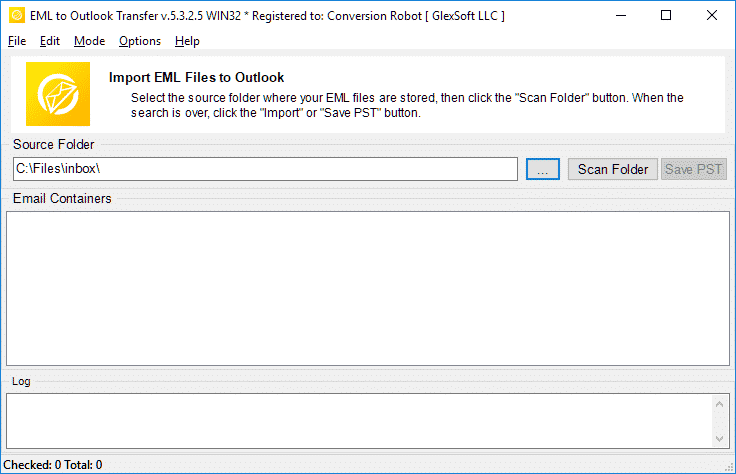
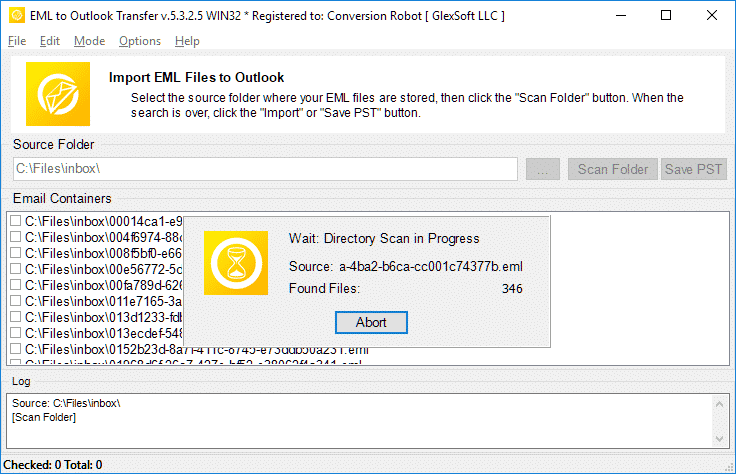
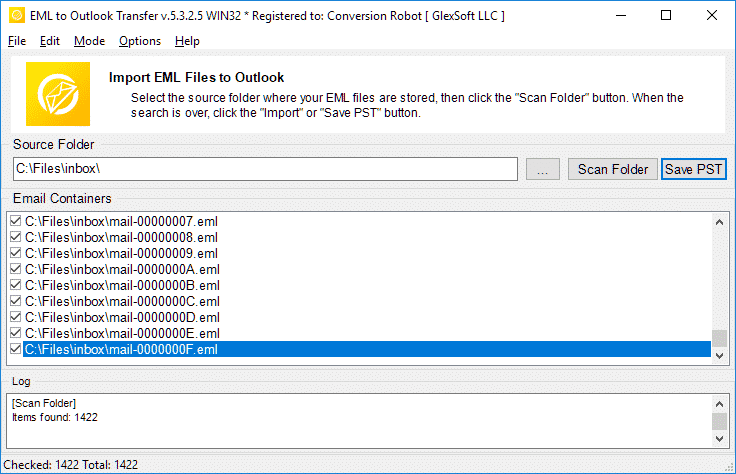
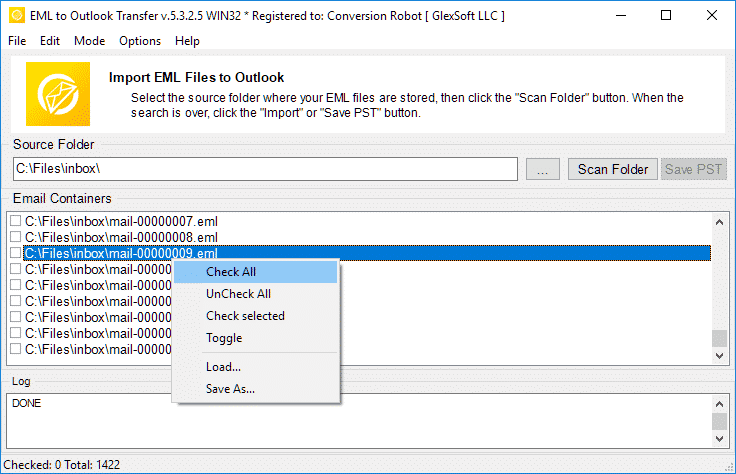
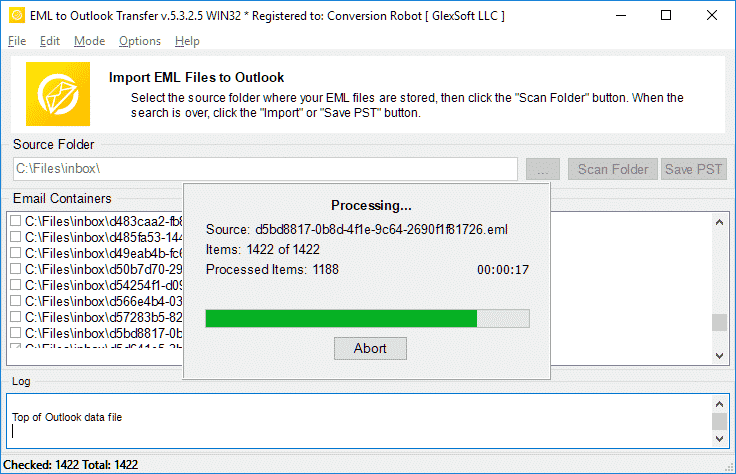
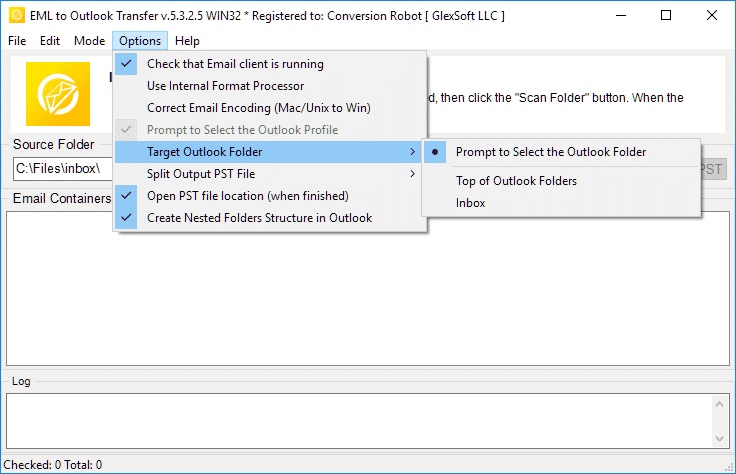
Передача EML в Outlook осуществляется быстро, надежная, и интуитивно понятная производительность для каждой задачи преобразования.
* Бесплатная пробная версия преобразует ограниченное количество сообщенийWhy Choose EML to Outlook Transfer?
1. High-Speed Email Migration Engine
EML to Outlook Transfer is built for high processing speed and data accuracy. The engine parses message files rapidly, preserving header fields, text formatting, and attachments across large archives without dropping records.
The streamlined wizard interface lets users initiate migrations without manual configuration hurdles, ensuring smooth file handling from start to finish.
2. Accurate Import into Microsoft Outlook
Data integrity is paramount during email migration. The software maintains original text encodings, HTML styling, and inline attachments across all supported versions of Microsoft Outlook, ensuring full compatibility even with messages created under non-Windows operating systems.
The software automatically adapts message formats into native Outlook structures (Персональный стол для хранения), ensuring that every sender, получатель, timestamp, and attachment matches the original source archive.
3. Recreate Your Folder Structure in Outlook
The hierarchy of your mail folders remains identical after transfer. Every subfolder and project directory appears in Outlook exactly as organized in your source archive, eliminating the need to rearrange messages post-import. This ensures an uninterrupted workflow and immediate familiarity with your migrated mail.
4. Import Message Files in Just a Few Clicks
Importing messages requires no advanced technical background. Simply select the root directory containing your source files, run the scan, and the software handles the migration automatically. Customer support is available if technical assistance is required.
All you need to do is specify the folder containing your message files, and the software executes the transition smoothly into your chosen destination.
5. Support for Password-Protected Outlook Profiles
Export your data safely even when target Outlook profiles or existing storage files are protected by passwords. The tool processes messages without compromising security or breaking user credentials, maintaining complete privacy throughout the migration.
6. Import Messages from Any EML-Based Email Client
EML is an open format used widely across different desktop platforms. This tool extracts messages from various desktop applications—such as Mozilla Thunderbird, Почта Windows Live, Почта Apple, эМ Client, и летучая мышь!—and consolidates them into Outlook cleanly, enabling smooth batch migration for multi-client environments.
7. Flexible Output: Default Profile or Standalone PST File
Export your correspondence directly into your current Outlook profile or create a brand new, автономный файл PST. Standalone PST files can be easily moved to another computer, backed up to external storage, or archived offline.
8. Unicode PST Support & Automatic PST Splitting
The software produces modern Unicode PST files that overcome legacy 2GB size restrictions, handling volumes up to 64TB. For optimal database health and easier file management, the software can also split large PST files into smaller parts during processing.
9. Batch Mode for High-Volume Processing
Migrating thousands of message files is effortless with the built-in bulk processing engine. After scanning your drive, the program moves all selected folders and emails to MS Outlook PST in a single automated session.
10. Intuitive Wizard-Based Interface for Beginners and Pros
The step-by-step wizard ensures that users of any experience level can execute email migrations without confusion, providing clear visual status indicators throughout the run.
Сравнение пробной и полной версии
| Программная функция | Бесплатная пробная лицензия | Домашняя Лицензия | Коммерческая Лицензия | Техническая Лицензия |
|---|---|---|---|---|
| Неограниченное количество писем | НЕТ | ДА | ДА | ДА |
| Неограниченное количество учетных записей | НЕТ | ДА | ДА | ДА |
| Командная строка (Пакетный режим) | НЕТ | НЕТ | ДА | ДА |
| Сетевые источники | ДА | НЕТ | ДА | ДА |
| Использование на стороне сервера | ДА | НЕТ | НЕТ | ДА |
| Тип продления (на выбор) | - | Руководство | Ручной и автоматический | Ручной и автоматический |
| Скидка на продление | - | 10% | 20% | 30% |
| Количество активаций (на выбор) | - | 1-5 | 1-50 | Неограниченное количество |
| Техническая поддержка | Ограничено | Стандарт | приоритет | Расширенный |
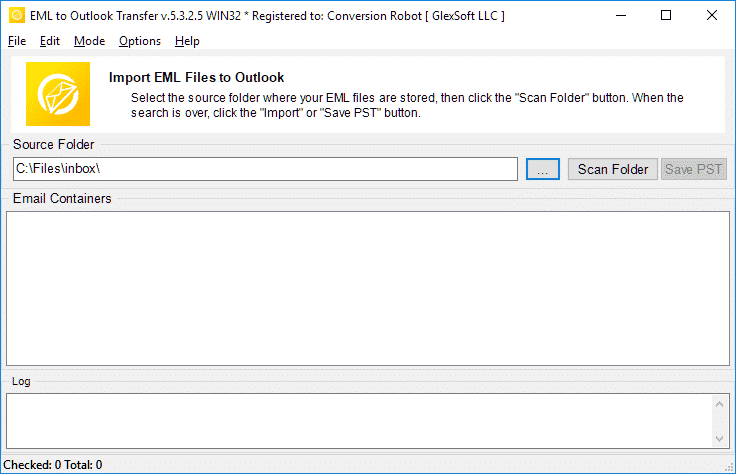
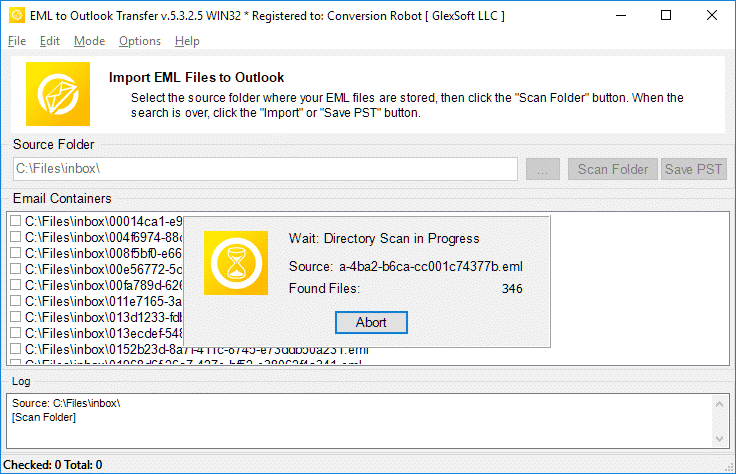
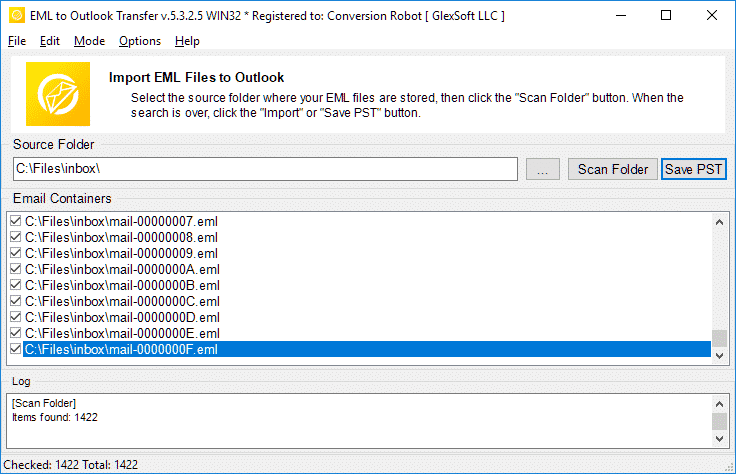
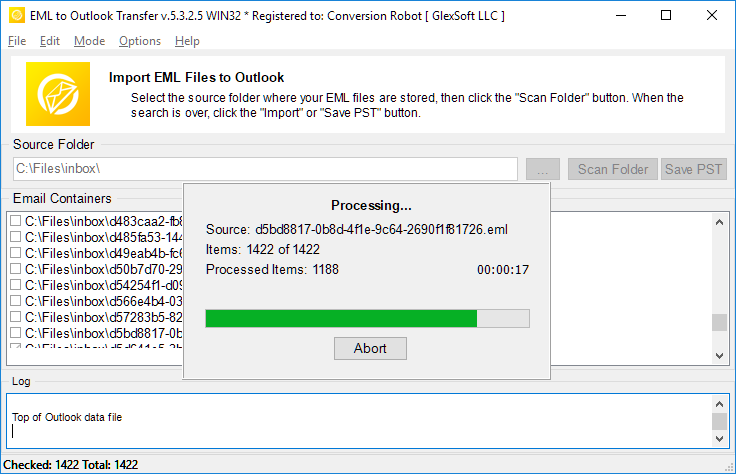
EML to Outlook конверсия – как это работает в 5 простые шаги
- Пробег тем EML to Outlook Transfer программное обеспечение.
- Указать расположение исходных файлов и папок EML.
- Нажмите Папка сканирования чтобы найти все вложенные подпапки и файлы EML.
- Используйте Сохранить PST кнопка, чтобы начать EML конверсии PST процесс.
- Открыто полученный PST-файл в Outlook и наслаждайтесь результатом.
Сопутствующие инструменты миграции электронной почты
- Thunderbird в Outlook,
- Mbox для Outlook,
- Live Mail в Outlook,
- Gmail в Outlook
- Mac Mail для Outlook,
- MSG в Outlook
- Извлечение данных Kit
Часто задаваемые вопросы о преобразовании EML в PST
В чем разница между PST и EML?
Формат файла PST разработан Microsoft для хранения сообщений., личные данные, события календаря и так далее. EML представляет собой формат интернет-сообщений для хранения текстов электронной почты и технических данных, связанных с сообщениями.. Файлы EML основаны на тексте.. Узнайте больше о что такое формат файла EML.
Какое приложение открывает файлы EML?
Многие почтовые клиенты используют EML в качестве основного способа хранения электронной почты.. Примерами приложений, которые могут работать с EML, являются Thunderbird., IncrediMail, Live Mail, Почта Apple (emlx-файлы) и другие. ля PST-конвертер инструмент может легко работать с файлами EML, созданными в любом из этих клиентов..
Как преобразовать EML в электронную почту Outlook?
Вы можете попробовать наш EML к PST конвертер по скачивание демо версия с нашего сайта. Запустите программное обеспечение, укажите папку, в которой находятся ваши исходные файлы eml, отсканируйте их программой и запустите процесс конвертации. Судебный процесс / демо-версия конвертирует до 10 электронные письма в каждой папке без каких-либо других ограничений. Если вы удовлетворены результатами испытания, вы можете активировать программное обеспечение, чтобы разблокировать все функции.
Можно ли открыть файл EML в Outlook без конвертера EML в Outlook?
Да. В Outlook 2010, Файлы EML открываются автоматически. В более ранних версиях MS Outlook вам может потребоваться внести определенные изменения в реестр, чтобы сообщить Outlook, что он должен открывать файлы EML.. Однако, более простой и естественный способ открыть файлы EML — просто экспортировать их все в результирующий файл PST.. Вы можете использовать наш инструмент конвертера EML для самого простого способа выполнить это.
Как объединить файлы EML в файл PST?
Если у вас есть несколько файлов EML, и вы хотите импортировать их все в формат файла PST, вы должны либо вручную импортировать их один за другим (освистывать), или воспользуйтесь профессиональным инструментом автоматического импорта, например EML to Outlook Transfer и закончим работу менее чем за час (зависит от количества файлов EML, конечно). Программа загружает все файлы EML в указанные папки и автоматически объединяет их в один файл PST в пакетном режиме., позволяет конвертировать EML в PST форматировать сразу.
Импортирует ли EML в Outlook бесплатное ПО?
Вы можете бесплатно загрузить и запустить программу конвертации EML в PST и запустить процесс конвертации.. Бесплатная версия не ограничивает никаких функций, но имеет ограничение на количество конвертируемых предметов.
И Если ваша работа связана с конвертацией eml в pts, или вы находитесь в ситуации, когда вам нужно немедленно преобразовать электронные письма, тем EML to Outlook Transfer инструмент - идеальное решение для вас. Это гарантирует, что ни один файл не останется нечитаемым, и ни одно сообщение не будет пропущено или не будет отображаться в папке «Входящие» после преобразования.. Конвертер EML эффективно решает проблемы миграции. Скачать пробную версию сегодня и сэкономить много времени и усилий.
Альтернативы EML to Outlook Transfer:
- Преобразование формата MSG в файлы Outlook или Outlook PST
- Live Mail to Outlook Transfer – конвертировать файлы EML, сохраненные Win Mail, в Outlook
- Data Extraction Kit for Outlook – экспорт электронной почты Outlook, или из PST-файла в формат EML
- Mac Mail to Outlook Transfer – импортировать файлы Mac OS EMLX в профиль Outlook или файлы Outlook PST
Отзывы покупателей
Ваш отзыв помогает нам совершенствоваться. Поделитесь, пожалуйста, своим опытом о EML to Outlook Transfer используя кнопку ниже.
Оставить отзыв | |
Хорошая программа для конвертации огромного количества файлов eml в формат pst..
Возможность конвертировать .eml в .pst с прямым импортом ценна, но меня больше интересовало разбиение PST, так как у меня огромное количество данных (тысячи предметов) и бэкапить все. Этот преобразователь оправдал мои ожидания..
Я сохранил кучу сообщений Gmail в виде файлов EML и переместил их в профиль Outlook.. Это оптимальный выбор, если вы не хотите синхронизировать Gmail с приложением для Windows.. Вы можете сразу импортировать файлы EML в Outlook, так что этот инструмент также экономит время.
После прекращения поддержки Windows Live Mail, Я перешел на Outlook, но так и не перенес свои старые сообщения. Спасибо, что придумали это простое решение. Это действительно простой инструмент для преобразования файлов EML в PST..
Я бы хотел, чтобы этот конвертер также мог извлекать электронные письма прямо из Thunderbird или, по крайней мере, поставлялся с инструкциями по экспорту.. Этот этап был хлопотным, но я смог конвертировать EML в Outlook без проблем. Общий, это работает как рекламируется.


