


電子メールの移行は複雑なプロセスです. 必要なレコードとオブジェクトを正確に抽出する必要があります, それらをターゲット形式に変換し、ユーザーのハードドライブに保存します. 単純そうに見えるかも知れませんが, しかしメール変換, 特にemlファイルの変換に関しては, 実際にははるかに複雑です. これは、eml から pst への変換の場合に特に当てはまります。, ある電子メール アプリケーションから別の電子メール アプリケーションにメッセージと添付ファイルを転送するために使用されるプロセス.
メールを変換する必要がある特定の状況が 1 つあります: EML ファイル形式を使用する電子メール アプリケーションから MS Outlook の PST 形式に切り替える場合. MS Outlook は独自の PST 形式でのみ動作します (パーソナルストレージテーブル), Outlook データ ファイルとも呼ばれます. これにはさまざまな種類のオブジェクトが保存されます, メールなど, 添付ファイル, 注釈, タスク, 連絡先など, すべてを 1 つのファイルにまとめた.
EML を PST に変換する必要がある場合, 特に、数年分の電子メールや、これらの EML ファイルに保存されている個人情報やビジネス情報を転送する場合は、, 手動で行うのは非常に難しい場合があります. これは、転送するメールが非常に多く、管理しなければならないファイルやフォルダーが非常に多いためです。.
フォルダー構造を維持したまま複数の EML ファイルを Outlook にインポートするには、変換するための特別なソフトウェアが必要な作業です。, EML から PST へのコンバーター ツールなど. いくつかの EML ファイルをインポートするだけの場合でも, 私たちのコンバーターは非常に役立ちます!
EML から Outlook への転送ビデオ ガイド
EML to Outlook Transfer は、複数の電子メールをほぼすべてのタイプの EML 形式から Outlook に変換するために必要な唯一のツールです. 電子メール ファイルを Outlook にインポートし、EML ファイルを開いて表示できます。, 編集, Outlook の標準機能を使用して返信または再送信する.
* - 未登録バージョンでは、限られた数のメッセージが変換されます| オペレーティング·システム | Microsoft Windows® Vista以降 |
| マイクロソフトオフィス | マイクロソフトOutlook®の 2003-2021 (スタンドアロン) |
| Outlook アカウント | 少なくとも 1 つの Outlook プロファイル (メールアカウント) 設定する必要があります |
| ソースファイル | *.EMLファイル |
| ハードドライブの空き容量 | 48 最小MB |
| 使用可能なメモリ | 4 32 ビットの場合は GB、 8 64 ビット オペレーティング システムの場合は GB 以上 |
| プロセッサー | ペンティアム IV 2 GHz以上 |
| 画面 | カラー表示, 少なくとも 1024 バツ 768 解決 |
| 
| 
| 
|
EML to PST Converter 特徴

さらに, 製品には、次の目的で使用できる内部電子メール コンバータが付属しています。 emlファイルを変換する Mozilla などの電子メール クライアントのデータを準備するため Thunderbird 以降の転送のため Outlook 中間体を介して EML フォーマット またはそれらを操作する.
その非常に簡単なウィザードベースのユーザーインターフェイスのおかげで, このプログラムは、eml から pst への電子メール変換を自分で処理しようとしている初心者でも使用できます。. どんなにあなたが何をする必要がありますか, OutlookにPSTにEMLまたはインポートEMLを変換します, このツールは、簡単にこれらのタスクを処理します.
EML から Outlook への転送についてのユーザーの意見
EML から Outlook へのコンバーターは救世主です! EML 形式で保存された重要なメールが数千件あり、それらを Outlook アカウントにすぐに取り込む必要がありました。. このソフトウェアにより、プロセスが驚くほど簡単かつ直感的になりました, 何時間もの手作業を節約できました. 強くお勧めします!

マルコ・パランドリ - スイス
最初はEML to Outlook Transferを購入するのをためらっていました, でも本当によかったです. ソフトウェアは信じられないほど使いやすく、効率的です. すべての EML ファイルを簡単かつ正確に Outlook に転送しました. また、私の質問に迅速かつ専門的に答えてくれた親切なカスタマー サポート チームにも感謝しています。.
ビョルン・ビルホルツ - ドイツ
EML ファイルを Outlook に転送する必要がある場合, これは使用するソフトウェアです. インターフェースはシンプルで分かりやすい, 転送プロセスは超高速です. 何千もの EML ファイルを問題なく Outlook アカウントに転送できました. ありがとう, Outlook の転送, このような信頼性の高い便利なツールを作成してくれて!
リスク管理室 - キング郡
他のレビューを見る
eml to pst ツールを必要とする最も一般的なシナリオには、次のようなものがあります。:
- Outlook は独自の PST 形式を使用するため、電子メール アプリケーションから Outlook への移行は独特のプロセスになります。, 市販されている他の製品とは互換性がありません. 電子メール アーカイブを Outlook に変換するには、eml 形式と適切な変換ツールを使用する必要があります。, EML から PST へのコンバーター ユーティリティなど.
このプログラムは、さまざまなプログラムに保存されている eml 電子メールを変換するのに最適です。, Outlook Expressを含む, MozillaのThunderbirdの, Windowsメール, ユードラ, The Bat!, IncrediMail, 側近, Apple Mailの (emlx ファイル) 主に EML ファイル形式を使用するか、EML ファイルのエクスポートを許可するその他の多くのファイル. - Windows OS のあるバージョンから、以前の eml ファイル形式をサポートしなくなった別のバージョンにアップグレードする場合, Windows Vista から Windows への移行など 8, 信頼できるEMLからPSTへのコンバーターが必要です. 例えば, Live Mail が Windows から削除されました 7, Outlook を代替手段として提供しました. eml ファイルを開くために特別な eml ビューアは必要ありません, eml を Outlook にインポートすることも、 PST形式にEMLを変換します そしてその目的のためにそれを使用します.
- 残念ながら, Outlook Express からより堅牢で機能的な MS Outlook へのアップグレード, 世界中の企業で使用されている標準的な電子メール アプリケーション, Microsoft の標準メール移行ツールは付属していません. ユーザーは、複数の eml ファイルを変換するために、EML to Outlook Transfer などのサードパーティ ソリューションを使用する必要があります。.
- 破損したメールデータベースからのデータ復旧, 個人用ストレージ テーブルまたはメッセージ形式のファイルが原因で、EML メッセージ ファイルのコレクションが生成され、健全な PST ファイルに再構築する必要があるのが一般的なシナリオです。. この状況では、信頼性の高い電子メール データ回復プロセスとツールが必要です. Outlook 転送ツールを使用すると、回復ソフトウェアを使用した後、EML を PST に簡単に変換できます.
Windows メールから MS Outlook への 1 回限りまたは定期的な電子メール転送に最適です。. 使いやすいインターフェースと強力なエンジンを搭載, 電子メール移行の複雑なタスクが数回クリックするだけで完了します, eml を pst に変換したり、eml ファイルを Outlook に変換したりする方法を知らなくても、5 年生でもできること.
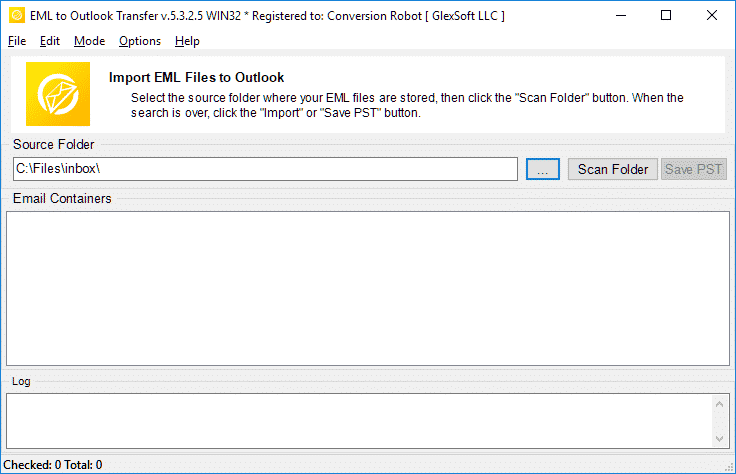
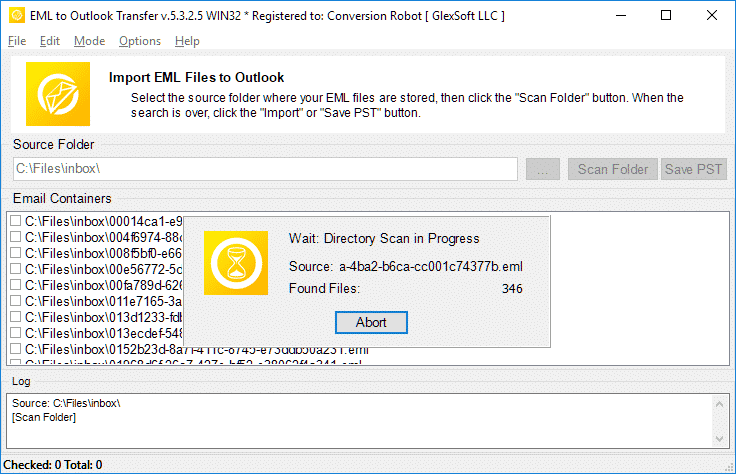
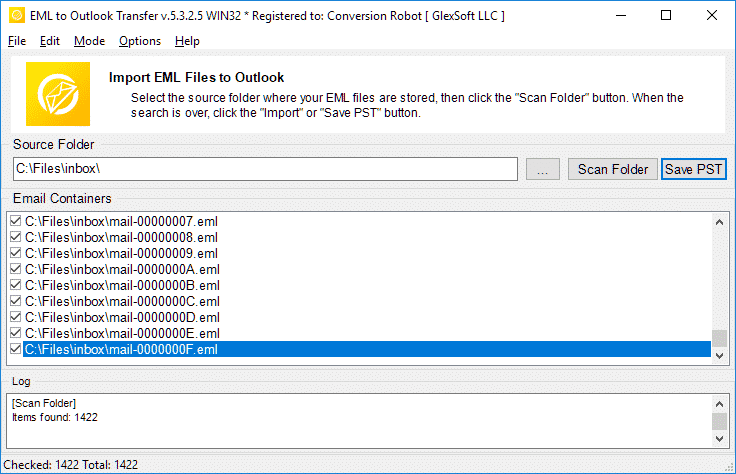
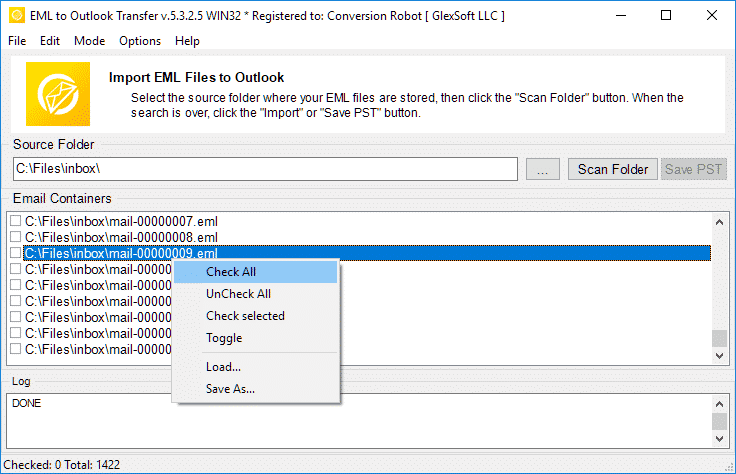
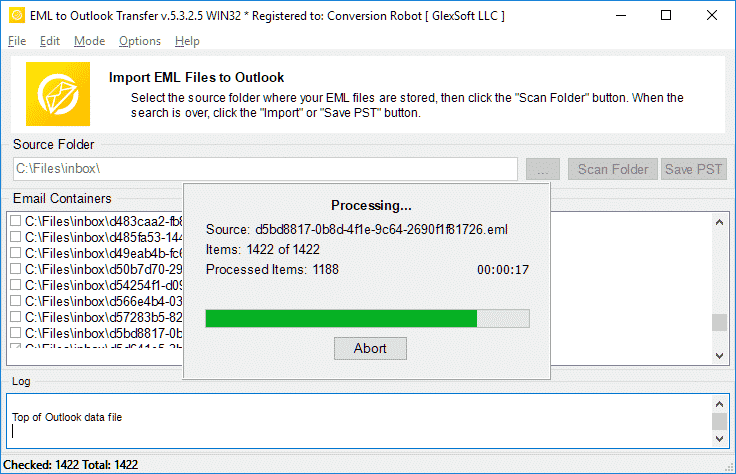
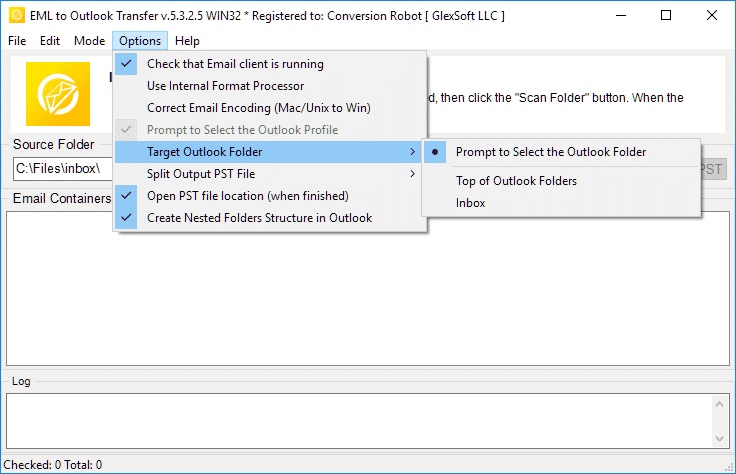
最終的に速いです, 信頼性が高く、直感的, これは、eml を pst 形式に変換し、電子メールの移行を完了するためのエンドツーエンドのソリューションです.
* - 未登録バージョンでは、限られた数のメッセージが変換されます市場で最速の EML から PST への移行エンジン
当社の広範な調査と厳格なテストプロセスにより、EML から Outlook への転送は、EML ファイル変換ツールの混雑した市場において際立っているという結論に至りました。. このソフトウェアの優れたパフォーマンスは、EML ファイルを PST 形式に迅速かつ正確に変換できることからも明らかです。. 他の競合他社とは異なります, このツールは、シームレスでエラーのない変換プロセスを保証します。, 個人と企業の両方にとって信頼できる選択肢となる.
更に, ユーザーフレンドリーなインターフェイスにより、初心者でも簡単に EML を PST に変換できます。. そう, EML を PST に変換する手間のかからない方法をお探しの場合, EML から Outlook への転送は、間違いなく現在市場で入手可能な最良のオプションです。.
.eml ファイルを Microsoft Office Outlook に迅速かつ正確にインポートします (EMLからPSTへのコンバーター)
Outlook Transfer ソフトウェアは速度が優れているだけではありません, また、eml 変換プロセス中に電子メール データの整合性も維持されます。. 直感的なインターフェースで設計されており、使いやすいです, 最低限の技術知識しか持たない人でも. 当社の pst コンバータは、Outlook のすべてのバージョンを強力にサポートします。, EML を PST に変換するための第一の選択肢としての地位をさらに固めます.
EML コンバータ ソフトウェアの効率, 正確さと使いやすさは、市場の他の EML ファイル変換ツールとは真の違いをもたらします。. このプログラムは、EMLファイルをMS PST形式に自動かつ非常に高速に変換します (パーソナルストレージテーブル). この方法で EML 転送を行うと、フォーマットが正確に保持されます, エンコーディングと添付ファイルも. このプログラムは、さまざまなオペレーティングシステムから取得したemlファイルを変換できます, これにより、電子メールのエンコーディングが Windows OS でサポートされているエンコーディングに変換されます。.
Outlook フォルダー内のユーザーのハード ドライブにフォルダー構造を再作成する可能性
EML を結果の PST ファイルに変換した後、メール フォルダーの階層全体が変更されずに Outlook プロファイルに配置されます。. これは、以前とまったく同じ場所でメールを見つけることができることを意味します. 重要なメールを再整理したり見失ったりすることを心配する必要はありません. この機能によりシームレスな移行が保証されます, メール管理の使いやすさと効率性を維持する.
数回のクリックで EML ファイルを Outlook にインポートする可能性 (OutlookにインポートEML)
EML コンバータ ツールを使用すると、EML ファイルを Outlook にインポートすることができ、技術的な知識や高度なコンピューター スキルは必要ありません。. 初心者ユーザーでも、マウスを数回クリックするだけで複数の eml ファイルを pst に簡単に変換できます。. プロセスは簡単でユーザーフレンドリーです, シンプルさを念頭に置いて設計された.
インポートする EML ファイルを選択するだけで、残りはソフトウェアが自動的に実行します。, それらを Outlook アカウントにシームレスに統合します. 加えて, ツールが提供するもの 24/7 顧客サポート, EML を PST に変換しようとしているときに問題が発生したユーザーを支援する準備ができています.
EML メッセージを Outlook pst ファイルに変換する可能性, でも、パスワードで保護されたもの (PSTにEMLを変換します)
パスワードで保護されている場合でも、EML を PST に変換します. 当社の EML to Outlook Transfer は、そのようなファイルを PST に慎重にエクスポートします (Outlookデータファイル) メッセージのプライバシーを侵害することなく. この変換プロセスにより、移行中の電子メール データの整合性と機密性が保証されます。. EML ファイルを PST 形式に転送する信頼性が高く安全な方法です, 元のパスワード保護を維持し、機密情報のプライバシーを最大限に確保します.
他の電子メール プログラムから抽出した電子メール メッセージを Outlook に簡単かつ迅速にインポートする
EML は一般的な形式であり、多くの電子メール クライアントが EML を使用してデータを保存しています. 今, EML から PST へのコンバーターを使用して、そのような電子メール クライアントから EML ファイルを抽出し、Outlook にインポートできます。. このツールはプロセスを合理化するように設計されています, 手間がかからず効率的になる. すべての重要な電子メールがデータの損失や破損なしに安全に Outlook に転送されることが保証されます。, 複数の eml ファイルを一度に変換できます.
EML ファイルをデフォルトの Outlook プロファイルまたは新しい PST ファイルにインポートします
私たちのツールはEMLをPSTに変換し、メッセージをデフォルトのOutlookプロファイルに直接エクスポートできます。, NS. 既存の Outlook データ ファイル, または、新しい PST ファイルを作成してデータを保存します. このツールは、EML を PST に変換し、結果の PST ファイルを別のコンピューターに移動するか、アーカイブ メールボックスに保存する場合に最適です。.
Unicode Outlook PST ファイルのサポート
EML から PST へのコンバータ ソフトウェアは、Unicode PST ファイルのサポートを提供する堅牢なツールです. この機能は、製品で 4GB を超えるサイズの *.pst ファイルを作成できるため、特に有益です。, なんと64TBまで処理できる容量を備えています. これは、大量のデータを扱い、EML を PST 形式に変換する必要があるユーザーにとって大きな利点です。.
EML コンバーター ツールの重要な機能の 1 つは、出力 PST ファイルを効果的に管理できることです。. 変換された Personal Storage Table ファイルが大きくなりすぎる場合, ソフトウェアには以下の機能があります 巨大な出力 PST ファイルをより小さいファイルに分割します, より扱いやすい部品. これにより、電子メール データが整理され、アクセス可能な状態に保たれます。, ユーザーが対象の PST ファイルを簡単に処理およびナビゲートできるようにします。.
EML を PST 形式にバッチ変換する
この EML から Microsoft Outlook へのコンバーターのおかげで、数百、さらには数千の EML ファイルを PST ファイルに大量に転送することが簡単かつ楽になります。. プログラムがディスクをスキャンした後, エクスポートする特定の EML ファイルを選択するか、一括 eml ファイル エクスポートを実行して、すべての電子メールを MS Outlook PST に正常に移行することができます。.
ソフトウェアのビジネス バージョンの重要な機能の 1 つは、次の機能です。 コマンドラインから一括EMLファイルを変換する, 驚くほど効率的で、コマンドライン操作に慣れている人にとって使いやすいものになります。. この機能を使用すると、単一のコマンドで大量の EML ファイルを複数の Outlook PST ファイルに変換できます。, ユーザーの時間と労力を大幅に節約.
初心者とプロユーザーに適したユーザーフレンドリーと非常に直感的なウィザードベースのインターフェイス
EML を PST ファイル形式に変換するだけの場合、わかりやすいユーザー インターフェイスは世界で最も重要なオプションではないと思うかもしれません。 (パーソナルストレージテーブル). しかしながら, メールのエクスポートが失敗したときの気持ちを想像してみてください 30 間違ったパラメーターを選択したか、間違ったボタンをクリックしただけで数分. 直感的なユーザー インターフェイスにより、これはもはや問題ではありません. やるべきことが明確に見えます, 変更を加える前に結果をプレビューできます.
EML から Outlook への変換は次のように機能します
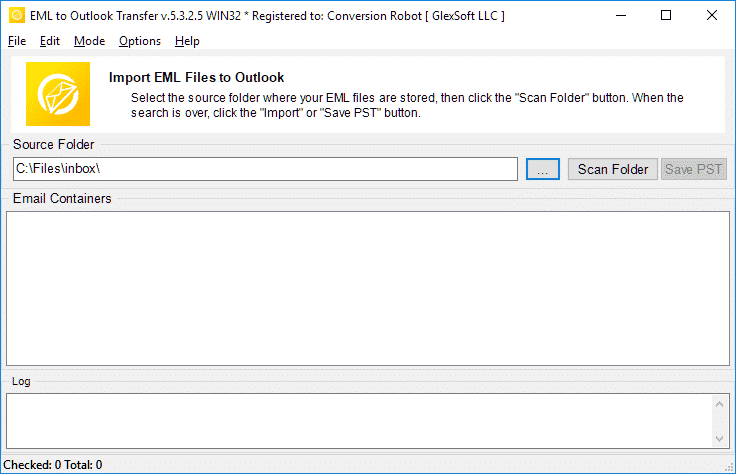
- EML to Outlook Transfer ソフトウェアを実行する.
- ソースEMLファイルとフォルダーの場所を指定します.
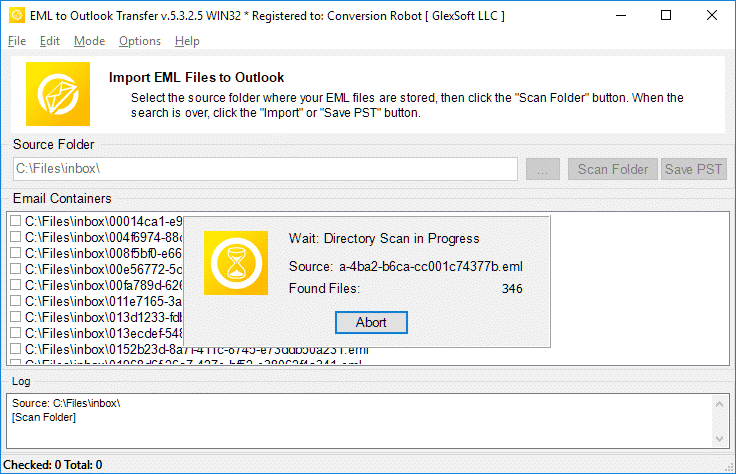
- 「フォルダーをスキャン」をクリックします’ ネストされたすべてのサブフォルダーを検索するボタン.
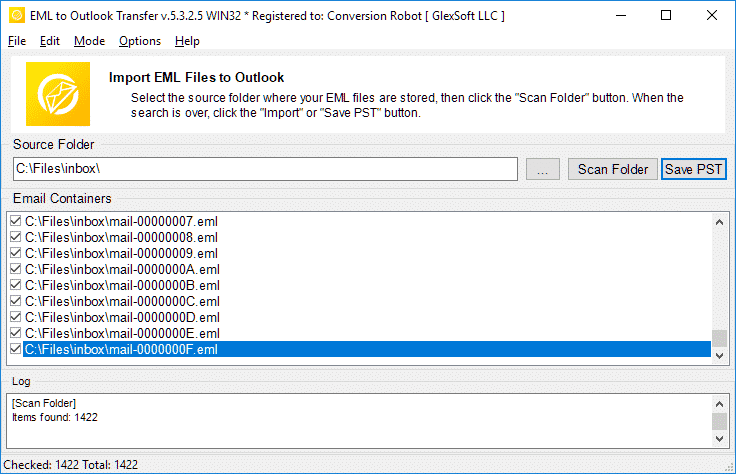
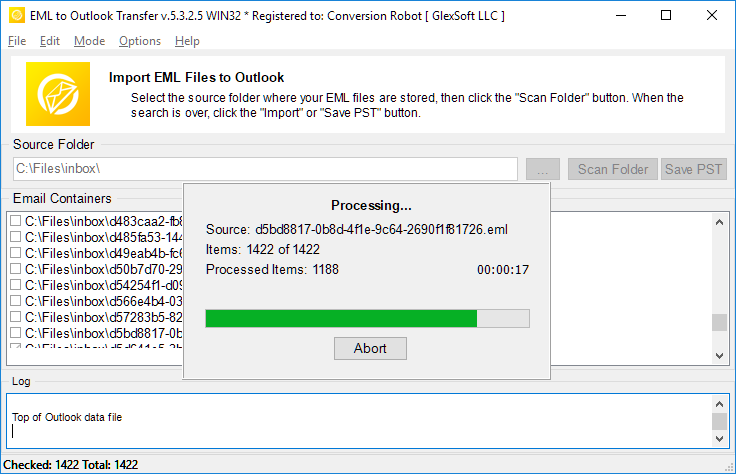
- 「PSTの保存」を使用します’ eml から pst への変換プロセスを開始するボタン.
- 結果の PST ファイルを Outlook で開き、結果を楽しみます.
EMLをPSTファイルに変換する必要があるのはいつですか?
EML to PST Converter は、EML ファイルをサードパーティの電子メール クライアントから Microsoft Outlook に移行するように設計されています. そして, 男の子, メッセージや電子メールを保存するための主要なファイル形式として EML を使用する電子メール クライアントは多数ありますか?. 例えば: サンダーバード, メールを見る, ユードラ, The Bat, IncrediMail, 側近, Apple Mailの (emlx ファイル) その他.
eml を pst に変換する必要がある場合の一般的なシナリオをいくつか示します。:
Windows Live メールの移行
Windows Live メールは、Windows に付属している電子メール クライアントです。, 少なくともWindowsまではそうでした 10. この人気のあるフリーウェアの電子メール クライアントは、メッセージと添付ファイルを EML ファイルとして保存します, そのため、代わりに Outlook に切り替えたい場合は、EML を PST に変換するツールが必要になる場合があります。. あるいは, あなたは私たちを試すことができます 自動化された Live Mail 変換ツール Windows メールで保存された eml ファイルを移行するには.
サンダーバードの移行
Thunderbird はメッセージを EML として保持することもできます. そして、eml ファイルを Outlook に手動でエクスポートすることは確かに選択肢ではありません – あなたは本当に重要なことのためにあなたの人生を必要とします. 代わりに、EML から Outlook への転送ツールへの移行を委任してください. 最小限の手間, 保証された結果. さらに, 必ず確認してください この自動化されたソフトウェア EML を Thunderbird から Outlook PST ファイルにエクスポートする場合. 移動 Thunderbird への EML ファイル も可能です.
Apple メールの移行
Apple Mail は Mac のメール クライアントです。. Mac での EML から PST への変換には追加の手順が必要です: これらのEMLファイルを物理的にコピーする必要があります (実際にはEMLXファイル) Mac コンピュータから. しかし、これは別として, プロセスはすべて同じです: EMLコンバータを実行すると、, そして、それは残りのすべてを行います.
The Bat! マイグレーション
The Bat! 強力で高度にカスタマイズされた電子メール クライアントです. 私たちの経験によれば、EML ファイルを The Bat から Outlook PST ファイルに変換するのは一般的なリクエストです. 多くのユーザーがこのクライアントから Microsoft Outlook などのより現代的なソリューションに移行します.
IncrediMail の移行
当社の EML to Outlook Transfer ソフトウェアは、IncrediMail クライアントからの移行にも役立ちます. かつて本当に信じられないほど, この電子メール プログラムは現在、放棄されています, なので用途が限られます. EML 移行ツールを使用して EML を PST ファイル形式にエクスポートし、Outlook に切り替えます.
Outlook Express への移行
この従来の Microsoft 電子メール クライアントは、そのシンプルさのおかげで過去に非常に人気がありました. そして今ではまったく同じ理由でめったに使用されません. EML から PST への自動コンバーターを入手して、電子メール データベースを Outlook Lite からその兄貴分に移動するだけです。.
体験版と製品版の比較
| ソフトウェアの機能 | 無料トライアルライセンス | Homeライセンス | ビジネスライセンス | 技術ライセンス |
|---|---|---|---|---|
| 無制限のメール数 | 違います | [はい] | [はい] | [はい] |
| アカウント数は無制限 | 違います | [はい] | [はい] | [はい] |
| コマンドライン (バッチモード) | 違います | 違います | [はい] | [はい] |
| ネットワークソース | [はい] | 違います | [はい] | [はい] |
| サーバー側での使用 | [はい] | 違います | 違います | [はい] |
| リニューアルタイプ (選択によって) | - | マニュアル | マニュアルとオート | マニュアルとオート |
| 更新割引 | - | 10% | 20% | 30% |
| アクティベーションの数 (選択によって) | - | 1-5 | 1-50 | 無制限 |
| 技術サポート | 限定 | スタンダード | 優先順位 | 拡張された |
よくある質問
PSTとEMLの違いは何ですか?
PST ファイル形式は、メッセージを保存するために Microsoft によって開発された独自の形式です。, 個人データ, カレンダーイベントなど. EML は、メッセージに関連付けられた電子メール テキストと技術データを格納するためのインターネット メッセージ形式を表します。. EML ファイルはテキストベースです.
EML ファイルを開くアプリ?
多くの電子メール クライアントは、電子メールを格納する主要な方法として EML を使用します。. EML で動作するアプリの例としては、Thunderbird があります。, IncrediMail, Live Mail, Apple Mailの (emlx ファイル) その他. PST コンバーター ツールは、これらのクライアントで作成された EML ファイルを簡単に処理できます。.
EML を Outlook メールに変換する方法?
EML から PST へのコンバーターを次の方法で試すことができます。 ダウンロード 当社ウェブサイトからのデモ版. ソフトウェアを実行します。, ソース eml ファイルが配置されているフォルダーを指定します, プログラムでスキャンして変換プロセスを開始します. トライアル / デモ版は最大で変換します 10 他の制限はなく、ニーズに合った場合はフォルダーごとにメールを送信します, ソフトウェアをアクティベートして全機能のロックを解除できます.
EML から Outlook へのコンバーターを使用せずに EML ファイルを Outlook で開くことはできますか?
[はい]. Outlookで 2010, EML ファイルは自動的に開かれます. 以前のバージョンの MS Outlook では、EML ファイルを開くように Outlook に指示するために、レジストリに特定の変更を加える必要がある場合があります。. しかしながら, EML ファイルを開くより簡単で自然な方法は、すべてのファイルを結果の PST ファイルにエクスポートすることです。. これを実行するための最も簡単な方法として、当社の EML コンバーター ツールを使用できます。.
EMLファイルをPSTファイルに結合するにはどうすればよいですか?
複数の EML ファイルがある場合, すべてを PST ファイル形式でインポートしたいとします。, それらを1つずつ手動でインポートする必要があります (ブーイング), または、EML to Outlook Transfer などの専門的な自動インポート ツールを使用して、1 時間以内に作業を完了してください (もちろん、EMLファイルの量に依存します). プログラムは、指定されたフォルダー内のすべての EML ファイルを読み込み、バッチ モードで自動的に単一の PST ファイルに結合します。, emlをpst形式に一度に変換できます.
EML を Outlook フリーウェアにインポートしています?
EMLからPSTへのコンバータープログラムを無料でダウンロードして実行し、変換プロセスを実行できます. フリーウェア版は機能を制限しません, ただし、変換されるアイテムの量に制限があります.
アンド 仕事で eml から pts への変換が頻繁に行われる場合, またはメールをすぐに変換する必要がある状況にある場合, EML to Outlook 転送ツールはあなたにとって完璧なソリューションです. 変換後に読み取れないファイルが残されたり、メッセージが見逃されたり、受信トレイに表示されたりすることがなくなります。. EML コンバーターは移行の課題を効果的に解決します. 体験版をダウンロードする 今日は時間と労力を大幅に節約できます.
の代替 EML to Outlook Transfer:
- MSGフォーマット変換 Outlook または Outlook PST ファイルへ
- Live Mail to Outlook Transfer – Win Mail で保存された EML ファイルを Outlook に変換する
- Data Extraction Kit for Outlook – EML形式にOutlookまたはPSTファイルからの輸出のメール
- Mac Mail to Outlook Transfer – Mac OS EMLX ファイルを Outlook プロファイルまたは Outlook PST ファイルにインポートする
お客様の声
あなたのご意見, 私たちはソフトウェアの改善をするために停止しないようにご提案やアイデアは非常に貴重になります. 約あなたの評価とレビューを投稿すること自由に感じなさい EML to Outlook Transfer 下のボタンを使用して製品. 私たちはあなたのフィードバックを本当に感謝します.
あなたのレビューを提出 | |
膨大な量の eml ファイルを pst 形式に変換する素晴らしいソフトウェア.
直接インポートで.emlを.pstに変換する機会は貴重です, しかし、私はPST分割にもっと興味がありました, 大量のデータがあるので (何千ものアイテム) そしてすべてをバックアップします. このコンバーターは私の期待に応えました.
たくさんのGmailメッセージをEMLファイルとして保存し、Outlookプロファイルに移動しました. GmailをWindowsアプリに同期させたくない場合は、これが最適な選択です。. EMLファイルをOutlookに一度にインポートできます, したがって、このツールは時間の節約にもなります.
WindowsLiveメールが廃止された後, Outlookに切り替えましたが、古いメッセージを転送しませんでした. この簡単な解決策を考え出してくれてありがとう. EMLファイルをPSTに変換するのは本当に簡単なツールです.
このコンバーターがThunderbirdから直接メールを抽出できるか、少なくともエクスポートの手順が付属していることを願っています. この段階は面倒でした, しかし、EMLをOutlookに問題なく変換することができました. 全体, 宣伝どおりに機能します.


