


아웃룩에 전송하는 EML is designed to streamline the migration of individual messages and entire folder hierarchies into Microsoft Outlook. The software provides flexible export options, – you can generate a clean, 독립형 .PST file on your local drive or import messages directly into an existing Outlook profile and filter converted emails by From, 에, 제목, Date and other email tags.
The built-in processing engine handles email files generated by various desktop clients, 모질라 썬더버드를 포함한, 윈도우 라이브 메일, 엠 클라이언트, and Apple Mail (EMLX). For users moving messages from Thunderbird, extracting data as standard EML 파일 ensures that all embedded media, custom flags, and folder trees remain fully preserved.
Thanks to an intuitive, wizard-driven interface, the entire transfer process requires only a few clicks, making large-scale mailbox consolidation straightforward for both individual users and IT professionals.
EML to Outlook Transfer 비디오 가이드
Watch how EML to Outlook Transfer locates source directories, scans mailbox contents, and packages messages into an Outlook-ready PST file in just a few minutes. EML to Outlook Transfer processes emails from virtually any client, enabling you to browse, reply to, 구성, and archive your messages using standard Outlook features.
* 무료 평가판은 제한된 수의 메시지를 변환합니다.| 운영 체제 | Microsoft Windows® Vista 이상 |
| 마이크로 소프트 오피스 | 마이크로소프트 아웃룩® 2003-2021 (독립형) |
| 아웃룩 계정 | 하나 이상의 Outlook 프로필 (이메일 계정) 구성해야 합니다 |
| 소스 파일 | *.EML 파일 |
| 하드 드라이브 공간 | 48 최소 MB |
| 사용 가능한 메모리 | 4 32비트용 GB 및 8 64비트 운영 체제의 경우 GB 이상 |
| 프로세서 | 펜티엄 IV 2 GHz 이상 |
| 표시하다 | 컬러 디스플레이, 최소로 설정 1024 엑스 768 해결 |
| 
| 
| 
|
Why Manual Email Migration Is Inefficient

Moving emails between different platforms is rarely as simple as copying files. While individual .eml files store standard RFC-822 message text, Microsoft Outlook organizes data inside structured containers called Personal Storage Tables (.pst). These files hold not only message bodies, but also embedded media, 첨부 파일, read/unread states, and custom metadata.
When attempting manual imports via drag-and-drop, Outlook often replaces original send dates with the current import timestamp, strips inline images, and ignores subfolder arrangements. For businesses and users with years of correspondence, manual transfer is time-consuming and prone to errors. An automated converter eliminates these bottlenecks by mapping data directly into Outlook’s native structure.
EML Transfer Software Key Technical Features
1. Preserves Complete Folder Hierarchies
The software mirrors your source directory structure inside Outlook. If your archived emails are organized into projects, 클라이언트, or yearly archives, every subfolder is recreated without requiring manual sorting after migration.
2. Multi-Client Source Compatibility
EML is an open standard utilized by diverse desktop applications. The converter processes files exported from:
-
- 모질라 썬더 버드: Seamlessly move local mail folders without database corruption.
- 윈도우 라이브 메일 / 윈도우 메일: Upgrade legacy Windows archives to modern Outlook versions.
- 애플 메일 (EMLX): Converts Mac OS message exports into Windows-compatible Unicode formats.
- 엠 클라이언트, 박쥐!, 유도라, and IncrediMail: Imports individual message backups with full metadata intact.
To learn more about how message standards operate, read our overview on what the EML file format represents.
3. Unicode Output and PST Splitting
Legacy ANSI PST files were restricted to 2 GB limits. This tool creates modern Unicode PST files capable of storing up to 64 결핵. To keep your mail databases healthy, you can also use the built-in option to split large PST files into smaller parts during conversion.
4. Attachment and Encoding Integrity
Non-Latin character sets (such as European, Asian, and Cyrillic special symbols) often fail during manual imports. The converter translates internal headers and character sets on the fly while safeguarding all attached files, 서류, and embedded images.
Typical Migration Scenarios
- Switching Email Clients. Moving from Thunderbird, 애플 메일, or legacy desktop clients to a corporate Microsoft Outlook environment.
- Operating System Upgrades. Transitioning data from older Windows installations (where Windows Live Mail was installed) to Windows 10 or Windows 11.
- Disaster Recovery. Extracting raw EML messages from damaged databases and packaging them back into a clean, working PST file.
- Archiving Mailboxes. Consolidating scattered desktop message files into a single, searchable offline storage file.
Need detailed step-by-step guidance? Follow our comprehensive tutorial on how to import EML files to Outlook for exact configuration options and screenshots.
Outlook Transfer에 EML에 대해 사용자가 말하는 것
EML to Outlook 변환기는 생명의 은인입니다.! 수천 개의 중요한 이메일을 EML 형식으로 저장했고 이를 내 Outlook 계정으로 빠르게 가져와야 했습니다.. 이 소프트웨어는 프로세스를 매우 쉽고 직관적으로 만들었습니다., 수작업 시간을 절약했습니다.. 추천!

마르코 팔란드리 - 스위스
처음에는 EML to Outlook Transfer를 구입하는 것을 주저했습니다., 하지만 난 정말 기뻐요. 이 소프트웨어는 매우 사용하기 쉽고 효율적입니다.. 모든 EML 파일을 쉽고 정확하게 Outlook으로 전송했습니다.. 또한 제 질문에 신속하고 전문적으로 답변해 준 도움이 되는 고객 지원팀에게도 감사드립니다..
Björn Birkholz - 독일
EML 파일을 Outlook으로 전송해야 하는 경우, 이것은 사용할 소프트웨어입니다. 인터페이스는 간단하고 직관적입니다, 전송 프로세스는 번개처럼 빠릅니다.. 아무런 문제 없이 수천 개의 EML 파일을 내 Outlook 계정으로 전송할 수 있었습니다.. 고맙습니다, 전망 전송, 신뢰할 수 있고 유용한 도구를 만들기 위해!
위험관리실 - 킹 카운티
다른 리뷰 보기
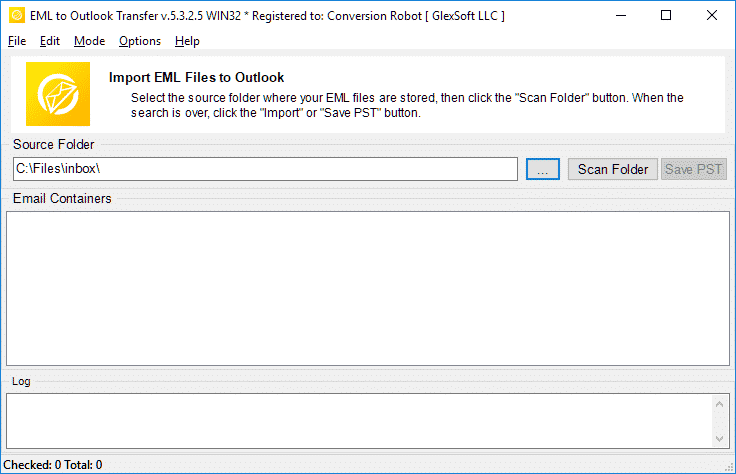
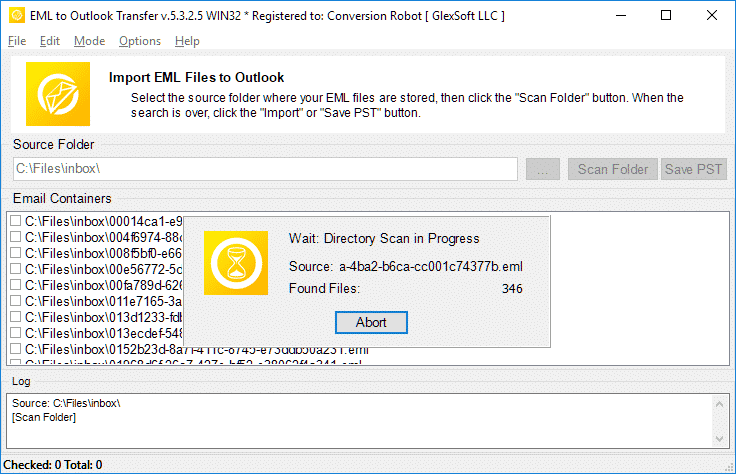
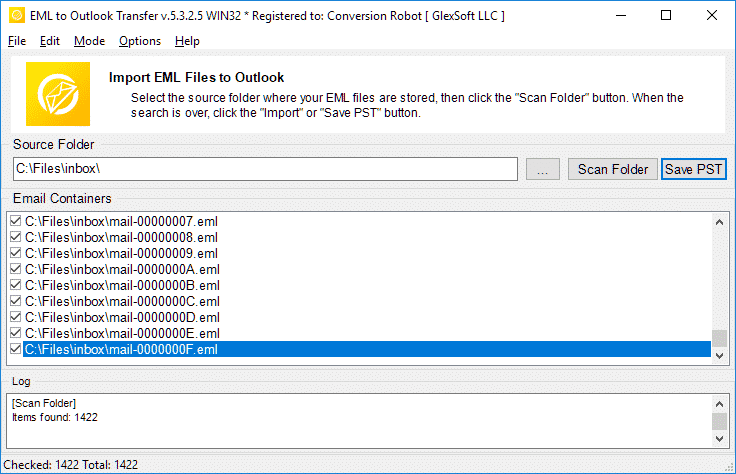
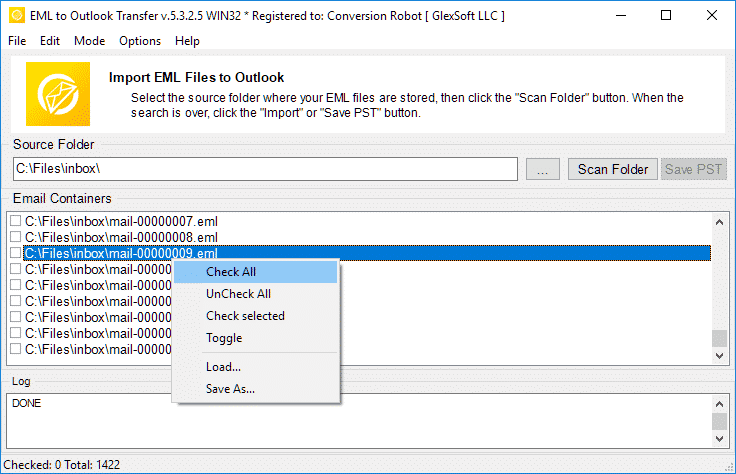
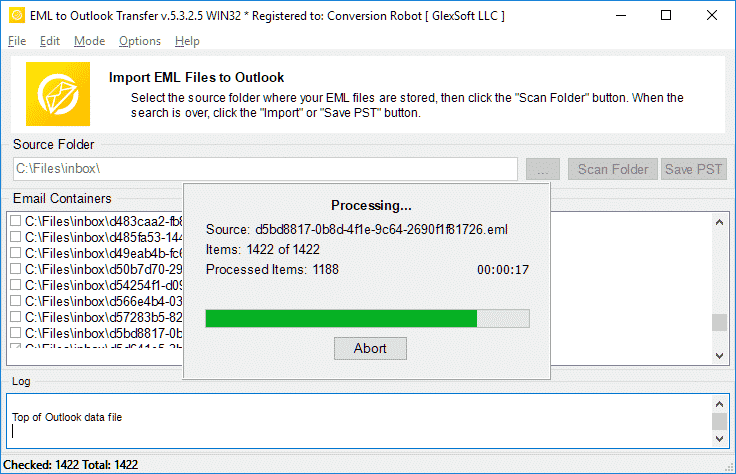
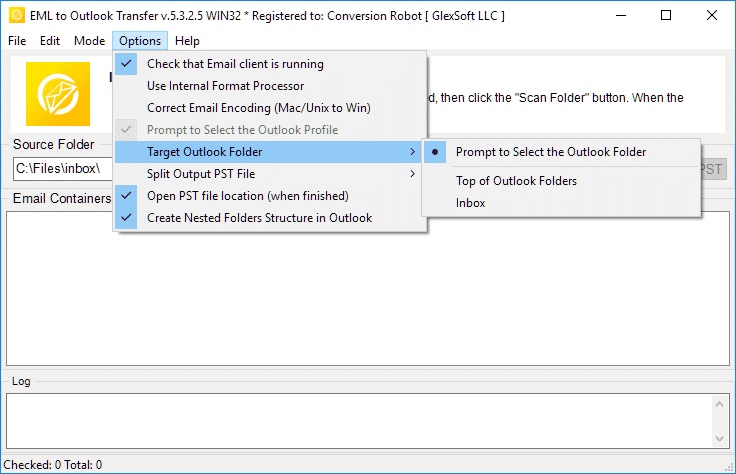
EML to Outlook Transfer는 빠르게 제공됩니다., 믿을 수있는, 모든 변환 작업에 대한 직관적인 성능.
* 무료 평가판은 제한된 수의 메시지를 변환합니다.Why Choose EML to Outlook Transfer?
1. High-Speed Email Migration Engine
EML to Outlook Transfer is built for high processing speed and data accuracy. The engine parses message files rapidly, preserving header fields, text formatting, and attachments across large archives without dropping records.
The streamlined wizard interface lets users initiate migrations without manual configuration hurdles, ensuring smooth file handling from start to finish.
2. Accurate Import into Microsoft Outlook
Data integrity is paramount during email migration. The software maintains original text encodings, HTML styling, and inline attachments across all supported versions of Microsoft Outlook, ensuring full compatibility even with messages created under non-Windows operating systems.
The software automatically adapts message formats into native Outlook structures (개인 스토리지 테이블), ensuring that every sender, 받는 사람, timestamp, and attachment matches the original source archive.
3. Recreate Your Folder Structure in Outlook
The hierarchy of your mail folders remains identical after transfer. Every subfolder and project directory appears in Outlook exactly as organized in your source archive, eliminating the need to rearrange messages post-import. This ensures an uninterrupted workflow and immediate familiarity with your migrated mail.
4. Import Message Files in Just a Few Clicks
Importing messages requires no advanced technical background. Simply select the root directory containing your source files, run the scan, and the software handles the migration automatically. Customer support is available if technical assistance is required.
All you need to do is specify the folder containing your message files, and the software executes the transition smoothly into your chosen destination.
5. Support for Password-Protected Outlook Profiles
Export your data safely even when target Outlook profiles or existing storage files are protected by passwords. The tool processes messages without compromising security or breaking user credentials, maintaining complete privacy throughout the migration.
6. Import Messages from Any EML-Based Email Client
EML is an open format used widely across different desktop platforms. This tool extracts messages from various desktop applications—such as Mozilla Thunderbird, 윈도우 라이브 메일, 애플 메일, 엠 클라이언트, 그리고 박쥐!—and consolidates them into Outlook cleanly, enabling smooth batch migration for multi-client environments.
7. Flexible Output: Default Profile or Standalone PST File
Export your correspondence directly into your current Outlook profile or create a brand new, standalone PST file. Standalone PST files can be easily moved to another computer, backed up to external storage, or archived offline.
8. Unicode PST Support & Automatic PST Splitting
The software produces modern Unicode PST files that overcome legacy 2GB size restrictions, handling volumes up to 64TB. For optimal database health and easier file management, the software can also split large PST files into smaller parts during processing.
9. Batch Mode for High-Volume Processing
Migrating thousands of message files is effortless with the built-in bulk processing engine. After scanning your drive, the program moves all selected folders and emails to MS Outlook PST in a single automated session.
10. Intuitive Wizard-Based Interface for Beginners and Pros
The step-by-step wizard ensures that users of any experience level can execute email migrations without confusion, providing clear visual status indicators throughout the run.
평가판과 정식 버전의 비교
| 소프트웨어 기능 | 무료 평가판 라이센스 | 홈 라이센스 | 비즈니스 라이센스 | 기술 라이센스 |
|---|---|---|---|---|
| 무제한 이메일 | 아니요 | 예 | 예 | 예 |
| 무제한 계정 수 | 아니요 | 예 | 예 | 예 |
| 명령줄 (배치 모드) | 아니요 | 아니요 | 예 | 예 |
| 네트워크 소스 | 예 | 아니요 | 예 | 예 |
| 서버 측 사용 | 예 | 아니요 | 아니요 | 예 |
| 갱신 유형 (선택에 의해) | - | 조작 | 수동 및 자동 | 수동 및 자동 |
| 갱신 할인 | - | 10% | 20% | 30% |
| 활성화 수 (선택에 의해) | - | 1-5 | 1-50 | 제한 없는 |
| 기술적 지원 | 제한된 | 표준 | 우선 사항 | 펼친 |
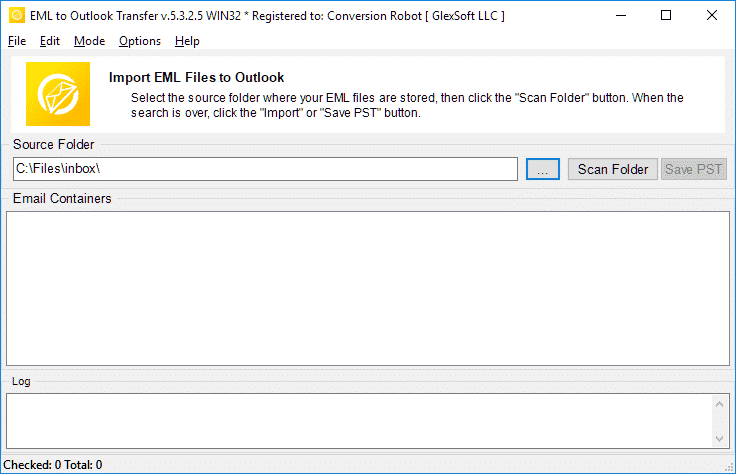
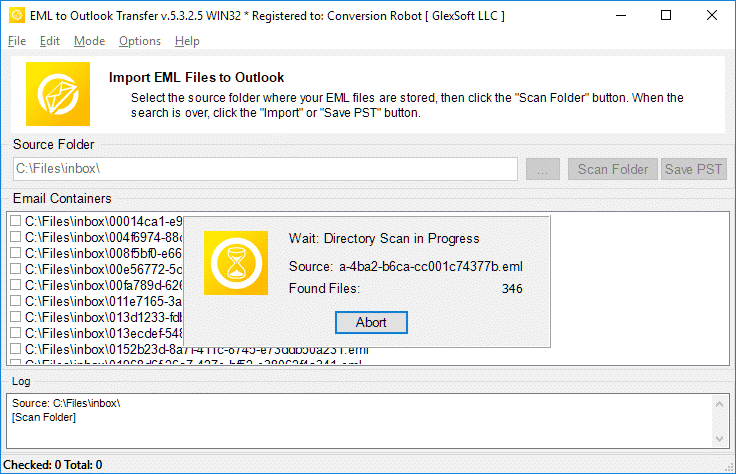
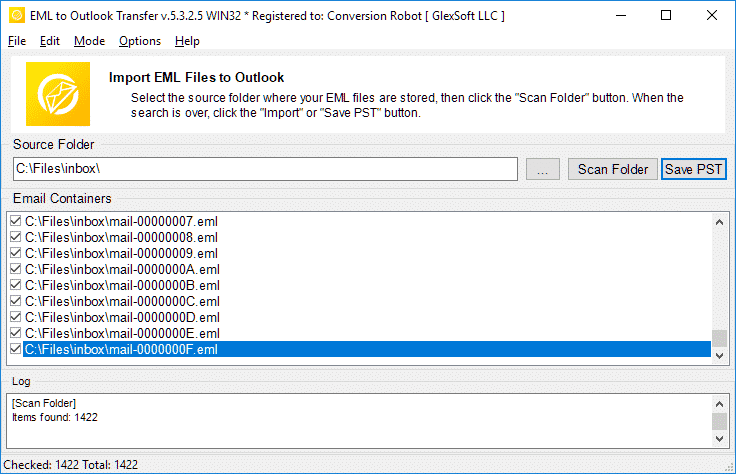
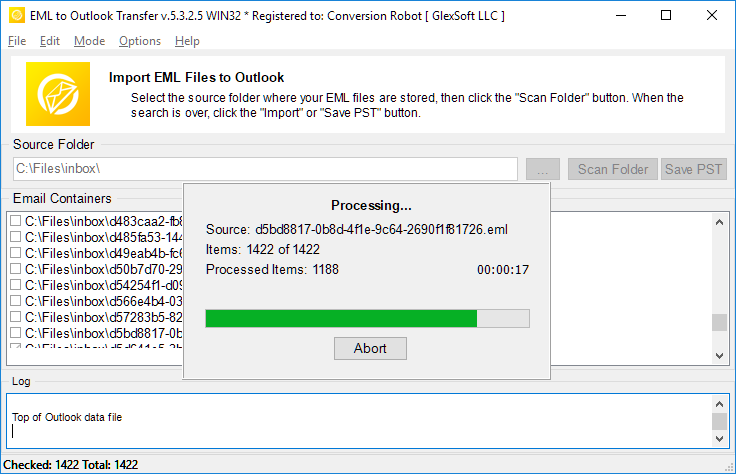
EML to Outlook 전환 – 작동 방식 5 간단한 단계
- 운영 그만큼 EML to Outlook Transfer 소프트웨어.
- 지정하다 소스 EML 파일 및 폴더의 위치.
- 딸깍 하는 소리 스캔 폴더 중첩된 하위 폴더와 EML 파일을 모두 찾으려면.
- 사용 저장 PST 시작하는 버튼 EML에서 PST로 변환 방법.
- 열다 Outlook에서 결과 PST 파일을 확인하고 결과를 즐기세요..
관련 이메일 마이그레이션 도구
EML에서 PST로의 변환에 대해 자주 묻는 질문
PST와 EML의 차이점은 무엇입니까?
PST 파일 형식은 메시지를 저장하기 위해 Microsoft에서 독점적으로 개발했습니다., 개인 정보, 캘린더 이벤트 등. EML은 메시지와 관련된 이메일 텍스트 및 기술 데이터를 저장하기 위한 인터넷 메시지 형식을 나타냅니다.. EML 파일은 텍스트 기반입니다.. 자세히 알아보기 EML 파일 형식은 무엇입니까.
EML 파일을 여는 앱?
많은 이메일 클라이언트는 이메일을 저장하는 기본 방법으로 EML을 사용합니다.. EML과 함께 작동할 수 있는 앱의 예는 Thunderbird입니다., IncrediMail을, 라이브 메일, 애플 메일 (emlx 파일) 다른 사람. 에이 PST 변환기 도구는 이러한 클라이언트에서 생성된 EML 파일을 쉽게 처리할 수 있습니다..
EML을 Outlook 이메일로 변환하는 방법?
당신은 우리를 시도할 수 있습니다 PST 변환기 EML 으로 다운로드 중 웹 사이트의 데모 버전. 소프트웨어를 실행, 소스 EML 파일이 있는 폴더 지정, 프로그램으로 스캔하고 변환 프로세스를 시작하십시오. 재판 / 데모 버전은 10 다른 제한 없이 폴더당 이메일. 시험 결과에 만족하시는 경우, 소프트웨어를 활성화하여 전체 기능을 잠금 해제할 수 있습니다..
EML to Outlook 변환기 없이 Outlook에서 EML 파일을 열 수 있습니까??
예. Outlook의 2010, EML 파일이 자동으로 열립니다.. 이전 버전의 MS Outlook에서는 EML 파일을 열어야 한다고 Outlook에 알리기 위해 레지스트리를 특정 변경해야 할 수 있습니다.. 하나, EML 파일을 여는 더 간단하고 자연스러운 방법은 모든 파일을 결과 PST 파일로 내보내는 것입니다.. EML 변환기 도구를 사용하여 이 작업을 가장 쉽게 수행할 수 있습니다..
EML 파일을 PST 파일에 결합하는 방법?
EML 파일이 여러 개인 경우, 모두 PST 파일 형식으로 가져오려고 합니다., 수동으로 하나씩 가져와야 합니다. (시끄러워), 또는 다음과 같은 전문적인 자동 가져오기 도구를 사용하세요. EML to Outlook Transfer 한 시간 안에 일을 끝내고 (물론 EML 파일의 양에 따라 다릅니다.). 프로그램은 지정된 폴더의 모든 EML 파일을 로드하고 배치 모드에서 단일 PST 파일에 자동으로 결합합니다., 을 허용 태평양 표준시 EML로 변환 한번에 포맷하기.
Outlook 프리웨어로 EML을 가져오고 있습니다.?
무료로 EML-PST 변환기 프로그램을 다운로드하여 실행하고 변환 프로세스를 실행할 수 있습니다.. 프리웨어 버전은 기능을 제한하지 않습니다, 그러나 변환된 항목의 양에는 제한이 있습니다..
이자형 작업에 많은 eml에서 pts로의 변환이 포함되는 경우, 또는 이메일을 즉시 변환해야 하는 상황에 처한 경우, 그만큼 EML to Outlook Transfer 도구는 당신을 위한 완벽한 솔루션입니다. 변환 후 받은 편지함에 읽을 수 없는 파일이 남거나 메시지가 누락되거나 읽을 수 없는 것으로 표시되지 않도록 합니다.. EML 변환기는 마이그레이션 문제를 효과적으로 해결합니다.. 평가판 다운로드 오늘 많은 시간과 노력을 절약하십시오..
대안 EML to Outlook Transfer:
- MSG 형식 변환 Outlook 또는 Outlook PST 파일로
- Live Mail to Outlook Transfer – Win Mail이 저장한 EML 파일을 Outlook으로 변환
- Data Extraction Kit for Outlook – EML 형식으로 Outlook 또는 PST 파일에서 수출 이메일
- Mac Mail to Outlook Transfer – Mac OS EMLX 파일을 Outlook 프로필 또는 Outlook PST 파일로 가져오기
고객 되먹임
귀하의 의견은 개선에 도움이 됩니다. 에 대한 경험을 공유해주세요 EML to Outlook Transfer 아래 버튼을 이용하여.
리뷰 제출 | |
엄청난 양의 eml 파일을 pst 형식으로 변환하는 훌륭한 소프트웨어.
직접 가져오기를 통해 .eml을 .pst로 변환할 수 있는 기회는 매우 중요합니다., 하지만 PST 분할에 더 관심이 있었습니다., 방대한 양의 데이터를 가지고 있기 때문에 (수천 개의 항목) 그리고 모든 것을 백업. 이 변환기는 내 기대에 부응했습니다..
많은 Gmail 메시지를 EML 파일로 저장하고 Outlook 프로필로 옮겼습니다.. Gmail을 Windows 앱과 동기화하지 않으려는 경우 이것이 최적의 선택입니다.. EML 파일을 Outlook으로 한 번에 가져올 수 있습니다., 따라서 이 도구는 시간을 절약해 줍니다..
Windows Live 메일이 중단된 후, Outlook으로 전환했지만 이전 메시지를 전송하지 않았습니다.. 이 간단한 해결책을 생각해 주셔서 감사합니다.. EML 파일을 PST로 변환하는 것은 정말 쉬운 도구입니다..
이 변환기가 Thunderbird에서 직접 이메일을 추출하거나 최소한 내보내기 지침과 함께 제공되기를 바랍니다.. 이 스테이지는 번거로웠다, 하지만 문제 없이 EML을 Outlook으로 변환할 수 있었습니다.. 사무용 겉옷, 그것은 광고 된대로 작동합니다.


