


EML لتحويل التوقعات is designed to streamline the migration of individual messages and entire folder hierarchies into Microsoft Outlook. The software provides flexible export options, – you can generate a clean, مستقل .PST file on your local drive or import messages directly into an existing Outlook profile and filter converted emails by From, إلى, موضوع, Date and other email tags.
The built-in processing engine handles email files generated by various desktop clients, بما في ذلك موزيلا ثندربيرد, الايميل الالكتروني الخاص بميكروسوفت, EM العميل, and Apple Mail (إملكس). For users moving messages from Thunderbird, extracting data as standard ملفات إمل ensures that all embedded media, custom flags, and folder trees remain fully preserved.
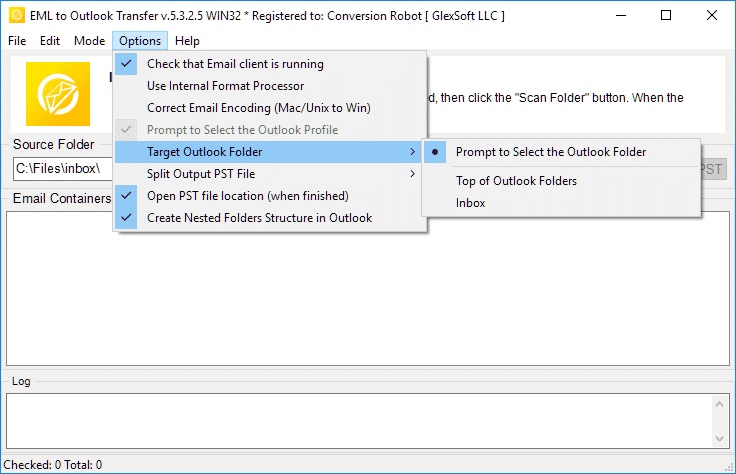
Thanks to an intuitive, wizard-driven interface, the entire transfer process requires only a few clicks, making large-scale mailbox consolidation straightforward for both individual users and IT professionals.
دليل فيديو EML to Outlook Transfer
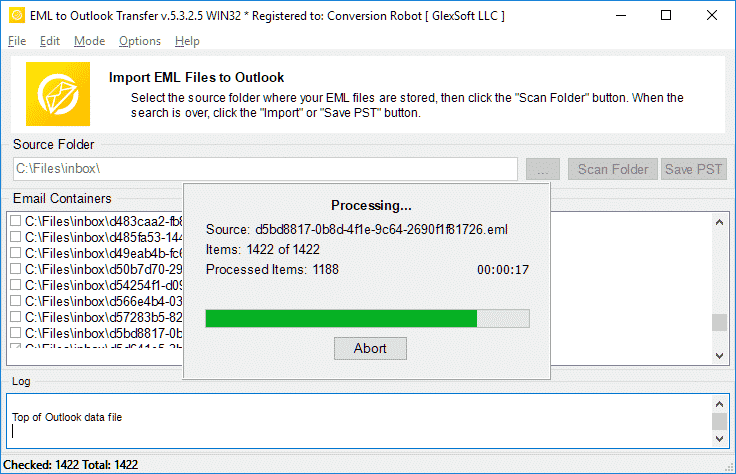
Watch how EML to Outlook Transfer locates source directories, scans mailbox contents, and packages messages into an Outlook-ready PST file in just a few minutes. EML to Outlook Transfer processes emails from virtually any client, enabling you to browse, reply to, تنظم, and archive your messages using standard Outlook features.
* النسخة التجريبية المجانية تحول عدد محدود من الرسائل| نظام التشغيل | Microsoft Windows® Vista أو أعلى |
| مايكروسوفت أوفيس | Microsoft Outlook® 2003-2021 (مستقل) |
| حساب Outlook | ملف تعريف Outlook واحد على الأقل (حساب البريد الإلكتروني) يجب تكوينه |
| الملفات المصدر | *.ملفات يمل |
| مساحة القرص الصلب | 48 الحد الأدنى من ميغابايت |
| الذاكرة المتوفرة | 4 جيجابايت لـ 32 بت و 8 غيغابايت أو أكثر لأنظمة تشغيل 64 بت |
| المعالج | بنتيوم الرابع 2 جيجاهرتز أو أسرع |
| عرض | شاشة ملونة, تعيين على الأقل 1024 X 768 دقة |
| 
| 
| 
|
Why Manual Email Migration Is Inefficient

Moving emails between different platforms is rarely as simple as copying files. While individual .eml files store standard RFC-822 message text, Microsoft Outlook organizes data inside structured containers called Personal Storage Tables (.pst). These files hold not only message bodies, but also embedded media, مرفقات, read/unread states, and custom metadata.
When attempting manual imports via drag-and-drop, Outlook often replaces original send dates with the current import timestamp, strips inline images, and ignores subfolder arrangements. For businesses and users with years of correspondence, manual transfer is time-consuming and prone to errors. An automated converter eliminates these bottlenecks by mapping data directly into Outlook’s native structure.
EML Transfer Software Key Technical Features
1. Preserves Complete Folder Hierarchies
The software mirrors your source directory structure inside Outlook. If your archived emails are organized into projects, عملاء, or yearly archives, every subfolder is recreated without requiring manual sorting after migration.
2. Multi-Client Source Compatibility
EML is an open standard utilized by diverse desktop applications. The converter processes files exported from:
-
- موزيلا ثندربيرد: Seamlessly move local mail folders without database corruption.
- الايميل الالكتروني الخاص بميكروسوفت / بريد ويندوز: Upgrade legacy Windows archives to modern Outlook versions.
- البريد التفاح (إملكس): Converts Mac OS message exports into Windows-compatible Unicode formats.
- EM العميل, The Bat!, يودورا, and IncrediMail: Imports individual message backups with full metadata intact.
To learn more about how message standards operate, read our overview on what the EML file format represents.
3. Unicode Output and PST Splitting
Legacy ANSI PST files were restricted to 2 GB limits. This tool creates modern Unicode PST files capable of storing up to 64 السل. To keep your mail databases healthy, you can also use the built-in option to split large PST files into smaller parts during conversion.
4. Attachment and Encoding Integrity
Non-Latin character sets (such as European, Asian, and Cyrillic special symbols) often fail during manual imports. The converter translates internal headers and character sets on the fly while safeguarding all attached files, وثائق, and embedded images.
Typical Migration Scenarios
- Switching Email Clients. Moving from Thunderbird, البريد التفاح, or legacy desktop clients to a corporate Microsoft Outlook environment.
- Operating System Upgrades. Transitioning data from older Windows installations (where Windows Live Mail was installed) to Windows 10 or Windows 11.
- Disaster Recovery. Extracting raw EML messages from damaged databases and packaging them back into a clean, working PST file.
- Archiving Mailboxes. Consolidating scattered desktop message files into a single, searchable offline storage file.
Need detailed step-by-step guidance? Follow our comprehensive tutorial on how to import EML files to Outlook for exact configuration options and screenshots.
ماذا يقول المستخدمون عن EML to Outlook Transfer
محول EML إلى Outlook هو المنقذ! كان لدي الآلاف من رسائل البريد الإلكتروني المهمة المحفوظة بتنسيق EML وكنت بحاجة إلى إدخالها في حساب Outlook الخاص بي بسرعة. جعل هذا البرنامج العملية سهلة وبديهية بشكل لا يصدق, ووفر لي ساعات من العمل اليدوي. ينصح به بشده!

ماركو بالاندري - سويسرا
كنت مترددًا في شراء EML إلى Outlook Transfer في البداية, لكني سعيد لأنني فعلت. البرنامج سهل الاستخدام وفعال بشكل لا يصدق. نقل جميع ملفات EML الخاصة بي إلى Outlook بسهولة ودقة. كما أنني أقدر فريق دعم العملاء المفيد الذي أجاب على أسئلتي بشكل سريع ومهني.
بيورن بيرخولز - ألمانيا
إذا كنت بحاجة إلى نقل ملفات EML إلى Outlook, هذا هو البرنامج الذي يجب استخدامه. الواجهة بسيطة ومباشرة, وعملية النقل سريعة جدًا. تمكنت من نقل آلاف ملفات EML إلى حساب Outlook الخاص بي دون أي مشاكل. شكرا, نقل التوقعات, لإنشاء مثل هذه الأداة الموثوقة والمفيدة!
مكتب إدارة المخاطر - مقاطعة كينغ
انظر الاستعراضات الأخرى
EML to Outlook Transfer يسلم بسرعة, موثوق بها, والأداء البديهي لكل مهمة تحويل.
* النسخة التجريبية المجانية تحول عدد محدود من الرسائلWhy Choose EML to Outlook Transfer?
1. High-Speed Email Migration Engine
EML to Outlook Transfer is built for high processing speed and data accuracy. The engine parses message files rapidly, preserving header fields, text formatting, and attachments across large archives without dropping records.
The streamlined wizard interface lets users initiate migrations without manual configuration hurdles, ensuring smooth file handling from start to finish.
2. Accurate Import into Microsoft Outlook
Data integrity is paramount during email migration. The software maintains original text encodings, HTML styling, and inline attachments across all supported versions of Microsoft Outlook, ensuring full compatibility even with messages created under non-Windows operating systems.
The software automatically adapts message formats into native Outlook structures (طاولة التخزين الشخصية), ensuring that every sender, متلقي, timestamp, and attachment matches the original source archive.
3. Recreate Your Folder Structure in Outlook
The hierarchy of your mail folders remains identical after transfer. Every subfolder and project directory appears in Outlook exactly as organized in your source archive, eliminating the need to rearrange messages post-import. This ensures an uninterrupted workflow and immediate familiarity with your migrated mail.
4. Import Message Files in Just a Few Clicks
Importing messages requires no advanced technical background. Simply select the root directory containing your source files, run the scan, and the software handles the migration automatically. Customer support is available if technical assistance is required.
All you need to do is specify the folder containing your message files, and the software executes the transition smoothly into your chosen destination.
5. Support for Password-Protected Outlook Profiles
Export your data safely even when target Outlook profiles or existing storage files are protected by passwords. The tool processes messages without compromising security or breaking user credentials, maintaining complete privacy throughout the migration.
6. Import Messages from Any EML-Based Email Client
EML is an open format used widely across different desktop platforms. This tool extracts messages from various desktop applications—such as Mozilla Thunderbird, الايميل الالكتروني الخاص بميكروسوفت, البريد التفاح, EM العميل, والخفاش!—and consolidates them into Outlook cleanly, enabling smooth batch migration for multi-client environments.
7. Flexible Output: Default Profile or Standalone PST File
Export your correspondence directly into your current Outlook profile or create a brand new, standalone PST file. Standalone PST files can be easily moved to another computer, backed up to external storage, or archived offline.
8. Unicode PST Support & Automatic PST Splitting
The software produces modern Unicode PST files that overcome legacy 2GB size restrictions, handling volumes up to 64TB. For optimal database health and easier file management, the software can also split large PST files into smaller parts during processing.
9. Batch Mode for High-Volume Processing
Migrating thousands of message files is effortless with the built-in bulk processing engine. After scanning your drive, the program moves all selected folders and emails to MS Outlook PST in a single automated session.
10. Intuitive Wizard-Based Interface for Beginners and Pros
The step-by-step wizard ensures that users of any experience level can execute email migrations without confusion, providing clear visual status indicators throughout the run.
مقارنة بين النسخة التجريبية والنسخة الكاملة
| ميزة البرنامج | رخصة تجريبية مجانية | الصفحة الرئيسية ترخيص | رخصة أعمال | الترخيص الفني |
|---|---|---|---|---|
| عدد غير محدود من رسائل البريد الإلكتروني | لا | نعم | نعم | نعم |
| عدد غير محدود من الحسابات | لا | نعم | نعم | نعم |
| سطر الأوامر (دفعة واسطة) | لا | لا | نعم | نعم |
| مصادر الشبكة | نعم | لا | نعم | نعم |
| استخدام جانب الخادم | نعم | لا | لا | نعم |
| نوع التجديد (بالاختيار) | - | كتيب | دليل و Auto | دليل و Auto |
| تجديد الخصم | - | 10% | 20% | 30% |
| عدد التنشيطات (بالاختيار) | - | 1-5 | 1-50 | غير محدود |
| دعم فني | محدود | معيار | أولوية | ممتد |
EML to Outlook التحويل - كيف يعمل 5 خطوات بسيطة
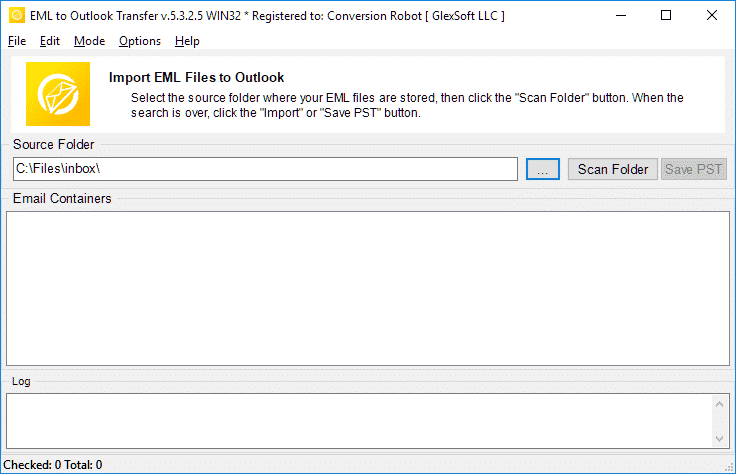
- جولة ال EML to Outlook Transfer البرمجيات.
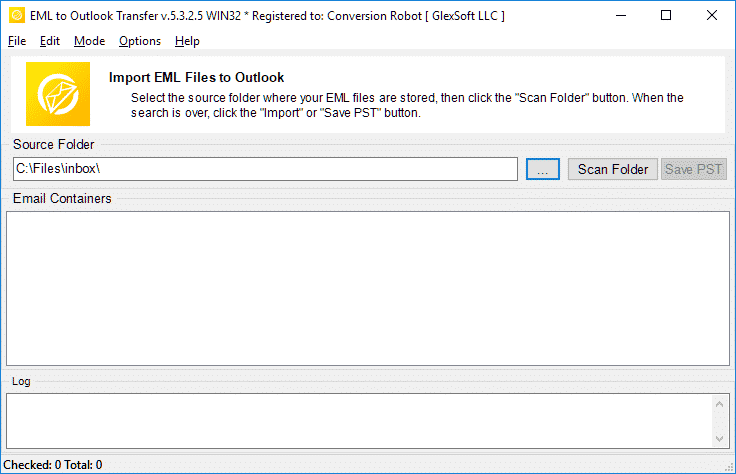
- تحديد موقع ملفات ومجلدات EML المصدرية.
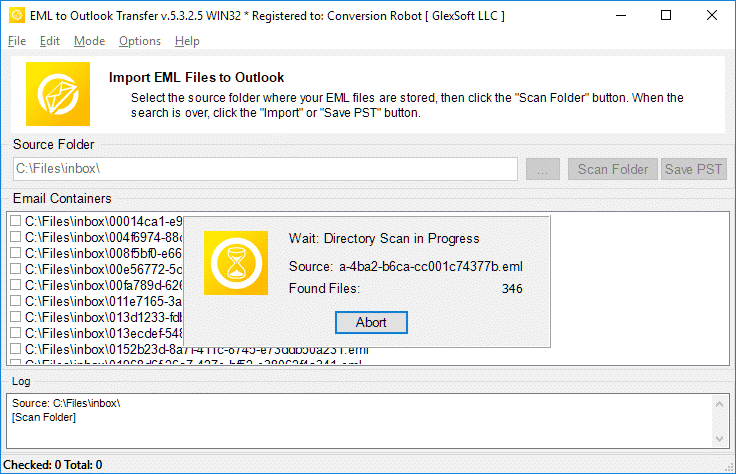
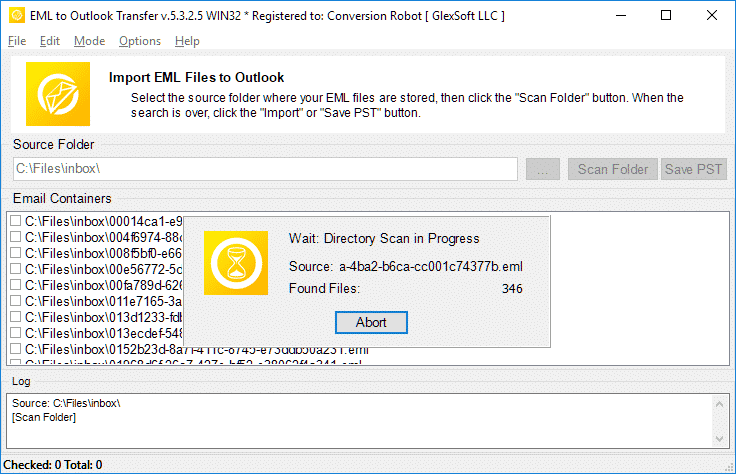
- انقر مجلد المسح الضوئي للعثور على كافة المجلدات الفرعية وملفات EML المتداخلة.
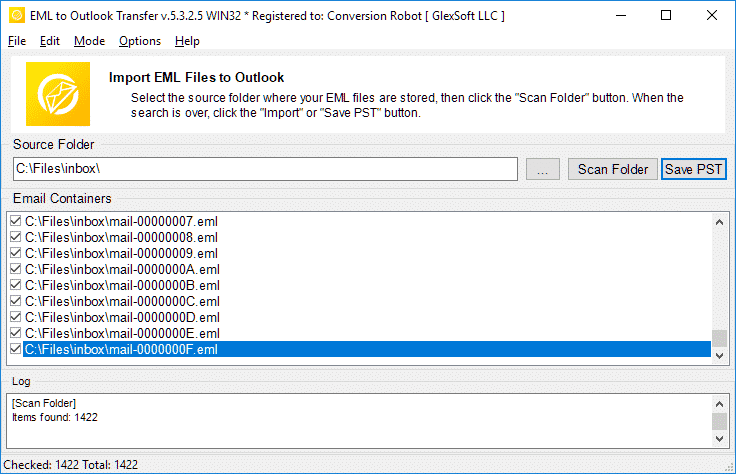
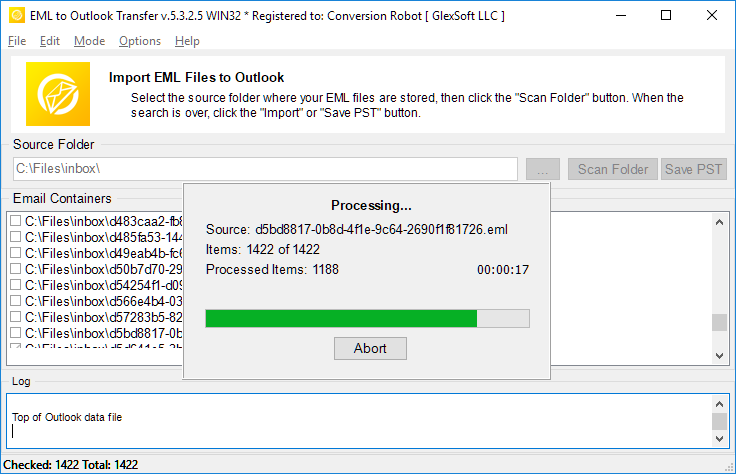
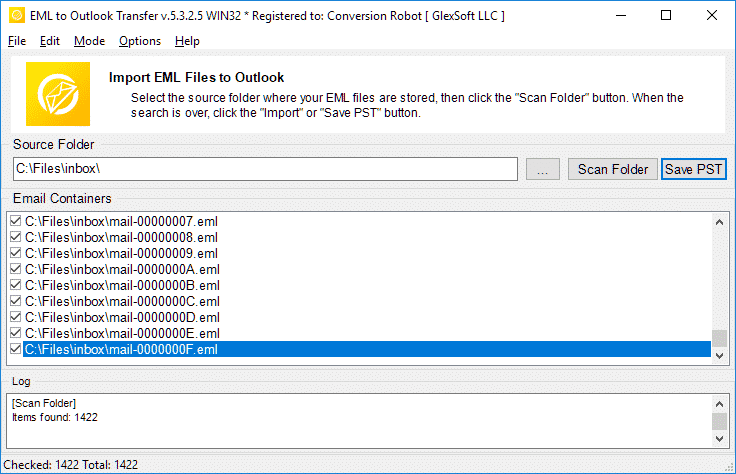
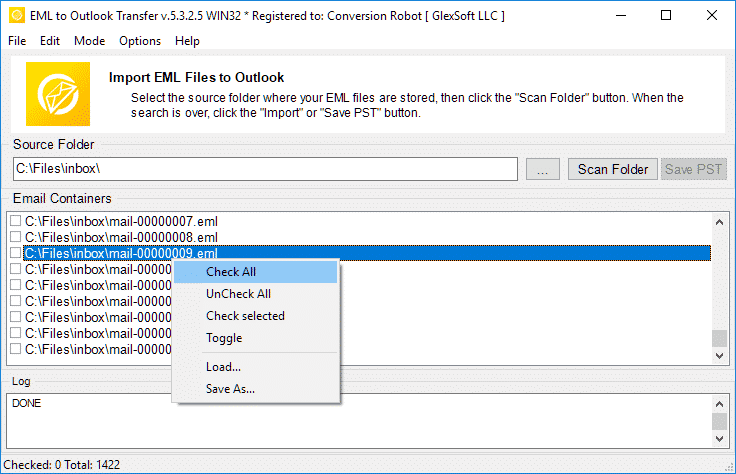
- استخدام حفظ توقيت المحيط الهادي زر لبدء تحويل EML إلى PST عملية.
- فتح ملف PST الناتج في Outlook واستمتع بالنتيجة.
أدوات ترحيل البريد الإلكتروني ذات الصلة
- ثندربيرد إلى Outlook
- MBOX إلى Outlook
- البريد المباشر إلى Outlook
- جوجل إلى Outlook
- ماك بريد إلى Outlook
- MSG إلى Outlook
- استخراج البيانات كيت
الأسئلة المتداولة حول تحويل EML إلى PST
ما هو الفرق بين PST و EML?
تنسيق ملف PST ملكية طورته Microsoft لتخزين الرسائل, بيانات شخصية, أحداث التقويم وما إلى ذلك. يمثل EML تنسيق رسائل الإنترنت لتخزين نصوص البريد الإلكتروني والبيانات الفنية المرتبطة بالرسائل. ملفات EML نصية. تعلم المزيد عن ما هو تنسيق ملف EML.
ما التطبيق الذي يفتح ملفات EML?
يستخدم العديد من عملاء البريد الإلكتروني EML كطريقة أساسية لتخزين رسائل البريد الإلكتروني. أمثلة على التطبيقات التي يمكن أن تعمل مع EML هي Thunderbird, انكريديميل, بريد مباشر, البريد التفاح (emlx) وآخرين. أ محول توقيت المحيط الهادي يمكن للأداة التعامل بسهولة مع ملفات EML التي تم إنشاؤها في أي من هؤلاء العملاء.
كيف أقوم بتحويل EML إلى بريد Outlook الإلكتروني?
يمكنك تجربة لدينا قائمة الأدوية الأساسية لتحويل الباسيفيكي بواسطة جارى التحميل النسخة التجريبية من موقعنا. تشغيل البرنامج, حدد المجلد حيث توجد ملفات eml المصدر الخاصة بك, امسحها بالبرنامج وابدأ عملية التحويل. المحاكمة / الإصدار التجريبي يحول ما يصل إلى 10 رسائل البريد الإلكتروني لكل مجلد دون أي قيود أخرى. إذا كنت راضيًا عن نتائج التجربة, يمكنك تنشيط البرنامج لفتح الميزات الكاملة.
هل يمكن فتح ملف EML في Outlook بدون محول EML إلى Outlook?
نعم. في Outlook 2010, يتم فتح ملفات EML تلقائيًا. في الإصدارات السابقة من MS Outlook ، قد تحتاج إلى إجراء تغييرات معينة في السجل لإخبار Outlook بضرورة فتح ملفات EML. ومع ذلك, تتمثل الطريقة الأبسط والأكثر طبيعية لفتح ملفات EML في تصديرها جميعًا إلى ملف PST ناتج. يمكنك استخدام أداة محول EML الخاصة بنا للحصول على أسهل طريقة للقيام بذلك.
كيف يمكنني دمج ملفات EML في ملف PST?
إذا كان لديك عدة ملفات EML, وتريد استيرادها جميعًا إلى تنسيق ملف PST, يجب عليك إما استيرادها يدويًا واحدًا تلو الآخر (مزعج), أو استخدم أداة استيراد آلية احترافية مثل EML to Outlook Transfer وإنهاء المهمة في أقل من ساعة (يعتمد على كمية ملفات EML بالطبع). يقوم البرنامج بتحميل جميع ملفات EML في المجلدات المحددة ويجمعها تلقائيًا في ملف PST واحد في وضع الدُفعات, يسمح ل تحويل يمل إلى PST تنسيق مرة واحدة.
يتم استيراد EML إلى برنامج Outlook المجاني?
يمكنك تنزيل برنامج محول EML إلى PST وتشغيله مجانًا وتشغيل عملية التحويل. الإصدار المجاني لا يقيد أي وظائف, لكن له حدًا على كمية العناصر المحولة.
و إذا كانت وظيفتك تنطوي على الكثير من تحويل eml إلى pts, أو أنك في موقف تحتاج فيه إلى تحويل رسائل البريد الإلكتروني على الفور, ال EML to Outlook Transfer الأداة هي الحل الأمثل بالنسبة لك. يضمن عدم ترك أي ملف غير قابل للقراءة وعدم فقدان أي رسالة أو ظهوره غير قابل للقراءة في صندوق الوارد الخاص بك بعد التحويل. محول EML يحل بشكل فعال تحديات الهجرة الخاصة بك. قم بتنزيل النسخة التجريبية اليوم ووفر على نفسك الكثير من الوقت والجهد.
بدائل ل EML to Outlook Transfer:
- تحويل تنسيق MSG إلى ملفات Outlook أو Outlook PST
- Live Mail to Outlook Transfer – تحويل ملفات EML المحفوظة بواسطة Win Mail إلى Outlook
- Data Extraction Kit for Outlook – رسائل البريد الإلكتروني التصدير من ملف PST Outlook أو إلى تنسيق EML
- Mac Mail to Outlook Transfer – استيراد ملفات Mac OS EMLX إلى ملف تعريف Outlook أو ملفات PST في Outlook
تقييم العملاء
ملاحظاتك تساعدنا على التحسن. يرجى مشاركة تجربتك حول EML to Outlook Transfer باستخدام الزر أدناه.
إرسال رأيك | |
برنامج رائع لتحويل الكميات الهائلة من ملفات eml إلى تنسيق pst.
تعتبر فرصة تحويل .eml إلى .pst مع الاستيراد المباشر ذات قيمة, لكنني كنت مهتمًا أكثر بتقسيم PST, لأن لدي كميات هائلة من البيانات (آلاف العناصر) وعمل نسخة احتياطية من كل شيء. هذا المحول ترقى إلى مستوى توقعاتي.
لقد قمت بحفظ مجموعة من رسائل Gmail كملفات EML ونقلها إلى ملف تعريف Outlook. هذا هو الخيار الأمثل إذا كنت لا تريد مزامنة Gmail مع تطبيق Windows. يمكنك استيراد ملفات EML إلى Outlook مرة واحدة, لذا فإن هذه الأداة توفر الوقت أيضًا.
بعد توقف Windows Live Mail, لقد قمت بالتبديل إلى Outlook ولكني لم أنقل رسائلي القديمة مطلقًا. شكرا لك على التوصل إلى هذا الحل البسيط. إنها حقًا أداة لا تحتاج إلى تفكير لتحويل ملفات EML إلى PST.
أتمنى أن يتمكن هذا المحول أيضًا من استخراج رسائل البريد الإلكتروني مباشرة من Thunderbird أو على الأقل يأتي مع تعليمات للتصدير. كانت هذه المرحلة صعبة, لكنني تمكنت من تحويل EML إلى Outlook دون مشاكل. بصورة شاملة, يعمل كما هو معلن عنه.


