


EML to Outlook Transfer is designed to streamline the migration of individual messages and entire folder hierarchies into Microsoft Outlook. The software provides flexible export options, – you can generate a clean, op zichzelf staand .PST file on your local drive or import messages directly into an existing Outlook profile and filter converted emails by From, Naar, Onderwerp, Date and other email tags.
The built-in processing engine handles email files generated by various desktop clients, inclusief Mozilla Thunderbird, Windows Live Mail, eM-client, and Apple Mail (EMLX). For users moving messages from Thunderbird, extracting data as standard EML-bestanden ensures that all embedded media, custom flags, and folder trees remain fully preserved.
Thanks to an intuitive, wizard-driven interface, the entire transfer process requires only a few clicks, making large-scale mailbox consolidation straightforward for both individual users and IT professionals.
EML naar Outlook Transfer videogids
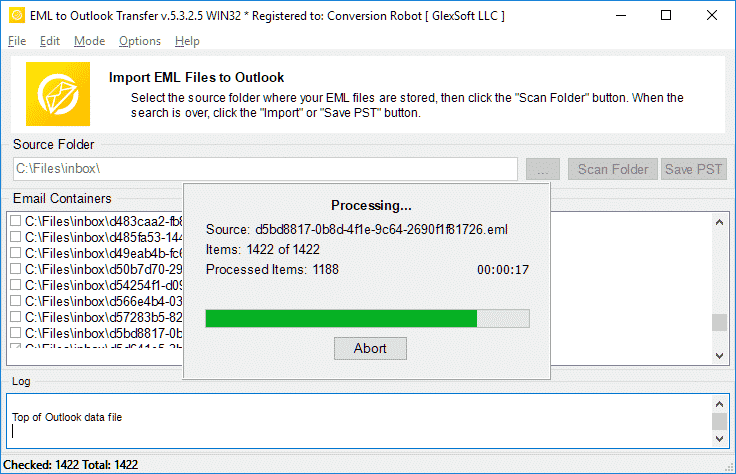
Watch how EML to Outlook Transfer locates source directories, scans mailbox contents, and packages messages into an Outlook-ready PST file in just a few minutes. EML to Outlook Transfer processes emails from virtually any client, enabling you to browse, reply to, organiseren, and archive your messages using standard Outlook features.
* Gratis proefversie converteert een beperkt aantal berichten| Besturingssysteem | Microsoft Windows® Vista of hoger |
| Microsoft Office | Microsoft Outlook® 2003-2021 (op zichzelf staand) |
| Outlook-account | Ten minste één Outlook-profiel (email account) moet worden geconfigureerd |
| Bronbestanden | *.eml bestanden |
| Ruimte op de harde schijf | 48 MB minimaal |
| Beschikbaar geheugen | 4 GB voor 32-bits en 8 GB of meer voor 64-bits besturingssystemen |
| Verwerker | Pentium IV 2 GHz of sneller |
| Weergave | Kleurenscherm, ingesteld op minimaal 1024 x 768 oplossing |
| 
| 
| 
|
Why Manual Email Migration Is Inefficient

Moving emails between different platforms is rarely as simple as copying files. While individual .eml files store standard RFC-822 message text, Microsoft Outlook organizes data inside structured containers called Personal Storage Tables (.pst). These files hold not only message bodies, but also embedded media, toebehoren, read/unread states, and custom metadata.
When attempting manual imports via drag-and-drop, Outlook often replaces original send dates with the current import timestamp, strips inline images, and ignores subfolder arrangements. For businesses and users with years of correspondence, manual transfer is time-consuming and prone to errors. An automated converter eliminates these bottlenecks by mapping data directly into Outlook’s native structure.
EML Transfer Software Key Technical Features
1. Preserves Complete Folder Hierarchies
The software mirrors your source directory structure inside Outlook. If your archived emails are organized into projects, klanten, or yearly archives, every subfolder is recreated without requiring manual sorting after migration.
2. Multi-Client Source Compatibility
EML is an open standard utilized by diverse desktop applications. The converter processes files exported from:
-
- Mozilla Thunderbird: Seamlessly move local mail folders without database corruption.
- Windows Live Mail / Windows Mail: Upgrade legacy Windows archives to modern Outlook versions.
- Apple Mail (EMLX): Converts Mac OS message exports into Windows-compatible Unicode formats.
- eM-client, The Bat!, Eudora, and IncrediMail: Imports individual message backups with full metadata intact.
To learn more about how message standards operate, read our overview on what the EML file format represents.
3. Unicode Output and PST Splitting
Legacy ANSI PST files were restricted to 2 GB limits. This tool creates modern Unicode PST files capable of storing up to 64 TB. To keep your mail databases healthy, you can also use the built-in option to split large PST files into smaller parts during conversion.
4. Attachment and Encoding Integrity
Non-Latin character sets (such as European, Asian, and Cyrillic special symbols) often fail during manual imports. The converter translates internal headers and character sets on the fly while safeguarding all attached files, documenten, and embedded images.
Typical Migration Scenarios
- Switching Email Clients. Moving from Thunderbird, Apple Mail, or legacy desktop clients to a corporate Microsoft Outlook environment.
- Operating System Upgrades. Transitioning data from older Windows installations (where Windows Live Mail was installed) to Windows 10 or Windows 11.
- Disaster Recovery. Extracting raw EML messages from damaged databases and packaging them back into a clean, working PST file.
- Archiving Mailboxes. Consolidating scattered desktop message files into a single, searchable offline storage file.
Need detailed step-by-step guidance? Follow our comprehensive tutorial on how to import EML files to Outlook for exact configuration options and screenshots.
Wat gebruikers zeggen over EML naar Outlook Transfer
EML naar Outlook-converter is een redder in nood! Ik had duizenden belangrijke e-mails opgeslagen in EML-indeling en moest ze snel in mijn Outlook-account krijgen. Deze software maakte het proces ongelooflijk eenvoudig en intuïtief, en bespaarde me uren handmatig werk. Sterk aanbevolen!

Marco Palandri - Zwitserland
Ik aarzelde eerst om EML naar Outlook Transfer te kopen, maar ik ben zo blij dat ik dat gedaan heb. De software is ongelooflijk eenvoudig te gebruiken en efficiënt. Het zette al mijn EML-bestanden gemakkelijk en nauwkeurig over naar Outlook. Ik waardeer ook het behulpzame klantenserviceteam dat mijn vragen snel en professioneel heeft beantwoord.
Björn Birkholz - Duitsland
Als u EML-bestanden naar Outlook moet overbrengen, dit is de te gebruiken software. De interface is eenvoudig en ongecompliceerd, en het overdrachtsproces is razendsnel. Ik kon zonder problemen duizenden EML-bestanden overzetten naar mijn Outlook-account. Dank u, Outlook Transfer, voor het maken van zo'n betrouwbaar en handig hulpmiddel!
Bureau voor risicobeheer - Koning provincie
Zie andere recensies
EML naar Outlook Transfer levert snel, betrouwbaar, en intuïtieve prestaties voor elke conversietaak.
* Gratis proefversie converteert een beperkt aantal berichtenWhy Choose EML to Outlook Transfer?
1. High-Speed Email Migration Engine
EML to Outlook Transfer is built for high processing speed and data accuracy. The engine parses message files rapidly, preserving header fields, text formatting, and attachments across large archives without dropping records.
The streamlined wizard interface lets users initiate migrations without manual configuration hurdles, ensuring smooth file handling from start to finish.
2. Accurate Import into Microsoft Outlook
Data integrity is paramount during email migration. The software maintains original text encodings, HTML styling, and inline attachments across all supported versions of Microsoft Outlook, ensuring full compatibility even with messages created under non-Windows operating systems.
The software automatically adapts message formats into native Outlook structures (Persoonlijke opbergtafel), ensuring that every sender, ontvanger, timestamp, and attachment matches the original source archive.
3. Recreate Your Folder Structure in Outlook
The hierarchy of your mail folders remains identical after transfer. Every subfolder and project directory appears in Outlook exactly as organized in your source archive, eliminating the need to rearrange messages post-import. This ensures an uninterrupted workflow and immediate familiarity with your migrated mail.
4. Import Message Files in Just a Few Clicks
Importing messages requires no advanced technical background. Simply select the root directory containing your source files, run the scan, and the software handles the migration automatically. Customer support is available if technical assistance is required.
All you need to do is specify the folder containing your message files, and the software executes the transition smoothly into your chosen destination.
5. Support for Password-Protected Outlook Profiles
Export your data safely even when target Outlook profiles or existing storage files are protected by passwords. The tool processes messages without compromising security or breaking user credentials, maintaining complete privacy throughout the migration.
6. Import Messages from Any EML-Based Email Client
EML is an open format used widely across different desktop platforms. This tool extracts messages from various desktop applications—such as Mozilla Thunderbird, Windows Live Mail, Apple Mail, eM-client, en de Bat!—and consolidates them into Outlook cleanly, enabling smooth batch migration for multi-client environments.
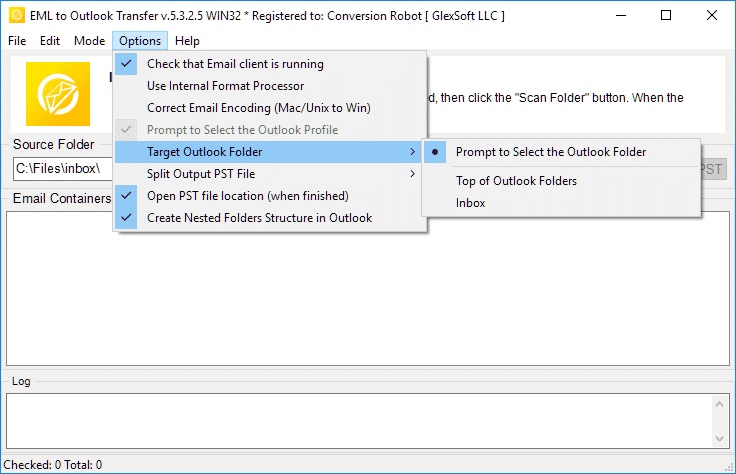
7. Flexible Output: Default Profile or Standalone PST File
Export your correspondence directly into your current Outlook profile or create a brand new, standalone PST-bestand. Standalone PST files can be easily moved to another computer, backed up to external storage, or archived offline.
8. Unicode PST Support & Automatic PST Splitting
The software produces modern Unicode PST files that overcome legacy 2GB size restrictions, handling volumes up to 64TB. For optimal database health and easier file management, the software can also split large PST files into smaller parts during processing.
9. Batch Mode for High-Volume Processing
Migrating thousands of message files is effortless with the built-in bulk processing engine. After scanning your drive, the program moves all selected folders and emails to MS Outlook PST in a single automated session.
10. Intuitive Wizard-Based Interface for Beginners and Pros
The step-by-step wizard ensures that users of any experience level can execute email migrations without confusion, providing clear visual status indicators throughout the run.
Vergelijking van de proefversie en de volledige versie
| Softwarefunctie | Gratis proeflicentie | Thuis Licentie | Zakelijke licentie | Technische Licentie |
|---|---|---|---|---|
| Onbeperkt aantal e-mails | NEE | JA | JA | JA |
| Onbeperkt aantal rekeningen | NEE | JA | JA | JA |
| Opdrachtregel (Batch-modus) | NEE | NEE | JA | JA |
| Netwerkbronnen | JA | NEE | JA | JA |
| Server-side gebruik | JA | NEE | NEE | JA |
| Type verlenging (bij keuze) | - | Met de hand | Handmatig en auto | Handmatig en auto |
| Verlengingskorting | - | 10% | 20% | 30% |
| Aantal activeringen (bij keuze) | - | 1-5 | 1-50 | Onbeperkt |
| Technische ondersteuning | Beperkt | Standaard | Prioriteit | Uitgebreid |
EML to Outlook conversie – hoe het werkt 5 eenvoudige stappen
- Lopen de EML to Outlook Transfer software.
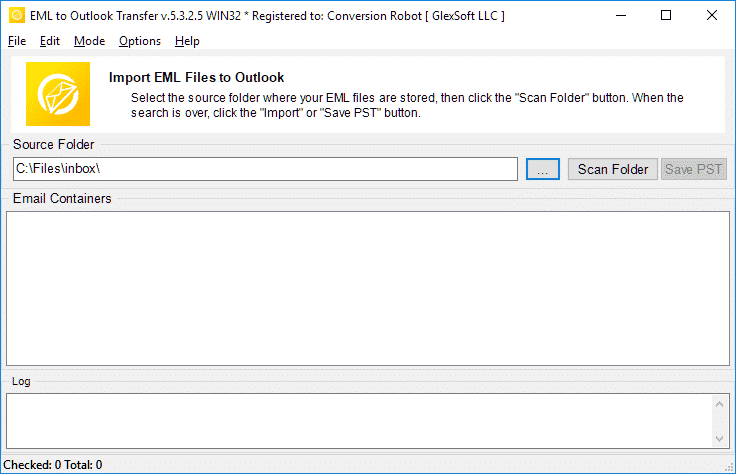
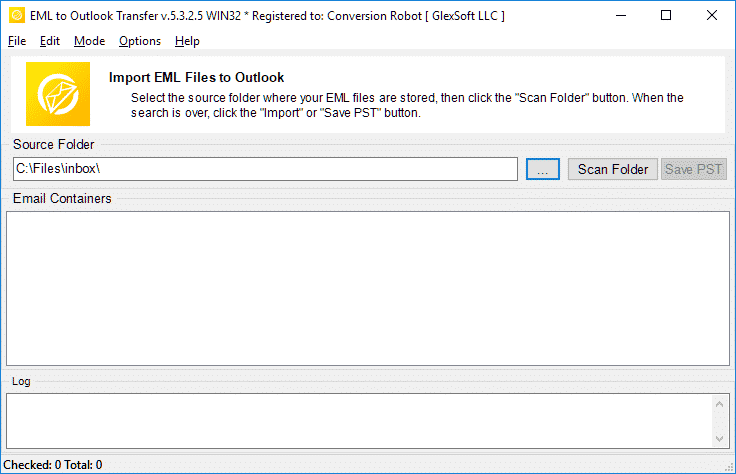
- Specificeer de locatie van uw bron-EML-bestanden en -mappen.
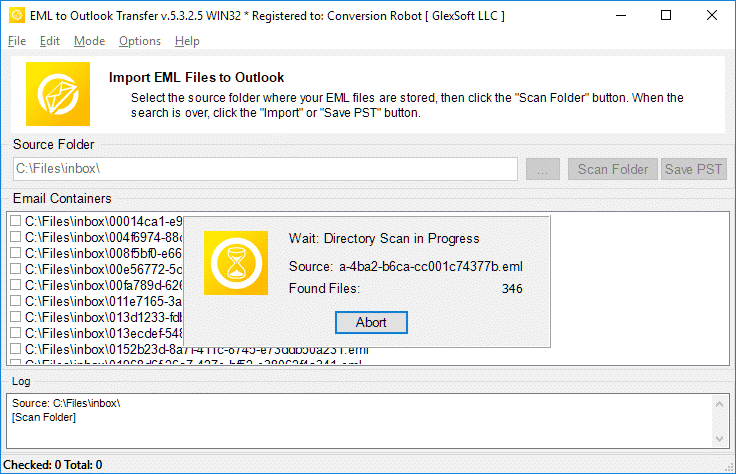
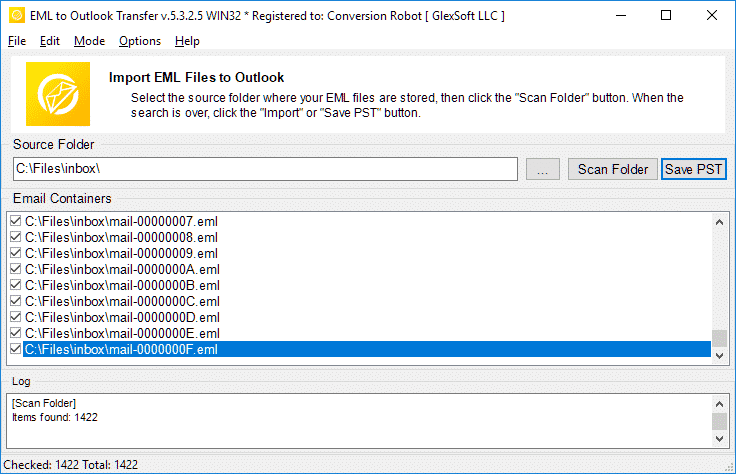
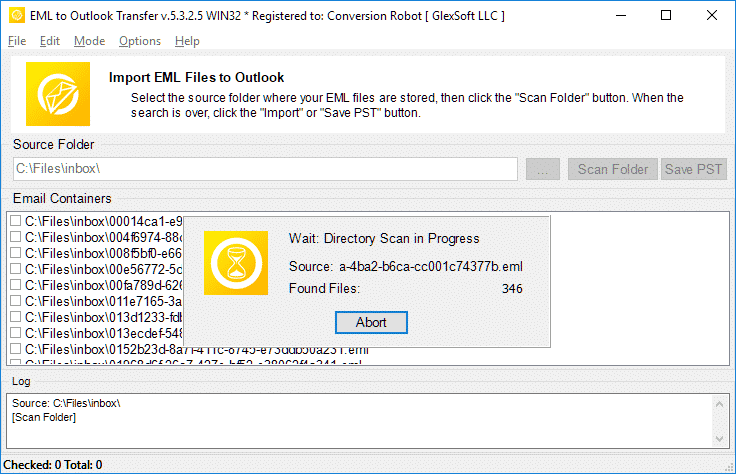
- Klik Scanmap om alle geneste submappen en EML-bestanden te vinden.
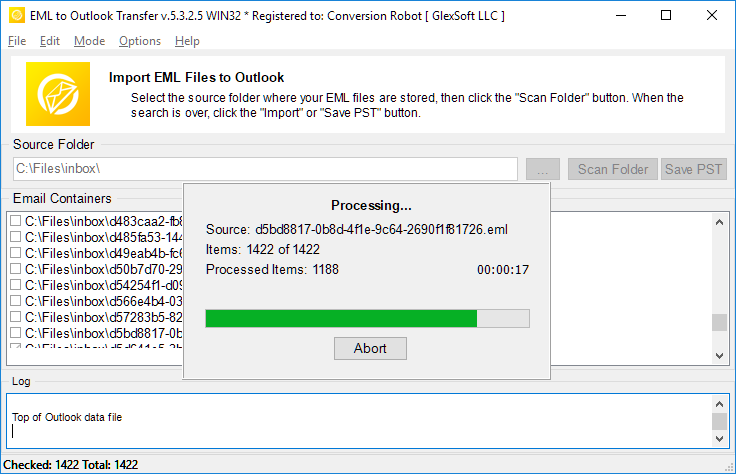
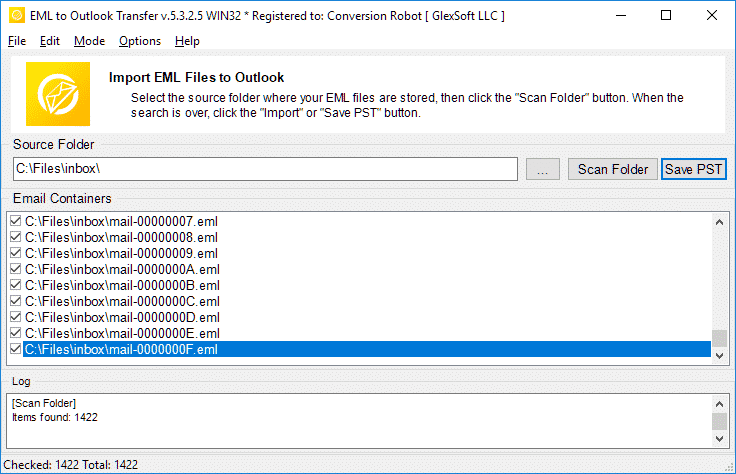
- Gebruik de PST opslaan knop om te starten EML naar PST conversie procédé.
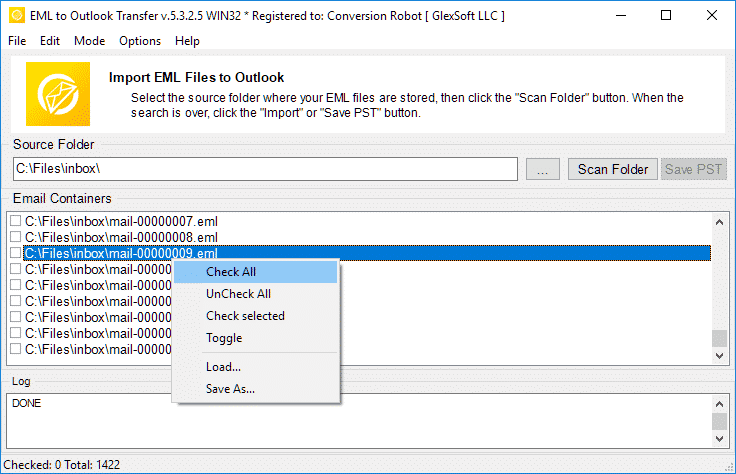
- openen het resulterende PST-bestand in Outlook en geniet van het resultaat.
Gerelateerde tools voor e-mailmigratie
- Thunderbird naar Outlook
- Mbox naar Outlook
- Live Mail naar Outlook
- Gmail naar Outlook
- Mac Mail naar Outlook
- MSG naar Outlook
- Gegevensextractiekit
Veelgestelde vragen over conversie van EML naar PST
Wat is het verschil tussen PST en EML??
Het PST-bestandsformaat is eigen ontwikkeld door Microsoft om berichten op te slaan, persoonlijke gegevens, agenda-evenementen enzovoort. EML staat voor het Internet Message Format om e-mailteksten en technische gegevens in verband met berichten op te slaan. De EML-bestanden zijn op tekst gebaseerd. Meer informatie over wat een EML-bestandsformaat is.
Welke app opent EML-bestanden?
Veel e-mailclients gebruiken EML als primaire manier om e-mails op te slaan. Voorbeelden van apps die met EML kunnen werken zijn Thunderbird, IncrediMail, Live e-mail, Apple Mail (emlx-bestanden) en anderen. EEN PST-converter tool kan gemakkelijk omgaan met EML-bestanden die in een van deze clients zijn gemaakt.
Hoe converteer ik EML naar Outlook-e-mail??
Je kunt onze proberen EML to PST Converter door downloaden de demoversie van onze website. Start de software, geef de map op waar uw bron-eml-bestanden zich bevinden, scan ze met het programma en start het conversieproces. De rechtszaak / demo-versie converteert naar 10 e-mails per map zonder andere beperkingen. Als u tevreden bent met de proefresultaten, u kunt de software activeren om de volledige functies te ontgrendelen.
Kan een EML-bestand in Outlook worden geopend zonder de EML naar Outlook-converter??
Ja. in Outlook 2010, EML-bestanden worden automatisch geopend. In eerdere versies van MS Outlook moet u mogelijk bepaalde wijzigingen in het register aanbrengen om Outlook te laten weten dat het EML-bestanden moet openen. Echter, een eenvoudigere en natuurlijkere manier om EML-bestanden te openen, is door ze allemaal naar een resulterend PST-bestand te exporteren. U kunt onze EML-conversietool gebruiken om dit op de meest moeiteloze manier uit te voeren.
Hoe combineer ik EML-bestanden naar PST-bestanden?
Als u meerdere EML-bestanden heeft, en u wilt ze allemaal importeren in een PST-bestandsindeling, je moet ze ofwel een voor een handmatig importeren (boooooing), of neem een professionele geautomatiseerde importtool zoals EML to Outlook Transfer en voltooi de klus in minder dan een uur (hangt natuurlijk af van het aantal EML-bestanden). Het programma laadt alle EML-bestanden in de opgegeven mappen en combineert ze automatisch tot een enkel PST-bestand in de batchmodus, staat toe converteren eml naar pst in één keer opmaken.
Importeert EML naar Outlook freeware?
U kunt het EML naar PST-conversieprogramma gratis downloaden en uitvoeren en het conversieproces uitvoeren. De freeware-versie beperkt geen enkele functie, maar heeft een limiet op het aantal geconverteerde items.
En Als uw baan veel conversie van eml naar pts met zich meebrengt, of u bevindt zich in een situatie waarin u e-mails onmiddellijk moet converteren, de EML to Outlook Transfer tool is de perfecte oplossing voor u. Het zorgt ervoor dat geen enkel bestand onleesbaar blijft en geen enkel bericht wordt gemist of onleesbaar verschijnt in uw inbox na conversie. EML-converter lost effectief uw migratie-uitdagingen op. Download de proefversie vandaag nog en bespaar jezelf een hoop tijd en moeite.
Alternatieven voor EML to Outlook Transfer:
- Conversie van MSG-indeling naar Outlook of Outlook PST-bestanden
- Live Mail to Outlook Transfer – converteer EML-bestanden die zijn opgeslagen door Win Mail naar Outlook
- Data Extraction Kit for Outlook – export e-mails van Outlook of PST-bestand naar EML-formaat
- Mac Mail to Outlook Transfer – importeer Mac OS EMLX-bestanden naar Outlook Profile of Outlook PST-bestanden
Klant Beoordelingen
Uw feedback helpt ons te verbeteren. Deel alstublieft uw ervaring over EML to Outlook Transfer via onderstaande knop.
Dien uw beoordeling | |
Mooi stukje software om de enorme hoeveelheid eml-bestanden naar pst-formaat te converteren.
De mogelijkheid om .eml naar .pst te converteren met directe import is waardevol, maar ik was meer geïnteresseerd in het splitsen van PST, aangezien ik enorme hoeveelheden gegevens heb (duizenden items) en maak een back-up van alles. Deze converter voldeed aan mijn verwachtingen.
Ik heb een aantal Gmail-berichten opgeslagen als EML-bestanden en deze naar het Outlook-profiel verplaatst. Dit is de optimale keuze als u uw Gmail niet wilt synchroniseren met de Windows-app. U kunt EML-bestanden in één keer in Outlook importeren, dus deze tool bespaart ook tijd.
Nadat Windows Live Mail werd stopgezet, Ik ben overgestapt naar Outlook maar heb mijn oude berichten nooit overgezet. Bedankt voor het bedenken van deze eenvoudige oplossing. Het is echt een no-brainer tool om EML-bestanden naar PST te converteren.
Ik wou dat deze converter ook e-mails rechtstreeks uit Thunderbird kon halen of in ieder geval met instructies voor export zou komen. Deze etappe was een gedoe, maar ik kon EML zonder problemen naar Outlook converteren. Algemeen, het werkt zoals geadverteerd.


