


EML to Outlook Transfer is designed to streamline the migration of individual messages and entire folder hierarchies into Microsoft Outlook. The software provides flexible export options, – you can generate a clean, independiente .PST file on your local drive or import messages directly into an existing Outlook profile and filter converted emails by From, A, Sujeto, Date and other email tags.
The built-in processing engine handles email files generated by various desktop clients, incluyendo Mozilla Thunderbird, Correo en vivo de Windows, eM Cliente, and Apple Mail (EMLX). For users moving messages from Thunderbird, extracting data as standard Archivos EML ensures that all embedded media, custom flags, and folder trees remain fully preserved.
Thanks to an intuitive, wizard-driven interface, the entire transfer process requires only a few clicks, making large-scale mailbox consolidation straightforward for both individual users and IT professionals.
Video guía de transferencia de EML a Outlook
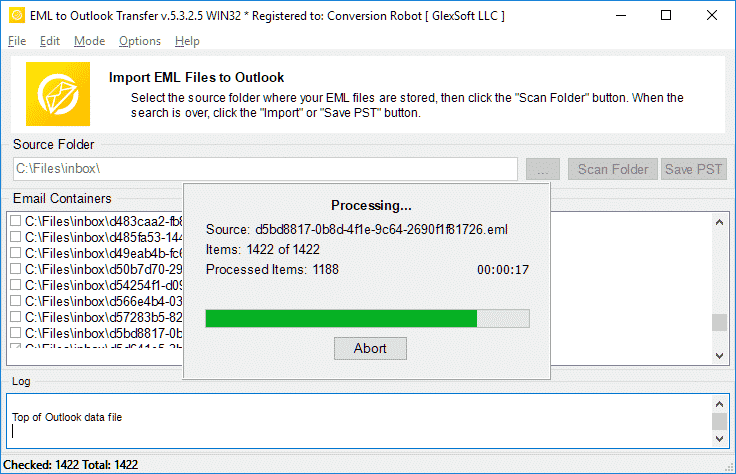
Watch how EML to Outlook Transfer locates source directories, scans mailbox contents, and packages messages into an Outlook-ready PST file in just a few minutes. EML to Outlook Transfer processes emails from virtually any client, enabling you to browse, reply to, organizar, and archive your messages using standard Outlook features.
* La prueba gratuita convierte un número limitado de mensajes| Sistema operativo | Microsoft Windows® Vista o superior |
| microsoft Office | Microsoft Outlook® 2003-2021 (independiente) |
| Cuenta de Outlook | Al menos un perfil de Outlook (cuenta de correo electrónico) debe ser configurado |
| Los archivos de origen | *.archivos EML |
| Espacio en disco duro | 48 MB mínimo |
| Memoria disponible | 4 GB para 32 bits y 8 GB o más para sistemas operativos de 64 bits |
| Procesador | Pentium IV 2 GHz o más rápido |
| Mostrar | Pantalla a color, establecer al menos 1024 éxtasis 768 resolución |
| 
| 
| 
|
Why Manual Email Migration Is Inefficient

Moving emails between different platforms is rarely as simple as copying files. While individual .eml files store standard RFC-822 message text, Microsoft Outlook organizes data inside structured containers called Personal Storage Tables (.pst). These files hold not only message bodies, but also embedded media, archivos adjuntos, read/unread states, and custom metadata.
When attempting manual imports via drag-and-drop, Outlook often replaces original send dates with the current import timestamp, strips inline images, and ignores subfolder arrangements. For businesses and users with years of correspondence, manual transfer is time-consuming and prone to errors. An automated converter eliminates these bottlenecks by mapping data directly into Outlook’s native structure.
EML Transfer Software Key Technical Features
1. Preserves Complete Folder Hierarchies
The software mirrors your source directory structure inside Outlook. If your archived emails are organized into projects, clientela, or yearly archives, every subfolder is recreated without requiring manual sorting after migration.
2. Multi-Client Source Compatibility
EML is an open standard utilized by diverse desktop applications. The converter processes files exported from:
-
- Mozilla Thunderbird: Seamlessly move local mail folders without database corruption.
- Correo en vivo de Windows / Correo de Windows: Upgrade legacy Windows archives to modern Outlook versions.
- Correo de Apple (EMLX): Converts Mac OS message exports into Windows-compatible Unicode formats.
- eM Cliente, Licencia de The Bat!, Eudora, and IncrediMail: Imports individual message backups with full metadata intact.
To learn more about how message standards operate, read our overview on what the EML file format represents.
3. Unicode Output and PST Splitting
Legacy ANSI PST files were restricted to 2 GB limits. This tool creates modern Unicode PST files capable of storing up to 64 Tuberculosis. To keep your mail databases healthy, you can also use the built-in option to split large PST files into smaller parts during conversion.
4. Attachment and Encoding Integrity
Non-Latin character sets (such as European, Asian, and Cyrillic special symbols) often fail during manual imports. The converter translates internal headers and character sets on the fly while safeguarding all attached files, documentos, and embedded images.
Typical Migration Scenarios
- Switching Email Clients. Moving from Thunderbird, Correo de Apple, or legacy desktop clients to a corporate Microsoft Outlook environment.
- Operating System Upgrades. Transitioning data from older Windows installations (where Windows Live Mail was installed) to Windows 10 or Windows 11.
- Disaster Recovery. Extracting raw EML messages from damaged databases and packaging them back into a clean, working PST file.
- Archiving Mailboxes. Consolidating scattered desktop message files into a single, searchable offline storage file.
Need detailed step-by-step guidance? Follow our comprehensive tutorial on how to import EML files to Outlook for exact configuration options and screenshots.
Lo que dicen los usuarios sobre la transferencia de EML a Outlook
El convertidor de EML a Outlook es un salvavidas! Tenía miles de correos electrónicos importantes guardados en formato EML y necesitaba ingresarlos rápidamente en mi cuenta de Outlook. Este software hizo que el proceso fuera increíblemente fácil e intuitivo., y me ahorró horas de trabajo manual. Muy recomendable!

marco palandri - Suiza
Al principio dudaba en comprar EML a Outlook Transfer, pero estoy tan contenta de haberlo hecho. El software es increíblemente fácil de usar y eficiente.. Transfirió todos mis archivos EML a Outlook con facilidad y precisión. También agradezco al útil equipo de atención al cliente que respondió mis preguntas de manera rápida y profesional..
Bjorn Birkholz - Alemania
Si necesita transferir archivos EML a Outlook, este es el software a utilizar. La interfaz es simple y directa., y el proceso de transferencia es ultrarrápido. Pude transferir miles de archivos EML a mi cuenta de Outlook sin ningún problema. Gracias, Transferencia de Outlook, por crear una herramienta tan confiable y útil!
Oficina de Gestión de Riesgos - condado rey
Ver otras reseñas
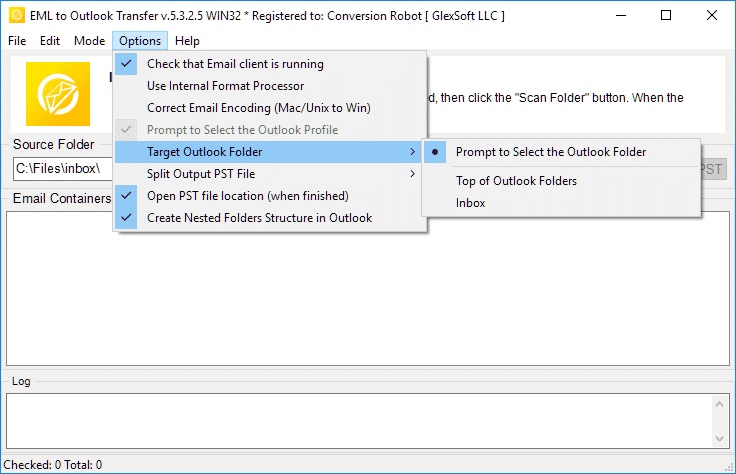
La transferencia de EML a Outlook es rápida, de confianza, y rendimiento intuitivo para cada tarea de conversión.
* La prueba gratuita convierte un número limitado de mensajesWhy Choose EML to Outlook Transfer?
1. High-Speed Email Migration Engine
EML to Outlook Transfer is built for high processing speed and data accuracy. The engine parses message files rapidly, preserving header fields, text formatting, and attachments across large archives without dropping records.
The streamlined wizard interface lets users initiate migrations without manual configuration hurdles, ensuring smooth file handling from start to finish.
2. Accurate Import into Microsoft Outlook
Data integrity is paramount during email migration. The software maintains original text encodings, HTML styling, and inline attachments across all supported versions of Microsoft Outlook, ensuring full compatibility even with messages created under non-Windows operating systems.
The software automatically adapts message formats into native Outlook structures (Mesa de almacenamiento personal), ensuring that every sender, recipiente, timestamp, and attachment matches the original source archive.
3. Recreate Your Folder Structure in Outlook
The hierarchy of your mail folders remains identical after transfer. Every subfolder and project directory appears in Outlook exactly as organized in your source archive, eliminating the need to rearrange messages post-import. This ensures an uninterrupted workflow and immediate familiarity with your migrated mail.
4. Import Message Files in Just a Few Clicks
Importing messages requires no advanced technical background. Simply select the root directory containing your source files, run the scan, and the software handles the migration automatically. Customer support is available if technical assistance is required.
All you need to do is specify the folder containing your message files, and the software executes the transition smoothly into your chosen destination.
5. Support for Password-Protected Outlook Profiles
Export your data safely even when target Outlook profiles or existing storage files are protected by passwords. The tool processes messages without compromising security or breaking user credentials, maintaining complete privacy throughout the migration.
6. Import Messages from Any EML-Based Email Client
EML is an open format used widely across different desktop platforms. This tool extracts messages from various desktop applications—such as Mozilla Thunderbird, Correo en vivo de Windows, Correo de Apple, eM Cliente, y el murciélago!—and consolidates them into Outlook cleanly, enabling smooth batch migration for multi-client environments.
7. Flexible Output: Default Profile or Standalone PST File
Export your correspondence directly into your current Outlook profile or create a brand new, archivo PST independiente. Standalone PST files can be easily moved to another computer, backed up to external storage, or archived offline.
8. Unicode PST Support & Automatic PST Splitting
The software produces modern Unicode PST files that overcome legacy 2GB size restrictions, handling volumes up to 64TB. For optimal database health and easier file management, the software can also split large PST files into smaller parts during processing.
9. Batch Mode for High-Volume Processing
Migrating thousands of message files is effortless with the built-in bulk processing engine. After scanning your drive, the program moves all selected folders and emails to MS Outlook PST in a single automated session.
10. Intuitive Wizard-Based Interface for Beginners and Pros
The step-by-step wizard ensures that users of any experience level can execute email migrations without confusion, providing clear visual status indicators throughout the run.
Comparación de la versión de prueba y completa
| Función de software | Licencia de prueba gratuita | Inicio Licencia | Licencia Comercial | Licencia Técnica |
|---|---|---|---|---|
| Número ilimitado de correos electrónicos | No | SÍ | SÍ | SÍ |
| Número ilimitado de cuentas | No | SÍ | SÍ | SÍ |
| Línea de comando (Por lotes) | No | No | SÍ | SÍ |
| Fuentes de red | SÍ | No | SÍ | SÍ |
| Uso del lado del servidor | SÍ | No | No | SÍ |
| Tipo de renovación (por elección) | - | Manual | Manual & Auto | Manual & Auto |
| Descuento de renovación | - | 10% | 20% | 30% |
| Número de activaciones (por elección) | - | 1-5 | 1-50 | Ilimitado |
| Soporte técnico | Limitado | Estándar | Prioridad | Extendido |
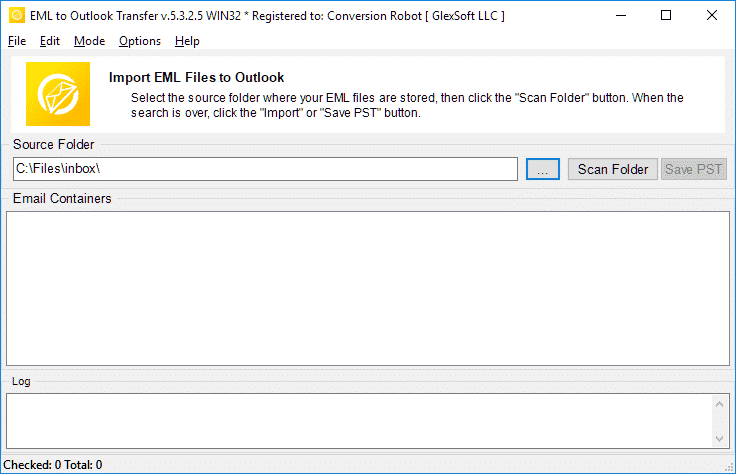
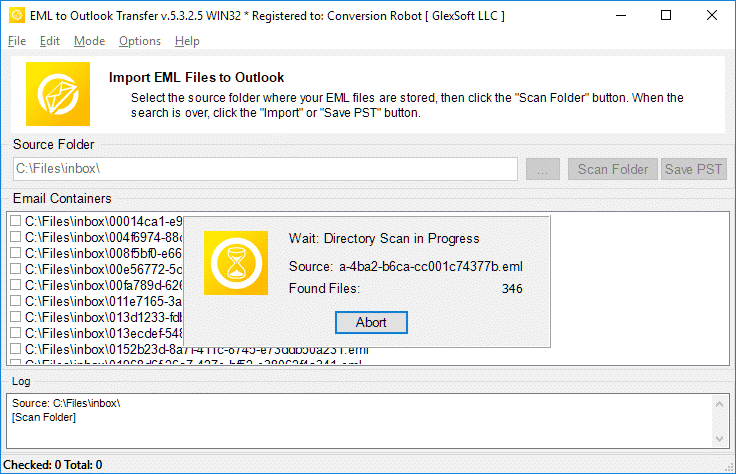
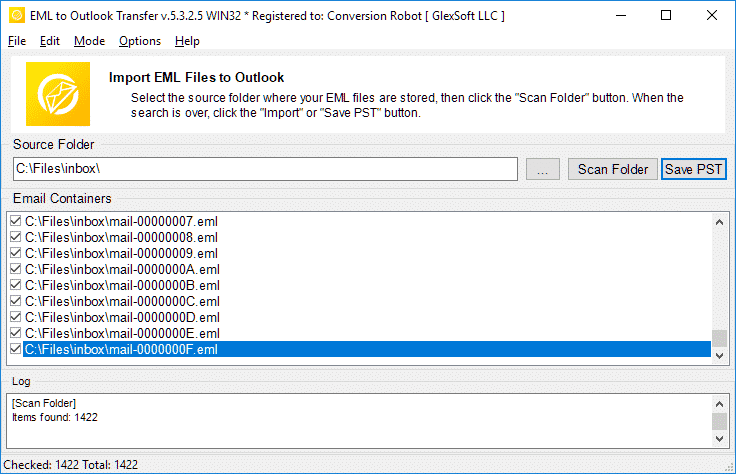
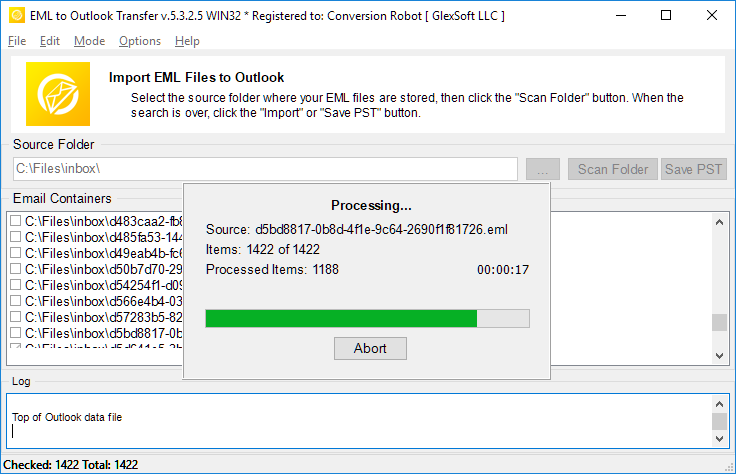
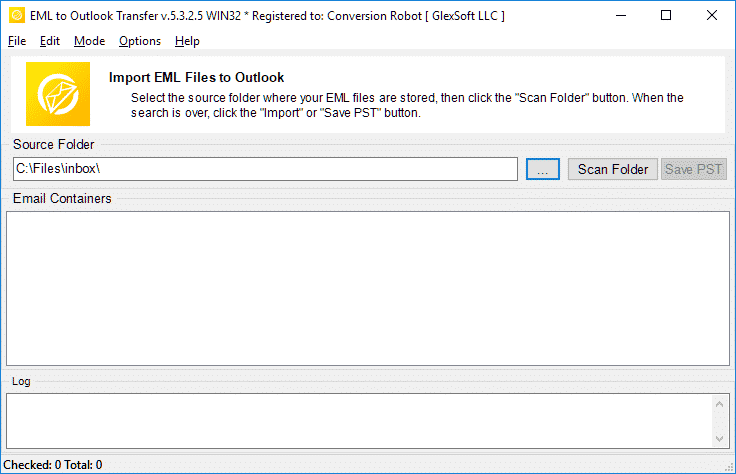
EML to Outlook conversión – cómo funciona en 5 sencillos pasos
- Carrera la EML to Outlook Transfer software.
- Especificar la ubicación de sus archivos y carpetas EML de origen.
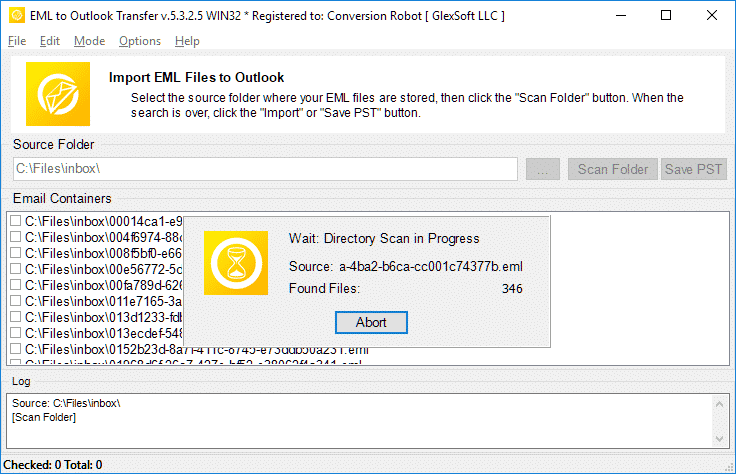
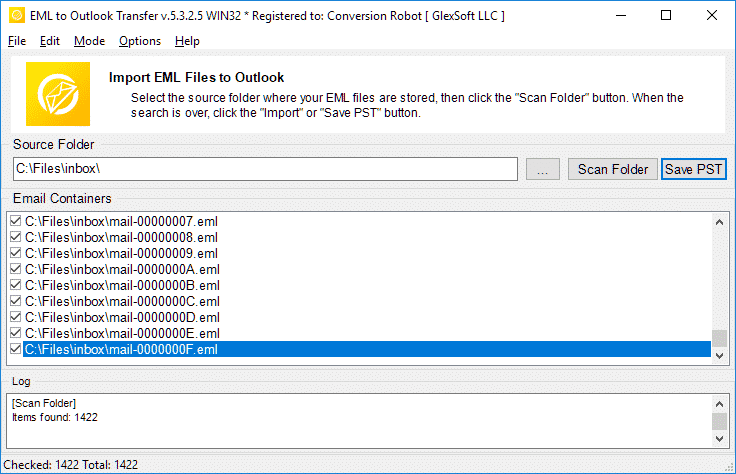
- Haga clic en exploración de carpeta para encontrar todas las subcarpetas anidadas y archivos EML.
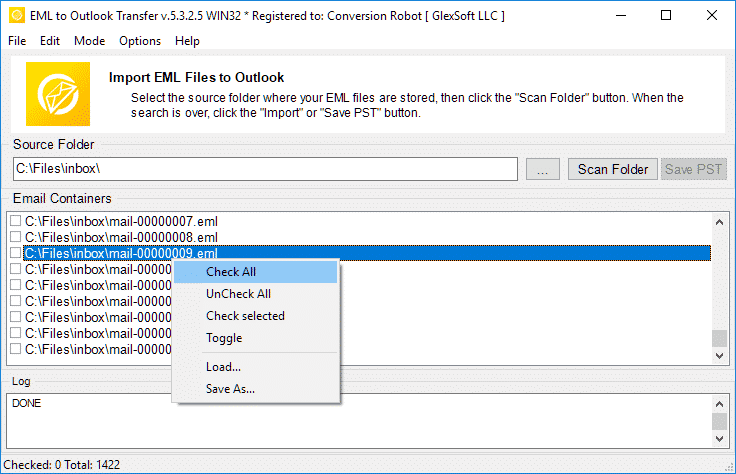
- Utilice la Guardar PST botón para iniciar el EML a PST de conversión proceso.
- Abierto el archivo PST resultante en Outlook y disfrute del resultado.
Herramientas de migración de correo electrónico relacionadas
- Thunderbird a Outlook
- Mbox a Outlook
- Live Mail a Outlook
- Gmail a Outlook
- Mac Mail a Outlook
- Mensaje a Outlook
- Kit de Extracción de Datos
Preguntas frecuentes sobre la conversión de EML a PST
¿Cuál es la diferencia entre PST y EML??
El formato de archivo PST es propietario desarrollado por Microsoft para almacenar mensajes, información personal, eventos del calendario, etc.. EML representa el formato de mensajes de Internet para almacenar textos de correo electrónico y datos técnicos asociados con los mensajes.. Los archivos EML están basados en texto. Más información sobre qué es un formato de archivo EML.
¿Qué aplicación abre archivos EML??
Muchos clientes de correo electrónico utilizan EML como forma principal de almacenar correos electrónicos. Ejemplos de aplicaciones que pueden funcionar con EML son Thunderbird, IncrediMail, Correo en vivo, Correo de Apple (archivos emlx) y otros. un Convertidor PST La herramienta puede manejar fácilmente archivos EML creados en cualquiera de estos clientes..
¿Cómo convierto EML a correo electrónico de Outlook??
Puedes probar nuestro EML a PST convertidor por descargando la versión de demostración de nuestro sitio web. Ejecutar el software, especifique la carpeta donde se encuentran sus archivos eml de origen, escanearlos con el programa e iniciar el proceso de conversión. La prueba / la versión de demostración convierte hasta 10 correos electrónicos por carpeta sin otras restricciones. Si está satisfecho con los resultados de la prueba, puede activar el software para desbloquear todas las funciones.
¿Se puede abrir un archivo EML en Outlook sin el convertidor de EML a Outlook??
Sí. en Outlook 2010, Los archivos EML se abren automáticamente. En versiones anteriores de MS Outlook, es posible que deba realizar ciertos cambios en el registro para indicarle a Outlook que debe abrir archivos EML.. Sin embargo, una forma más simple y natural de abrir archivos EML es exportarlos todos a un archivo PST resultante. Puede usar nuestra herramienta de conversión de EML para obtener la forma más sencilla de realizar esto.
¿Cómo combino archivos EML con archivos PST??
Si tiene varios archivos EML, y desea importarlos todos a un formato de archivo PST, debe importarlos manualmente uno por uno (abucheo), o utilice una herramienta profesional de importación automatizada como EML to Outlook Transfer y terminar el trabajo en menos de una hora (depende de la cantidad de archivos EML, por supuesto). El programa carga todos los archivos EML en las carpetas especificadas y los combina automáticamente en un solo archivo PST en el modo por lotes, permite convertir eml a pst formatear de una vez.
Está importando EML a Outlook software gratuito?
Puede descargar y ejecutar el programa de conversión de EML a PST de forma gratuita y ejecutar el proceso de conversión. La versión gratuita no restringe ninguna función., pero tiene un límite en la cantidad de artículos convertidos.
Y Si su trabajo implica una gran cantidad de conversión de eml a pts, o se encuentra en una situación en la que necesita convertir los correos electrónicos de inmediato, la EML to Outlook Transfer La herramienta es la solución perfecta para ti.. Garantiza que ningún archivo quede ilegible y que ningún mensaje se pierda o aparezca ilegible en su bandeja de entrada después de la conversión.. El convertidor EML resuelve eficazmente sus desafíos de migración. Descarga la versión de prueba hoy y ahórrese mucho tiempo y esfuerzo.
Alternativas a EML to Outlook Transfer:
- Conversión de formato MSG a Outlook o archivos PST de Outlook
- Live Mail to Outlook Transfer – convertir archivos EML guardados por Win Mail a Outlook
- Data Extraction Kit for Outlook – exportar correos electrónicos de Outlook o archivo PST a formato EML
- Mac Mail to Outlook Transfer – importar archivos EMLX de Mac OS a perfiles de Outlook o archivos PST de Outlook
Opiniones de nuestros clientes
Tus comentarios nos ayudan a mejorar. Por favor comparte tu experiencia sobre EML to Outlook Transfer usando el botón de abajo.
Envíe su opinión | |
Buen software para convertir la gran cantidad de archivos eml al formato pst.
La oportunidad de convertir .eml a .pst con importación directa es valiosa, pero estaba más interesado en la división de PST, ya que tengo grandes cantidades de datos (miles de artículos) y copia de seguridad de todo. Este convertidor estuvo a la altura de mis expectativas..
Guardé un montón de mensajes de Gmail como archivos EML y los moví al perfil de Outlook. Esta es la opción óptima si no desea sincronizar su Gmail con la aplicación de Windows. Puede importar archivos EML a Outlook a la vez, por lo que esta herramienta también ahorra tiempo.
Después de la suspensión de Windows Live Mail, Me cambié a Outlook pero nunca transfirí mis mensajes antiguos. Gracias por proponer esta sencilla solución.. Realmente es una herramienta sencilla para convertir archivos EML a PST.
Desearía que este convertidor también pudiera extraer correos electrónicos directamente de Thunderbird o al menos viniera con instrucciones para exportar. Esta etapa fue una molestia, pero pude convertir EML a Outlook sin problemas. En general, funciona como se anuncia.


