


EML Outlook Transfer is designed to streamline the migration of individual messages and entire folder hierarchies into Microsoft Outlook. The software provides flexible export options, – you can generate a clean, itsenäinen .PST file on your local drive or import messages directly into an existing Outlook profile and filter converted emails by From, jotta, Aihe, Date and other email tags.
The built-in processing engine handles email files generated by various desktop clients, mukaan lukien Mozilla Thunderbird, Windows Liven sähköposti, eM-asiakas, and Apple Mail (EMLX). For users moving messages from Thunderbird, extracting data as standard EML-tiedostot ensures that all embedded media, custom flags, and folder trees remain fully preserved.
Thanks to an intuitive, wizard-driven interface, the entire transfer process requires only a few clicks, making large-scale mailbox consolidation straightforward for both individual users and IT professionals.
EML to Outlook Transfer -videoopas
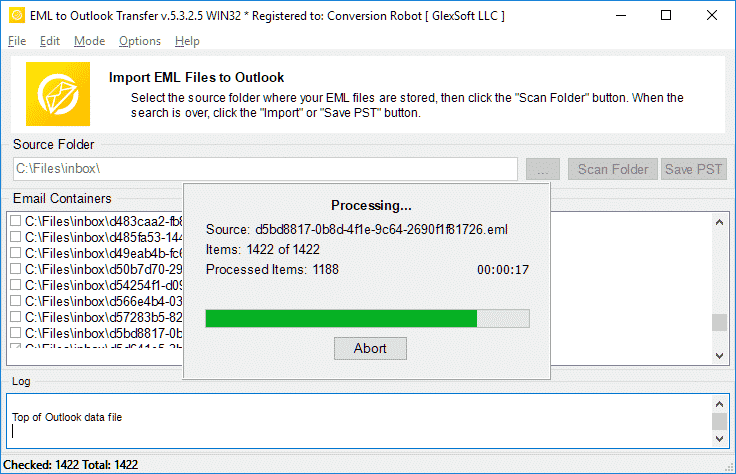
Watch how EML to Outlook Transfer locates source directories, scans mailbox contents, and packages messages into an Outlook-ready PST file in just a few minutes. EML to Outlook Transfer processes emails from virtually any client, enabling you to browse, reply to, järjestää, and archive your messages using standard Outlook features.
* Ilmainen kokeiluversio muuntaa rajoitetun määrän viestejä| Käyttöjärjestelmä | Microsoft Windows® Vista tai uudempi |
| Microsoft Office | Microsoft Outlook® 2003-2021 (itsenäinen) |
| Outlook-tili | Vähintään yksi Outlook-profiili (sähköpostitili) pitäisi konfiguroida |
| Source-tiedostot | *.EML |
| Kiintolevytilaa | 48 MB vähintään |
| Käytettävissä oleva muisti | 4 GB 32-bittisille ja 8 Gt tai enemmän 64-bittisille käyttöjärjestelmille |
| Prosessori | Pentium IV 2 GHz tai nopeampi |
| Näyttö | Värillinen näyttö, asetettu vähintään 1024 X 768 resoluutio |
| 
| 
| 
|
Why Manual Email Migration Is Inefficient

Moving emails between different platforms is rarely as simple as copying files. While individual .eml files store standard RFC-822 message text, Microsoft Outlook organizes data inside structured containers called Personal Storage Tables (.pst). These files hold not only message bodies, but also embedded media, liitetiedostot, read/unread states, and custom metadata.
When attempting manual imports via drag-and-drop, Outlook often replaces original send dates with the current import timestamp, strips inline images, and ignores subfolder arrangements. For businesses and users with years of correspondence, manual transfer is time-consuming and prone to errors. An automated converter eliminates these bottlenecks by mapping data directly into Outlook’s native structure.
EML Transfer Software Key Technical Features
1. Preserves Complete Folder Hierarchies
The software mirrors your source directory structure inside Outlook. If your archived emails are organized into projects, asiakkaita, or yearly archives, every subfolder is recreated without requiring manual sorting after migration.
2. Multi-Client Source Compatibility
EML is an open standard utilized by diverse desktop applications. The converter processes files exported from:
-
- Mozilla Thunderbird: Seamlessly move local mail folders without database corruption.
- Windows Liven sähköposti / Windows Mail: Upgrade legacy Windows archives to modern Outlook versions.
- Apple Mail (EMLX): Converts Mac OS message exports into Windows-compatible Unicode formats.
- eM-asiakas, The Bat!, Eudora, and IncrediMail: Imports individual message backups with full metadata intact.
To learn more about how message standards operate, read our overview on what the EML file format represents.
3. Unicode Output and PST Splitting
Legacy ANSI PST files were restricted to 2 GB limits. This tool creates modern Unicode PST files capable of storing up to 64 TB. To keep your mail databases healthy, you can also use the built-in option to split large PST files into smaller parts during conversion.
4. Attachment and Encoding Integrity
Non-Latin character sets (such as European, Asian, and Cyrillic special symbols) often fail during manual imports. The converter translates internal headers and character sets on the fly while safeguarding all attached files, asiakirjoja, and embedded images.
Typical Migration Scenarios
- Switching Email Clients. Moving from Thunderbird, Apple Mail, or legacy desktop clients to a corporate Microsoft Outlook environment.
- Operating System Upgrades. Transitioning data from older Windows installations (where Windows Live Mail was installed) to Windows 10 or Windows 11.
- Disaster Recovery. Extracting raw EML messages from damaged databases and packaging them back into a clean, working PST file.
- Archiving Mailboxes. Consolidating scattered desktop message files into a single, searchable offline storage file.
Need detailed step-by-step guidance? Follow our comprehensive tutorial on how to import EML files to Outlook for exact configuration options and screenshots.
Mitä käyttäjät sanovat EML to Outlook Transferista
EML to Outlook -muunnin on hengenpelastaja! Minulla oli tuhansia tärkeitä sähköposteja tallennettuna EML-muodossa, ja minun piti saada ne nopeasti Outlook-tililleni. Tämä ohjelmisto teki prosessista uskomattoman helpon ja intuitiivisen, ja säästin tuntikausia manuaalista työtä. Erittäin suositeltavaa!

Marco Palandri - Sveitsi
Aluksi epäröin ostaa EML:n Outlook Transferiin, mutta olen niin iloinen, että tein. Ohjelmisto on uskomattoman helppokäyttöinen ja tehokas. Se siirsi kaikki EML-tiedostoni Outlookiin helposti ja tarkasti. Arvostan myös avuliasta asiakastukea, joka vastasi kysymyksiini nopeasti ja ammattimaisesti.
Björn Birkholz - Saksa
Jos sinun on siirrettävä EML-tiedostoja Outlookiin, tämä on käytettävä ohjelmisto. Käyttöliittymä on yksinkertainen ja suoraviivainen, ja siirtoprosessi on salamannopea. Pystyin siirtämään tuhansia EML-tiedostoja Outlook-tililleni ilman ongelmia. Kiitos, Outlookin siirto, luotettavan ja hyödyllisen työkalun luomiseen!
Riskienhallinnan toimisto - King County
Katso muut arvostelut
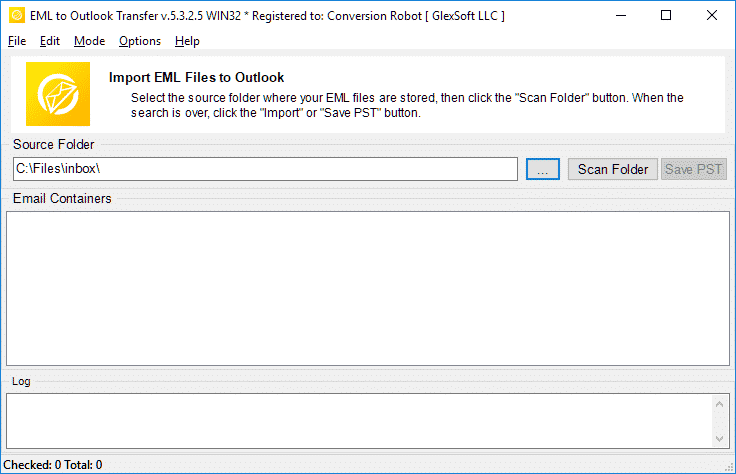
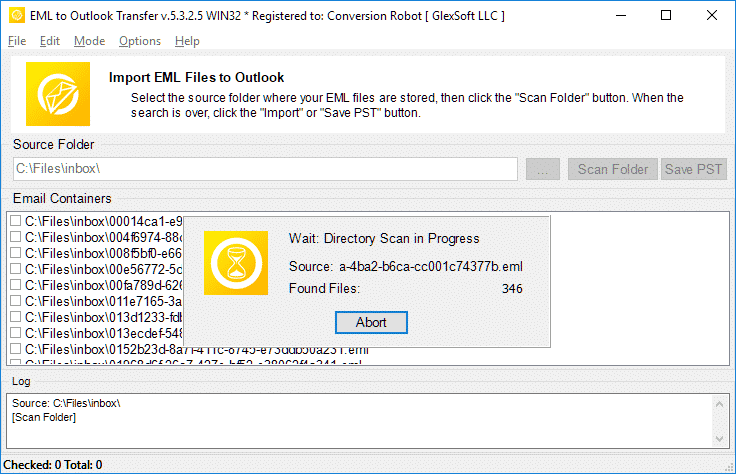
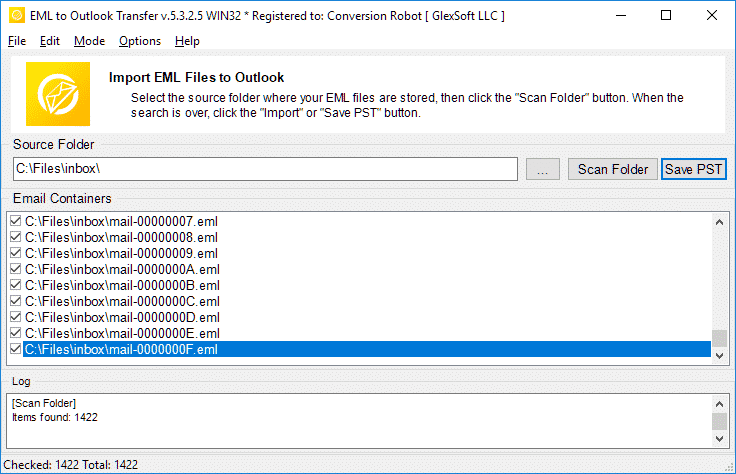
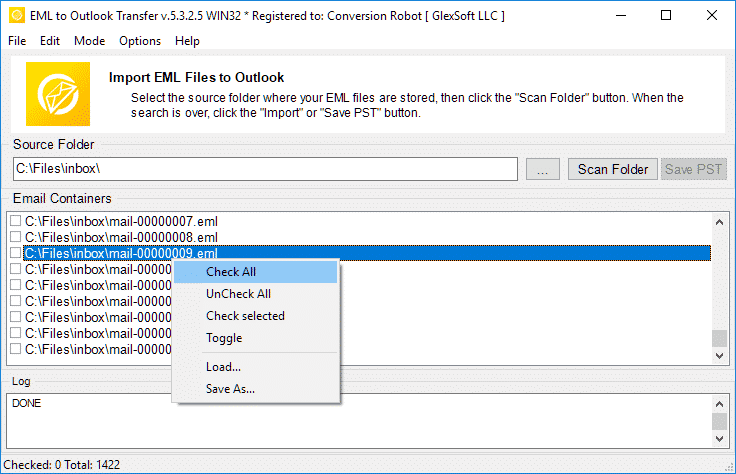
EML to Outlook Transfer toimittaa nopeasti, luotettava, ja intuitiivinen suorituskyky jokaiseen muunnostehtävään.
* Ilmainen kokeiluversio muuntaa rajoitetun määrän viestejäWhy Choose EML to Outlook Transfer?
1. High-Speed Email Migration Engine
EML to Outlook Transfer is built for high processing speed and data accuracy. The engine parses message files rapidly, preserving header fields, text formatting, and attachments across large archives without dropping records.
The streamlined wizard interface lets users initiate migrations without manual configuration hurdles, ensuring smooth file handling from start to finish.
2. Accurate Import into Microsoft Outlook
Data integrity is paramount during email migration. The software maintains original text encodings, HTML styling, and inline attachments across all supported versions of Microsoft Outlook, ensuring full compatibility even with messages created under non-Windows operating systems.
The software automatically adapts message formats into native Outlook structures (Henkilökohtainen säilytyspöytä), ensuring that every sender, vastaanottaja, timestamp, and attachment matches the original source archive.
3. Recreate Your Folder Structure in Outlook
The hierarchy of your mail folders remains identical after transfer. Every subfolder and project directory appears in Outlook exactly as organized in your source archive, eliminating the need to rearrange messages post-import. This ensures an uninterrupted workflow and immediate familiarity with your migrated mail.
4. Import Message Files in Just a Few Clicks
Importing messages requires no advanced technical background. Simply select the root directory containing your source files, run the scan, and the software handles the migration automatically. Customer support is available if technical assistance is required.
All you need to do is specify the folder containing your message files, and the software executes the transition smoothly into your chosen destination.
5. Support for Password-Protected Outlook Profiles
Export your data safely even when target Outlook profiles or existing storage files are protected by passwords. The tool processes messages without compromising security or breaking user credentials, maintaining complete privacy throughout the migration.
6. Import Messages from Any EML-Based Email Client
EML is an open format used widely across different desktop platforms. This tool extracts messages from various desktop applications—such as Mozilla Thunderbird, Windows Liven sähköposti, Apple Mail, eM-asiakas, ja The Bat!—and consolidates them into Outlook cleanly, enabling smooth batch migration for multi-client environments.
7. Flexible Output: Default Profile or Standalone PST File
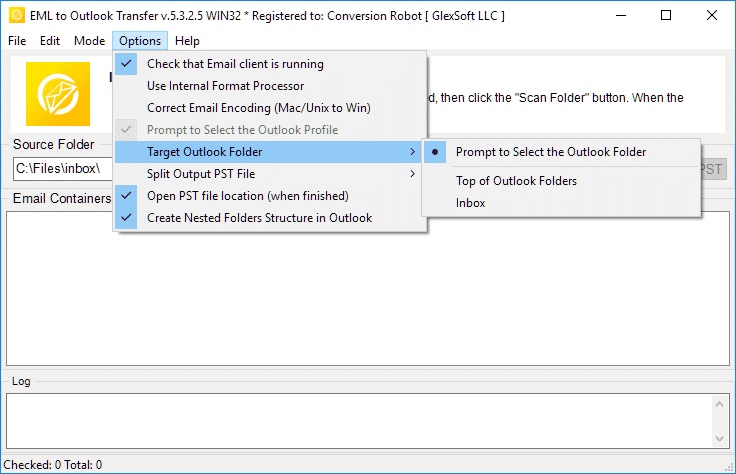
Export your correspondence directly into your current Outlook profile or create a brand new, standalone PST-tiedoston. Standalone PST files can be easily moved to another computer, backed up to external storage, or archived offline.
8. Unicode PST Support & Automatic PST Splitting
The software produces modern Unicode PST files that overcome legacy 2GB size restrictions, handling volumes up to 64TB. For optimal database health and easier file management, the software can also split large PST files into smaller parts during processing.
9. Batch Mode for High-Volume Processing
Migrating thousands of message files is effortless with the built-in bulk processing engine. After scanning your drive, the program moves all selected folders and emails to MS Outlook PST in a single automated session.
10. Intuitive Wizard-Based Interface for Beginners and Pros
The step-by-step wizard ensures that users of any experience level can execute email migrations without confusion, providing clear visual status indicators throughout the run.
Kokeiluversion ja täysversion vertailu
| Ohjelmistoominaisuus | Ilmainen kokeiluversio lisenssi | Koti-Anniskeluoikeudet | Toimilupa | Tekninen lisenssi |
|---|---|---|---|---|
| Rajoittamaton määrä sähköposteja | Ei | Kyllä | Kyllä | Kyllä |
| Rajoittamaton määrä tilejä | Ei | Kyllä | Kyllä | Kyllä |
| Komentorivi (Erätila) | Ei | Ei | Kyllä | Kyllä |
| Verkkolähteet | Kyllä | Ei | Kyllä | Kyllä |
| Palvelinpuolen käyttö | Kyllä | Ei | Ei | Kyllä |
| Uusimisen tyyppi (omasta valinnastaan) | - | manuaalinen | Manuaalinen ja auto | Manuaalinen ja auto |
| Uusimisalennus | - | 10% | 20% | 30% |
| Aktivointien määrä (omasta valinnastaan) | - | 1-5 | 1-50 | Rajoittamaton |
| Tekninen tuki | Rajoitettu | Standardi | Prioriteetti | Laajennettu |
EML to Outlook muuntaminen – miten se toimii 5 yksinkertaisia ohjeita
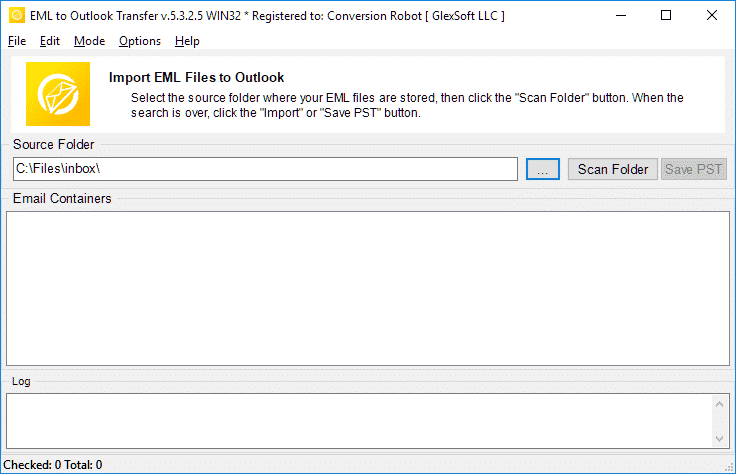
- Ajaa the EML to Outlook Transfer ohjelmisto.
- Määritä lähde-EML-tiedostojen ja -kansioiden sijainti.
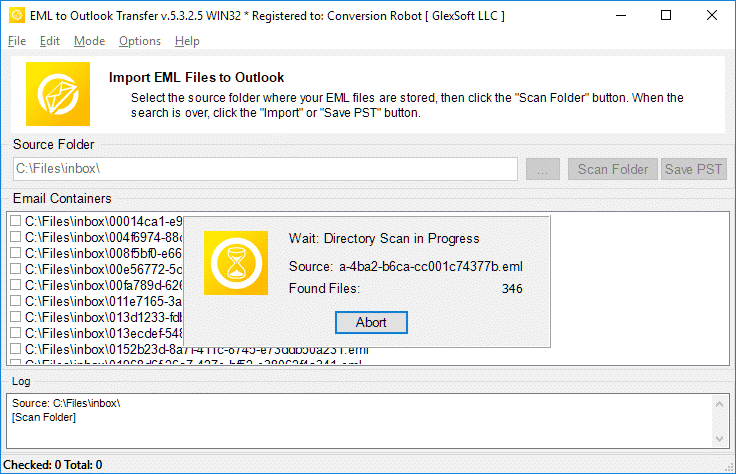
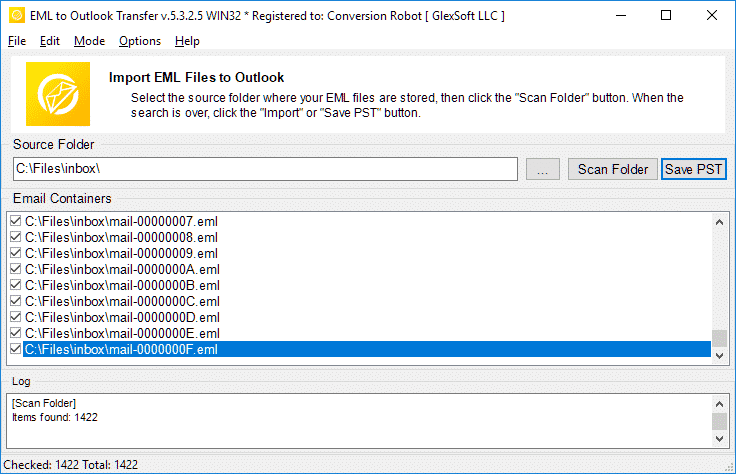
- Klikkaa Skannaa kansio löytääksesi kaikki sisäkkäiset alikansiot ja EML-tiedostot.
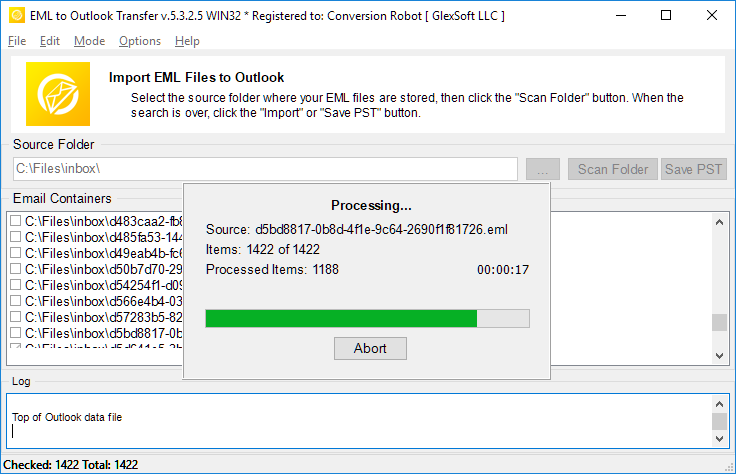
- Käytä Tallenna PST -painiketta käynnistääksesi EML on PST muuntaminen käsitellä asiaa.
- Avoin tuloksena oleva PST-tiedosto Outlookissa ja nauti tuloksesta.
Aiheeseen liittyvät sähköpostin siirtotyökalut
- Thunderbird Outlook
- Mbox Outlookiin
- Live Mail Outlookiin
- Gmailista Outlookiin
- Mac Mail Outlookiin
- MSG Outlookiin
- Tiedonpoistosarja
Usein kysyttyjä kysymyksiä EML:n muuntamisesta PST:ksi
Mitä eroa on PST:n ja EML:n välillä?
PST-tiedostomuoto on Microsoftin kehittämä oma viestien tallentamiseen, henkilökohtaiset tiedot, kalenteritapahtumat ja niin edelleen. EML edustaa Internet-viestimuotoa sähköpostitekstien ja viesteihin liittyvien teknisten tietojen tallentamiseen. EML-tiedostot ovat tekstipohjaisia. Lisätietoja: mikä on EML-tiedostomuoto.
Mikä sovellus avaa EML-tiedostoja?
Monet sähköpostiohjelmat käyttävät EML:ää ensisijaisena tapana tallentaa sähköpostit. Esimerkkejä sovelluksista, jotka voivat toimia EML:n kanssa, ovat Thunderbird, IncrediMail-sähköposti, Live-sähköposti, Apple Mail (emlx tiedostot) ja muut. A PST-muunnin työkalu voi helposti käsitellä missä tahansa näistä asiakkaista luotuja EML-tiedostoja.
Kuinka muuntaa EML Outlook-sähköpostiksi?
Voit kokeilla meidän EML PST muunnin mennessä lataaminen demoversio verkkosivultamme. Ohjelmiston, määritä kansio, jossa lähde-eml-tiedostosi sijaitsevat, skannaa ne ohjelmalla ja aloita muunnosprosessi. Oikeudenkäynti / demoversio muuntaa jopa 10 sähköpostit kansiokohtaisesti ilman muita rajoituksia. Jos olet tyytyväinen kokeen tuloksiin, voit aktivoida ohjelmiston vapauttaaksesi kaikki ominaisuudet.
Voidaanko EML-tiedosto avata Outlookissa ilman EML to Outlook -muunninta?
Kyllä. Outlookissa 2010, EML-tiedostot avataan automaattisesti. MS Outlookin aiemmissa versioissa saatat joutua tekemään tiettyjä muutoksia rekisteriin kertoaksesi Outlookille, että sen pitäisi avata EML-tiedostoja. Kuitenkin, yksinkertaisempi ja luonnollisempi tapa avata EML-tiedostoja on vain viedä ne kaikki tuloksena olevaan PST-tiedostoon. Voit käyttää EML-muunnintyökaluamme vaivattomaan tapaan tehdä tämä.
Kuinka yhdistän EML-tiedostot PST-tiedostoihin?
Jos sinulla on useita EML-tiedostoja, ja haluat tuoda ne kaikki PST-tiedostomuotoon, sinun tulee joko tuoda ne manuaalisesti yksitellen (boooooring), tai ota ammattimainen automatisoitu tuontityökalu, kuten EML to Outlook Transfer ja tee työ valmiiksi alle tunnissa (riippuu tietysti EML-tiedostojen määrästä). Ohjelma lataa kaikki määritetyissä kansioissa olevat EML-tiedostot ja yhdistää ne automaattisesti yhdeksi PST-tiedostoksi erätilassa, sallii muuntaa EML on PST muotoon kerralla.
Tuo EML:ää Outlook-ilmaisohjelmistoon?
Voit ladata ja suorittaa EML-PST-muunninohjelman ilmaiseksi ja suorittaa muunnosprosessin. Ilmaisversio ei rajoita toimintoja, mutta sillä on rajoitus muunnettujen tuotteiden määrälle.
JA Jos työhösi liittyy paljon eml-pisteiden muuntamista, tai olet tilanteessa, jossa sinun on muutettava sähköpostit välittömästi, the EML to Outlook Transfer työkalu on täydellinen ratkaisu sinulle. Se varmistaa, että mikään tiedosto ei jää lukukelvottomaksi, eikä yhtään viestiä jää huomaamatta tai se ei näy sähköpostilaatikossasi lukemattomana muuntamisen jälkeen. EML-muunnin ratkaisee tehokkaasti siirtoon liittyvät haasteesi. Lataa kokeiluversio tänään ja säästät paljon aikaa ja vaivaa.
Vaihtoehtoja EML to Outlook Transfer:
- MSG-muodon muuntaminen Outlook- tai Outlook PST-tiedostoihin
- Live Mail to Outlook Transfer – muuntaa Win Mailin tallentamat EML-tiedostot Outlookiin
- Data Extraction Kit for Outlook – vienti sähköpostit Outlook tai PST-tiedoston EML muotoon
- Mac Mail to Outlook Transfer – tuoda Mac OS EMLX -tiedostoja Outlook-profiiliin tai Outlookin PST-tiedostoihin
Asiakaspalautteen
Palautteesi auttaa meitä parantamaan toimintaamme. Ole hyvä ja jaa kokemuksesi aiheesta EML to Outlook Transfer käyttämällä alla olevaa painiketta.
Kirjoita arvostelu | |
Mukava ohjelmisto muuntaa valtava määrä eml-tiedostoja pst-muotoon.
Mahdollisuus muuntaa .eml tiedostoksi .pst suoralla tuonnilla on arvokas, mutta minua kiinnostaa enemmän PST-jako, koska minulla on valtava määrä dataa (tuhansia esineitä) ja varmuuskopioi kaikki. Tämä muuntaja vastasi odotuksiani.
Tallensin joukon Gmail-viestejä EML-tiedostoina ja siirsin ne Outlook-profiiliin. Tämä on optimaalinen valinta, jos et halua synkronoida Gmailia Windows-sovellukseen. Voit tuoda EML-tiedostoja Outlookiin kerralla, joten tämä työkalu säästää myös aikaa.
Kun Windows Live Mail lopetettiin, Vaihdoin Outlookiin, mutta en koskaan siirtänyt vanhoja viestejäni. Kiitos, että keksit tämän yksinkertaisen ratkaisun. Se on todella helppo työkalu muuntaa EML-tiedostoja PST-muotoon.
Toivon, että tämä muuntaja voisi myös poimia sähköpostit suoraan Thunderbirdistä tai ainakin mukana tulee vientiohjeet. Tämä vaihe oli vaivalloinen, mutta pystyin muuttamaan EML:n Outlookiksi ilman ongelmia. Yleensä ottaen, toimii kuten mainostetaan.


