


EML to Outlook Transfer is designed to streamline the migration of individual messages and entire folder hierarchies into Microsoft Outlook. The software provides flexible export options, – you can generate a clean, stand alone .PST file on your local drive or import messages directly into an existing Outlook profile and filter converted emails by From, A, Soggetto, Date and other email tags.
The built-in processing engine handles email files generated by various desktop clients, compreso Mozilla Thunderbird, Windows Live Mail, eM client, and Apple Mail (EMLX). For users moving messages from Thunderbird, extracting data as standard File EML ensures that all embedded media, custom flags, and folder trees remain fully preserved.
Thanks to an intuitive, wizard-driven interface, the entire transfer process requires only a few clicks, making large-scale mailbox consolidation straightforward for both individual users and IT professionals.
Guida video per il trasferimento da EML a Outlook
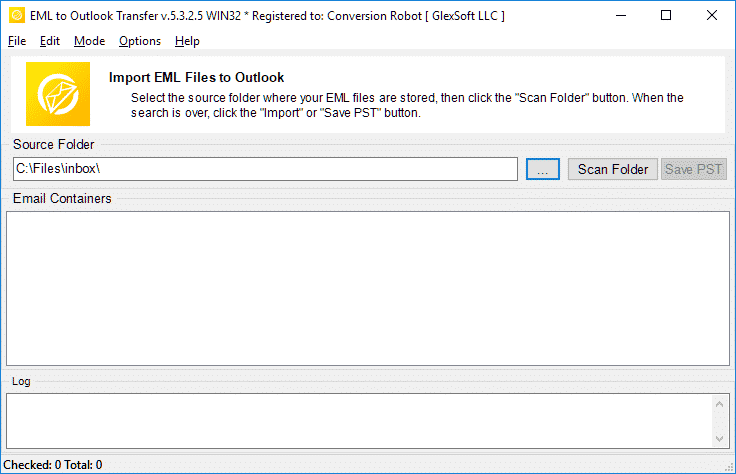
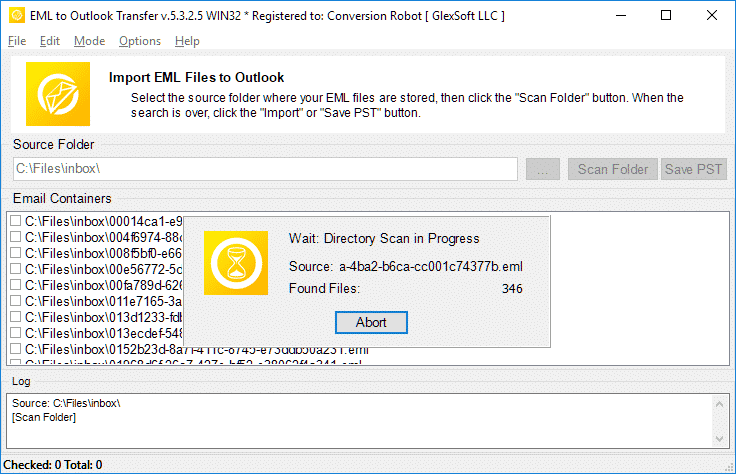
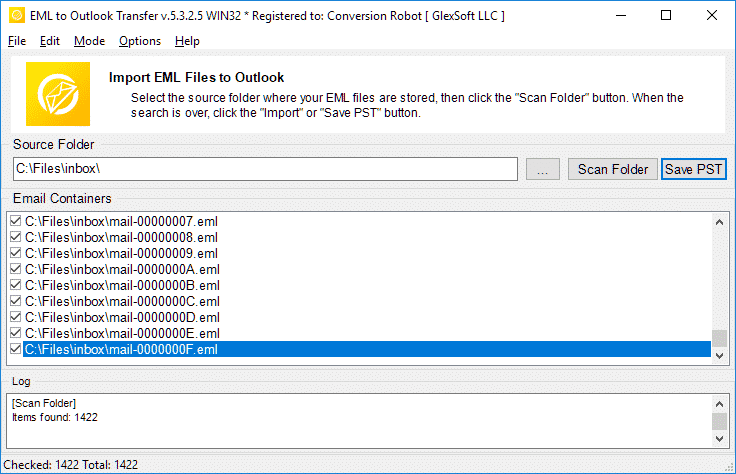
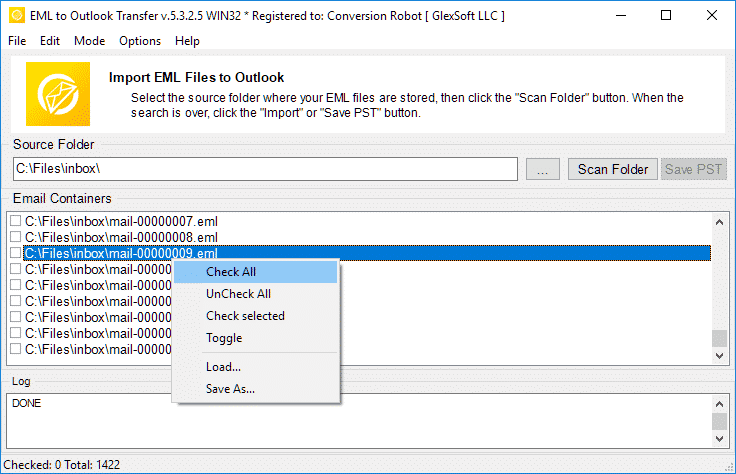
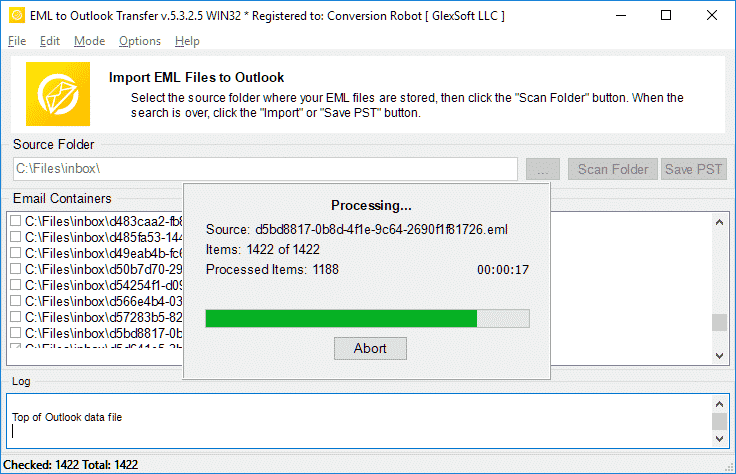
Watch how EML to Outlook Transfer locates source directories, scans mailbox contents, and packages messages into an Outlook-ready PST file in just a few minutes. EML to Outlook Transfer processes emails from virtually any client, enabling you to browse, reply to, organizzare, and archive your messages using standard Outlook features.
* La prova gratuita converte un numero limitato di messaggi| Sistema operativo | Microsoft Windows® Vista o superiore |
| Microsoft Office | MicrosoftOutlook® 2003-2021 (stand alone) |
| Conto Outlook | Almeno un profilo di Outlook (account email) dovrebbe essere configurato |
| I file di origine | *.file EML |
| Spazio su disco rigido | 48 MB minimo |
| Memoria disponibile | 4 GB per 32 bit e 8 GB o più per sistemi operativi a 64 bit |
| Processore | Pentio IV 2 GHz o più veloce |
| Schermo | Display a colori, impostare almeno 1024 X 768 risoluzione |
| 
| 
| 
|
Why Manual Email Migration Is Inefficient

Moving emails between different platforms is rarely as simple as copying files. While individual .eml files store standard RFC-822 message text, Microsoft Outlook organizes data inside structured containers called Personal Storage Tables (.pst). These files hold not only message bodies, but also embedded media, allegati, read/unread states, and custom metadata.
When attempting manual imports via drag-and-drop, Outlook often replaces original send dates with the current import timestamp, strips inline images, and ignores subfolder arrangements. For businesses and users with years of correspondence, manual transfer is time-consuming and prone to errors. An automated converter eliminates these bottlenecks by mapping data directly into Outlook’s native structure.
EML Transfer Software Key Technical Features
1. Preserves Complete Folder Hierarchies
The software mirrors your source directory structure inside Outlook. If your archived emails are organized into projects, clienti, or yearly archives, every subfolder is recreated without requiring manual sorting after migration.
2. Multi-Client Source Compatibility
EML is an open standard utilized by diverse desktop applications. The converter processes files exported from:
-
- Mozilla Thunderbird: Seamlessly move local mail folders without database corruption.
- Windows Live Mail / Posta di Windows: Upgrade legacy Windows archives to modern Outlook versions.
- Posta Apple (EMLX): Converts Mac OS message exports into Windows-compatible Unicode formats.
- eM client, The Bat!, Eudora, and IncrediMail: Imports individual message backups with full metadata intact.
To learn more about how message standards operate, read our overview on what the EML file format represents.
3. Unicode Output and PST Splitting
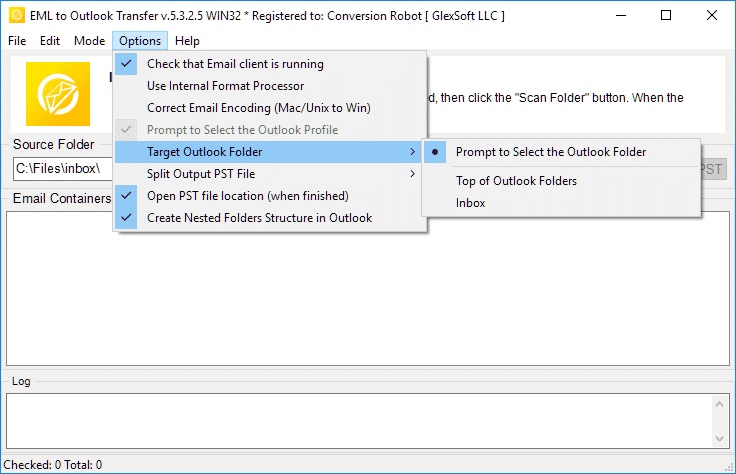
Legacy ANSI PST files were restricted to 2 GB limits. This tool creates modern Unicode PST files capable of storing up to 64 TB. To keep your mail databases healthy, you can also use the built-in option to split large PST files into smaller parts during conversion.
4. Attachment and Encoding Integrity
Non-Latin character sets (such as European, Asian, and Cyrillic special symbols) often fail during manual imports. The converter translates internal headers and character sets on the fly while safeguarding all attached files, documenti, and embedded images.
Typical Migration Scenarios
- Switching Email Clients. Moving from Thunderbird, Posta Apple, or legacy desktop clients to a corporate Microsoft Outlook environment.
- Operating System Upgrades. Transitioning data from older Windows installations (where Windows Live Mail was installed) to Windows 10 or Windows 11.
- Disaster Recovery. Extracting raw EML messages from damaged databases and packaging them back into a clean, working PST file.
- Archiving Mailboxes. Consolidating scattered desktop message files into a single, searchable offline storage file.
Need detailed step-by-step guidance? Follow our comprehensive tutorial on how to import EML files to Outlook for exact configuration options and screenshots.
Cosa dicono gli utenti su EML to Outlook Transfer
Il convertitore da EML a Outlook è un vero toccasana! Avevo migliaia di e-mail importanti salvate in formato EML e avevo bisogno di inserirle rapidamente nel mio account Outlook. Questo software ha reso il processo incredibilmente facile e intuitivo, e mi ha risparmiato ore di lavoro manuale. Altamente raccomandato!

Marco Palandri - Svizzera
All'inizio ero riluttante ad acquistare EML su Outlook Transfer, ma sono così felice di averlo fatto. Il software è incredibilmente facile da usare ed efficiente. Ha trasferito tutti i miei file EML in Outlook con facilità e precisione. Apprezzo anche l'utile team di assistenza clienti che ha risposto alle mie domande in modo rapido e professionale.
Bjorn Birkholz - Germania
Se devi trasferire i file EML su Outlook, questo è il software da utilizzare. L'interfaccia è semplice e diretta, e il processo di trasferimento è velocissimo. Sono stato in grado di trasferire migliaia di file EML sul mio account Outlook senza problemi. Grazie, Outlook Trasferimento, per aver creato uno strumento così affidabile e utile!
Ufficio di gestione del rischio - Contea del Re
Vedi altre recensioni
Il trasferimento da EML a Outlook è rapido, affidabile, e prestazioni intuitive per ogni attività di conversione.
* La prova gratuita converte un numero limitato di messaggiWhy Choose EML to Outlook Transfer?
1. High-Speed Email Migration Engine
EML to Outlook Transfer is built for high processing speed and data accuracy. The engine parses message files rapidly, preserving header fields, text formatting, and attachments across large archives without dropping records.
The streamlined wizard interface lets users initiate migrations without manual configuration hurdles, ensuring smooth file handling from start to finish.
2. Accurate Import into Microsoft Outlook
Data integrity is paramount during email migration. The software maintains original text encodings, HTML styling, and inline attachments across all supported versions of Microsoft Outlook, ensuring full compatibility even with messages created under non-Windows operating systems.
The software automatically adapts message formats into native Outlook structures (Tavolo di archiviazione personale), ensuring that every sender, destinatario, timestamp, and attachment matches the original source archive.
3. Recreate Your Folder Structure in Outlook
The hierarchy of your mail folders remains identical after transfer. Every subfolder and project directory appears in Outlook exactly as organized in your source archive, eliminating the need to rearrange messages post-import. This ensures an uninterrupted workflow and immediate familiarity with your migrated mail.
4. Import Message Files in Just a Few Clicks
Importing messages requires no advanced technical background. Simply select the root directory containing your source files, run the scan, and the software handles the migration automatically. Customer support is available if technical assistance is required.
All you need to do is specify the folder containing your message files, and the software executes the transition smoothly into your chosen destination.
5. Support for Password-Protected Outlook Profiles
Export your data safely even when target Outlook profiles or existing storage files are protected by passwords. The tool processes messages without compromising security or breaking user credentials, maintaining complete privacy throughout the migration.
6. Import Messages from Any EML-Based Email Client
EML is an open format used widely across different desktop platforms. This tool extracts messages from various desktop applications—such as Mozilla Thunderbird, Windows Live Mail, Posta Apple, eM client, e il pipistrello!—and consolidates them into Outlook cleanly, enabling smooth batch migration for multi-client environments.
7. Flexible Output: Default Profile or Standalone PST File
Export your correspondence directly into your current Outlook profile or create a brand new, file PST standalone. Standalone PST files can be easily moved to another computer, backed up to external storage, or archived offline.
8. Unicode PST Support & Automatic PST Splitting
The software produces modern Unicode PST files that overcome legacy 2GB size restrictions, handling volumes up to 64TB. For optimal database health and easier file management, the software can also split large PST files into smaller parts during processing.
9. Batch Mode for High-Volume Processing
Migrating thousands of message files is effortless with the built-in bulk processing engine. After scanning your drive, the program moves all selected folders and emails to MS Outlook PST in a single automated session.
10. Intuitive Wizard-Based Interface for Beginners and Pros
The step-by-step wizard ensures that users of any experience level can execute email migrations without confusion, providing clear visual status indicators throughout the run.
Confronto tra la versione di prova e quella completa
| Funzionalità software | Licenza di prova gratuita | Casa License | Licenza D'Affari | Licenza tecnico |
|---|---|---|---|---|
| Numero illimitato di email | NO | SÌ | SÌ | SÌ |
| Numero illimitato di account | NO | SÌ | SÌ | SÌ |
| Riga di comando (Modalità batch) | NO | NO | SÌ | SÌ |
| Fonti di rete | SÌ | NO | SÌ | SÌ |
| Uso lato server | SÌ | NO | NO | SÌ |
| Tipo di rinnovo (per scelta) | - | Manuale | Manuale e automatico | Manuale e automatico |
| Sconto rinnovo | - | 10% | 20% | 30% |
| Numero di attivazioni (per scelta) | - | 1-5 | 1-50 | Illimitato |
| Supporto tecnico | Limitato | Standard | Priorità | Esteso |
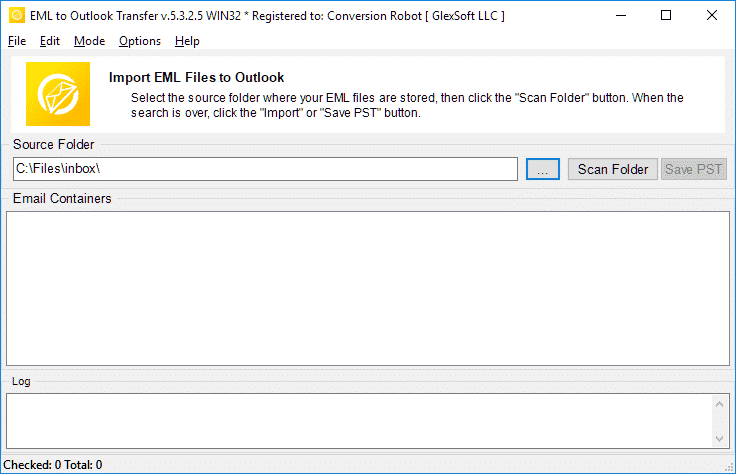
EML to Outlook conversione: come funziona 5 semplici passi
- Correre il EML to Outlook Transfer Software.
- Specificare la posizione dei file e delle cartelle EML di origine.
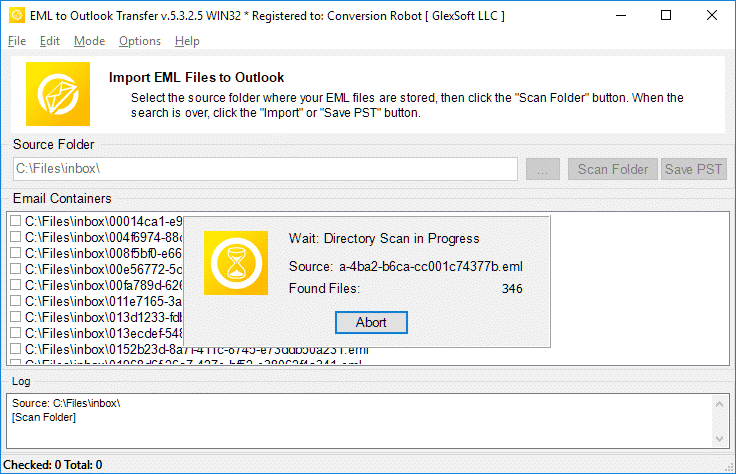
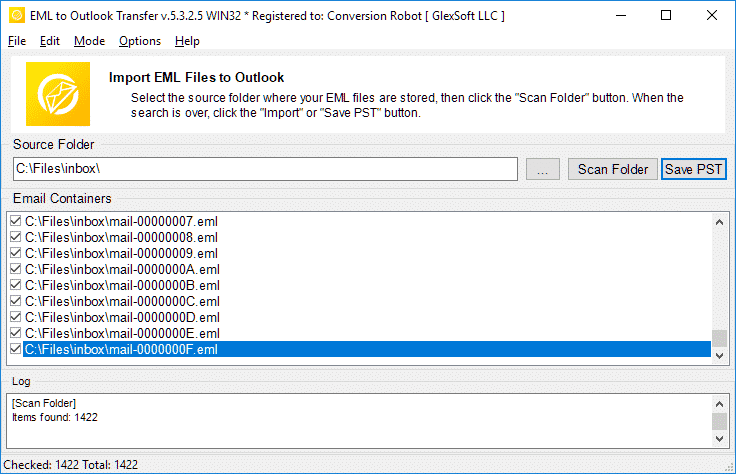
- Fare clic Scansione cartella per trovare tutte le sottocartelle nidificate e i file EML.
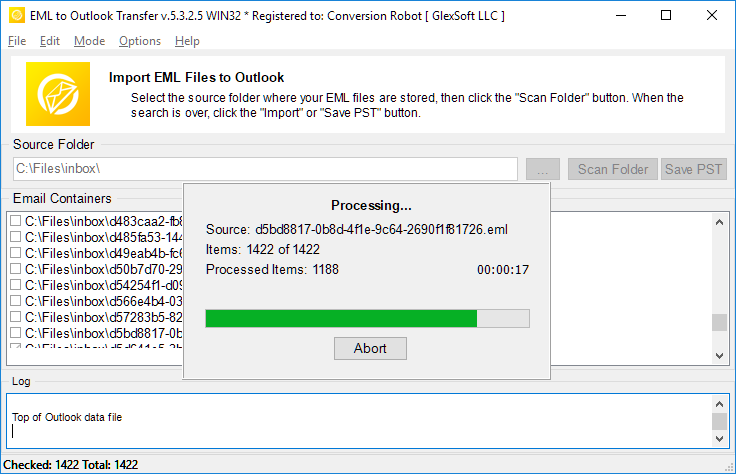
- Utilizzare il Salvare PST pulsante per avviare il EML alla conversione PST processo.
- Aperto il file PST risultante in Outlook e goditi il risultato.
Strumenti di migrazione della posta elettronica correlati
- Thunderbird a Outlook
- Mbox a Outlook
- Live Mail a Outlook
- Da Gmail a Outlook
- Mac Mail per Outlook
- SMS a Outlook
- Data Kit Estrazione
Domande frequenti sulla conversione da EML a PST
Qual è la differenza tra PST ed EML?
Il formato di file PST è proprietario sviluppato da Microsoft per archiviare i messaggi, dati personali, eventi del calendario e così via. EML rappresenta l'Internet Message Format per archiviare testi di posta elettronica e dati tecnici associati ai messaggi. I file EML sono basati su testo. Scopri di più su cos'è un formato di file EML.
Quale app apre i file EML?
Molti client di posta elettronica utilizzano EML come modo principale per archiviare le email. Esempi di app che possono funzionare con EML sono Thunderbird, IncrediMail, Posta in diretta, Posta Apple (emlx) e altri. un Convertitore PST lo strumento può gestire facilmente i file EML creati in uno qualsiasi di questi client.
Come posso convertire EML in e-mail di Outlook?
Puoi provare il nostro EML a PST Converter da scaricando la versione demo dal nostro sito web. Eseguire il software, specificare la cartella in cui si trovano i file eml di origine, scansionali con il programma e avvia il processo di conversione. Il processo / la versione demo converte fino a 10 e-mail per cartella senza altre restrizioni. Se sei soddisfatto dei risultati della prova, è possibile attivare il software per sbloccare tutte le funzionalità.
È possibile aprire un file EML in Outlook senza il convertitore da EML a Outlook?
Sì. in Outlook 2010, I file EML vengono aperti automaticamente. Nelle versioni precedenti di MS Outlook potrebbe essere necessario apportare alcune modifiche al registro per indicare a Outlook che dovrebbe aprire i file EML. Tuttavia, un modo più semplice e naturale per aprire i file EML è semplicemente esportarli tutti in un file PST risultante. Puoi utilizzare il nostro strumento di conversione EML per eseguire questa operazione nel modo più semplice.
Come unisco i file EML al file PST?
Se hai più file EML, e vuoi importarli tutti in un formato di file PST, dovresti importarli manualmente uno per uno (fischiando), oppure prendi uno strumento di importazione automatizzato professionale come EML to Outlook Transfer e finisci il lavoro in meno di un'ora (ovviamente dipende dalla quantità di file EML). Il programma carica tutti i file EML nelle cartelle specificate e li combina automaticamente in un singolo file PST in modalità batch, permette di convertire eml a pst formato in una sola volta.
Sta importando EML in Outlook freeware?
Puoi scaricare ed eseguire gratuitamente il programma di conversione da EML a PST ed eseguire il processo di conversione. La versione freeware non limita nessuna funzione, ma ha un limite alla quantità di articoli convertiti.
e Se il tuo lavoro comporta molte conversioni da eml a pts, oppure ti trovi in una situazione in cui devi convertire le email immediatamente, il EML to Outlook Transfer tool è la soluzione perfetta per te. Garantisce che nessun file venga lasciato illeggibile e che nessun messaggio venga perso o appaia illeggibile nella posta in arrivo dopo la conversione. Il convertitore EML risolve efficacemente le tue sfide di migrazione. Scarica la versione di prova oggi e risparmia un sacco di tempo e fatica.
Alternative alla EML to Outlook Transfer:
- Conversione del formato MSG ai file PST di Outlook o Outlook
- Live Mail to Outlook Transfer – convertire i file EML salvati da Win Mail in Outlook
- Data Extraction Kit for Outlook – Export-mail da file PST di Outlook o in formato EML
- Mac Mail to Outlook Transfer – importa i file EMLX di Mac OS nel profilo di Outlook o nei file PST di Outlook
Commenti dei clienti
Il tuo feedback ci aiuta a migliorare. Per favore condividi la tua esperienza su EML to Outlook Transfer utilizzando il pulsante qui sotto.
Invia la tua opinione | |
Bel software per convertire l'enorme quantità di file eml in formato pst.
L'opportunità di convertire .eml in .pst con l'importazione diretta è preziosa, ma ero più interessato alla divisione PST, dato che ho enormi quantità di dati (migliaia di articoli) e fai il backup di tutto. Questo convertitore ha soddisfatto le mie aspettative.
Ho salvato un sacco di messaggi Gmail come file EML e li ho spostati nel profilo di Outlook. Questa è la scelta ottimale se non desideri sincronizzare il tuo Gmail con l'app di Windows. Puoi importare file EML in Outlook contemporaneamente, quindi questo strumento è anche un risparmio di tempo.
Dopo che Windows Live Mail è stato interrotto, Sono passato a Outlook ma non ho mai trasferito i miei vecchi messaggi. Grazie per aver trovato questa semplice soluzione. È davvero uno strumento semplice per convertire i file EML in PST.
Vorrei che questo convertitore potesse anche estrarre e-mail direttamente da Thunderbird o almeno arrivasse con le istruzioni per l'esportazione. Questa fase è stata una seccatura, ma sono stato in grado di convertire EML in Outlook senza problemi. Complessivamente, funziona come pubblicizzato.


